
Readers of downloaded language guides
You want to open your guides at the campsite without Wi-Fi. Kobo explains how to download e-books to your e-reader in advance; before setting off, check that your own titles are available offline.


Text-based guides in a supported ePub format are generally a good fit for a compact e-reader, as long as you download them before setting off and test any dictionary features with your own files. For PDFs with tables, maps or a fixed page layout, a larger screen or tablet may be worth considering. The Dutch Consumers' Association says tablets are often easier to use for PDFs, while a compact e-reader takes up less space.
You want to open your guides at the campsite without Wi-Fi. Kobo explains how to download e-books to your e-reader in advance; before setting off, check that your own titles are available offline.
You look up translations as you read and want to know whether the language pair you need works with your guide. Also check whether you can select words in your book's file format.
Your guides may include tables, maps or meaningful use of colour. The Dutch Consumers' Association notes that many PDFs are difficult to read on e-readers, so check a sample page on the screen size you are considering.
When choosing an e-reader for language guides at the campsite, your decision will mainly depend on your files, how you look up words and how easy pages are to read when they don't reflow to fit the screen.
| Concern | What to look for | Who is this most relevant for? |
|---|---|---|
| Opening guides offline | Check the file format and any copy protection, then download the guide and open it before setting off. | I want to open my guide without the campsite Wi-Fi and check in advance that my file works. Around 31% of consumers say offline access and file compatibility are their main buying concerns. |
| Translating words | Check the language pair you need and test word selection using one of your own sample files. | If I want to look up words as I read, the dictionary needs to work with both my book and the languages I need. Around 25% of consumers give useful word definitions or translations top priority. |
| Reading tables and maps | View an actual page on the screen you are considering and check the tables, map labels and how much zooming is needed. | For a guide with a fixed PDF layout, I want to see the whole page without constantly zooming in. Around 25% of consumers say readable layouts, tables or maps are their main buying concern. |
| Reading outdoors and in changing light | Check the lighting and water resistance of the exact model, and follow the instructions for use. | I want to read outdoors during the day and sometimes in low light, with a model suited to campsite conditions. Around 19% of consumers prioritise reading in changing outdoor conditions. |
A PDF may have a fixed page layout that is difficult to view on a compact screen. The Dutch Consumers' Association says tablets are often easier to use for PDFs.
Before you buy, view an actual page from your guide on the screen size you are considering.
A fixed-layout page may require extra zooming or mean you need to use a larger device.
Kobo warns that the dictionary may not work with PDFs or certain borrowed or free e-books.
Test word selection and the translation direction you need using an example from your own guide.
A Kobo book that is only available online still needs to be downloaded before you can read it without Wi-Fi.
Sync and open all the titles you need before setting off.
The Clara BW and Clara Colour are compact options for those who mainly read text. Kobo describes the Libra Colour as a model with a 7-inch colour screen and page-turn buttons.
The Verse Pro Azure is a compact black-and-white option, while the Verse Pro Color is a colour version. For the Azure, PocketBook lists support for ePub, PDF, Adobe DRM and dictionary combinations, among other features.
The Shine Color is a compact colour option. Tolino lists a 6-inch colour screen and adjustable lighting.
This selection includes e-readers for text and colour, as well as tablets for guides with a fixed page layout. For PDFs, check that the text and details are readable on screen; a larger tablet is less compact than an e-reader.
 Image unavailable
For those who value colour in images or maps; check how well your guide's page layout reads on screen using a copy of your own.
7-inch colour screen, 300 ppi and front light with 36 levels. The title also lists 4 + 64 GB.
 Image unavailable
A compact option for text-based guides; before setting off, check that your own files open on the device.
6-inch e-ink screen, front light with 36 levels, Android 14 and built-in Google Play. The title lists 4 + 64 GB.
 Image unavailable
For those looking for an e-reader with colour display; check how well the text and any page layout work using your own guide.
6.13-inch E-Ink screen and Android 14. The title lists 8 GB + 256 GB.
 Image unavailable
A tablet may be worth considering for guides with a fixed PDF layout; the Dutch Consumers' Association says tablets are often easier to use for PDFs. A tablet is less compact than an e-reader.
8.68-inch IPS screen and Android 15.
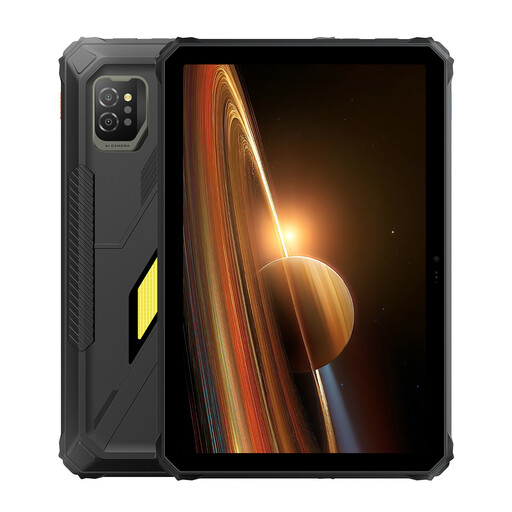 Image unavailable
A tablet may be worth considering for guides with a fixed PDF layout; the Dutch Consumers' Association says tablets are often easier to use for PDFs. Bear in mind that a tablet is less compact than an e-reader.
11-inch IPS screen and Android 15.
Yes, as long as the guide has already been downloaded to your e-reader and can be opened there. Kobo explains that books aren't always stored locally automatically, so check before setting off that you can open the title without an internet connection.
Don't assume you can with Kobo without testing first: according to the manufacturer, the dictionary may not work with PDFs or some borrowed or free e-books. Try the guide and the language pair you need before relying on this feature.
Kobo explains how to transfer an unprotected ePub or PDF file using a computer and a USB connection. Check the instructions for your model; this method is not a way to bypass copy protection.
When you buy from a business online, you are often entitled to a 14-day cooling-off period, according to the Dutch government. You are also entitled to a product that meets reasonable expectations; there is no fixed statutory guarantee period in the Netherlands. If something is faulty, contact the seller.