
Vandaag of morgen in huis

Kwaliteit gegarandeerd

Welkomstaanbiedingen ontgrendelen: GRATIS bezorging | Tot 80% korting | Gratis 30 dagen JoyPlus-proefperiode
Download de app
A camera and smartphone gimbal can make your videos noticeably smoother, but not every model is suitable for every type of recording. A phone stabiliser for walking vlogs needs different features from an action camera for football, cycling or water sports. A compact digital camera and a selfie stick with tripod also solve different problems.
When comparing products, focus especially on the specifications behind the marketing terms. A high resolution, for example, says little about stabilisation, battery life or ease of use. Below, you’ll find the main pitfalls, technical points and some popular choices for different situations.
Product names sometimes mention 4K, 5K or tens of megapixels. Always check the technical description. The Songdian Pocket Camera’s product name mentions 4K, while its specifications state a maximum video resolution of 1920 × 1080p. That is Full HD, not 4K video.
So pay attention to:
Digital zoom enlarges the image using software. As a result, detail may be lost when zooming in a long way. Optical zoom uses the lens itself and is generally a more useful point of reference when choosing a camera for sport and travel.
A 3-axis gimbal corrects movement across several axes, but the result also depends on your smartphone’s weight, the balance and the app being used. A gimbal cannot make walking completely shake-free and cannot follow every rapid movement.
So check:
Electronic stabilisation is often built into an action camera. With a smartphone gimbal, stabilisation is provided by motors. These two systems are configured differently and are not automatically interchangeable.
A gimbal may be able to supply power to your phone, but this could reduce the gimbal’s own operating time. A camera for content creation often also requires a memory card, spare battery, cable or microphone.
Check which components are included:
Also check the safety information. Lithium batteries must not be opened, punctured or exposed to high temperatures. Only use a waterproof housing when it has been closed correctly and is suitable for the intended use.
For vlogging, livestreaming and everyday recording, a 3-axis smartphone gimbal is a practical starting point. Features such as subject or face tracking can be useful when you are filming on your own. According to the brands’ product information, some models can also track multiple people, pets or fast-moving subjects. Treat this as a product specification, not a guarantee that every scene will be tracked perfectly.
A wide field of view is important for football and other team sports. An automatic tracking system also needs enough space to keep players in the frame. Check whether tracking works in your region, with your phone model and with the streaming app you want to use.
A heavy camera requires a gimbal with sufficient load capacity. A smartphone gimbal is usually designed for a phone held in a clamp, while a camera gimbal uses a different mounting system. A compact camera can be appealing for travel, but check whether accessories such as a tripod, light or microphone will still fit.
With a selfie stick with tripod, stability and maximum length are important. A long pole can tip over more easily outdoors or on uneven ground. Keep the legs low and check that the phone is fully secured in the holder before you start filming.
Full HD is often sufficient for social media, while 4K video requires more storage space and a faster memory card. A U3-rated microSD card is required for stable 4K recording on certain action cameras. Always check the card limit for the specific model.
WiFi and USB-C can make transferring files easier. A webcam function is useful for video calls or livestreams, but check beforehand whether your computer recognises the device without additional software.
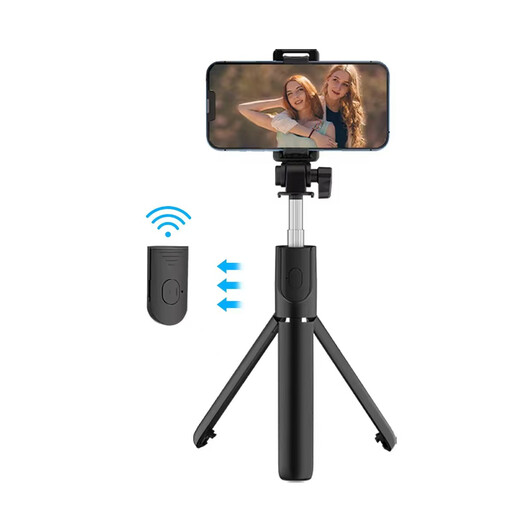
Why it suits this profile: For simple selfies, group photos and static videos, this model combines a phone holder, Bluetooth remote control and tripod function in one accessory.
The maximum length of approximately 193 cm and weight of around 340 g are specified. This allows you to assess in advance whether the stand is suitable for use indoors or outdoors.
Bluetooth control from up to approximately 10 metres away and support for iOS and Android, according to the product description.
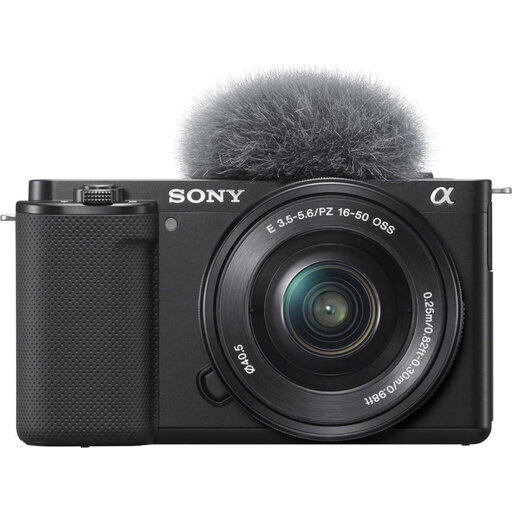
Why it suits this profile: This mirrorless camera is designed for vlogging, product reviews, travel and everyday photography with interchangeable lenses.
The product specifications list the APS-C sensor, 4K video at 30 fps and digital Active stabilisation separately. You can therefore assess these features alongside one another instead of focusing solely on the megapixel count.
24.2 MP APS-C sensor, 16–50mm power zoom lens, tilting touchscreen and WiFi, according to the product information.
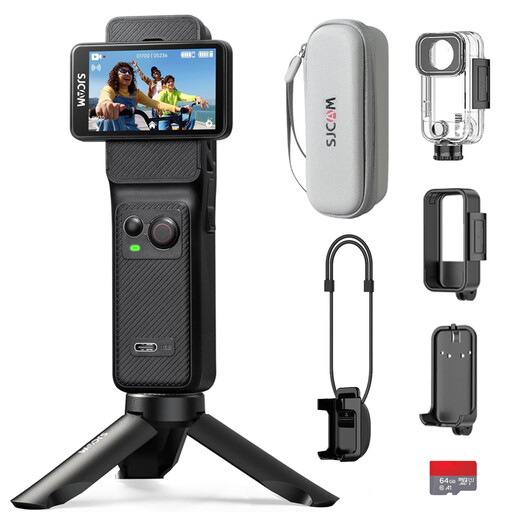
Why it suits this profile: Suitable for sport, travel and vlogging when you want a compact camera with a housing, wide-angle lens and accessory kit.
The manufacturer states that the camera itself is not waterproof; the supplied housing is required underwater. This avoids confusion about what the waterproofing claim actually means.
4K at 30 fps, 6-axis stabilisation, support for microSD cards up to 512 GB and a stated operating time of up to 437 minutes with the grip and spare battery.
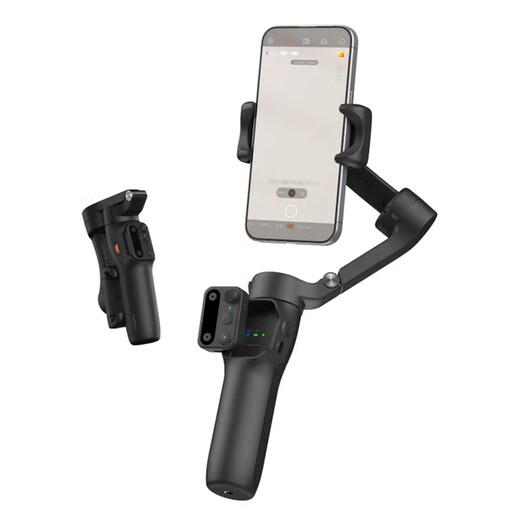
Why it suits this profile: This foldable phone stabiliser is designed for vlogs, livestreams, travel and vertical videos for social media.
The product description explicitly mentions support for portrait and landscape orientation, as well as a detachable remote control. This means you do not need an additional camera operator or remote control for use.
3-axis stabilisation, a stated battery life of 11 hours and a wireless remote control with a range of up to 10 metres, according to the product information.
We’ve put together a complete, up-to-date list of products that fully meet these strict selection criteria and the applicable European safety regulations.
Not every phone will fit automatically. Check the maximum size, weight and compatibility with iOS or Android. Some tracking and editing features only work through the manufacturer’s app. A bulky protective case may also prevent the phone from sitting securely in the clamp.
That depends on your priorities. A smartphone gimbal is particularly useful for reducing motion blur while walking and filming. A vlogging camera, such as a mirrorless camera, can give you more control over lens choice, image quality and autofocus. For simple social videos, a phone with a gimbal may be enough; for product reviews or photography, a digital camera may be more suitable.
Allow for a memory card, spare batteries, a protective case and, if necessary, a microphone. With an action camera, you may need a waterproof housing and mounts. With a smartphone gimbal, app features, firmware updates and charging both the gimbal and phone may form part of everyday use. So don’t only check the purchase price; also consider which camera accessories you genuinely need.
