
Creator of close-up crochet tutorials
You want individual stitches and hand movements to be easy to see, so compare the focus distance, lens and framing at your own workstation.


Start with a set-up that captures your crochet clearly and at a large enough size from your working height. A webcam is a good choice for recording through your computer; a mirrorless camera gives you a choice of lenses and audio connections, but needs more fine-tuning. A compact gimbal camera is mainly worth considering if you also film demonstrations while moving around.
You want individual stitches and hand movements to be easy to see, so compare the focus distance, lens and framing at your own workstation.
You want to record or teach live from a fixed position using your computer, and need a practical camera mount and suitable audio recording.
You want to record a complete tutorial in one go, so consider recording time, power, storage and microphone use.
Best for: a fixed table set-up where you record or teach live using a computer.
Bear in mind: the mount and viewing angle help determine whether your work is clearly in shot; arrange audio recording separately if the webcam has no microphone.
Best for: anyone who wants to choose a lens to suit their working distance or connect a microphone to the camera.
Bear in mind: the lens, mounting, storage and power need more thought; a standard kit does not guarantee that small stitches will appear large enough in shot.
Best for: anyone who alternates between a fixed table recording and demonstrations while moving around.
Bear in mind: a gimbal is no substitute for a secure mount above your crochet; check that your stitches and both hands fit in shot.
Before you choose, make a test recording at the planned mounting height. Check the focus and framing together, with both hands and the step you want to explain in shot.
| What to consider | What should you check? | Which consumers is this important for? |
|---|---|---|
| Stitches in focus and large enough | Test the focus and framing from the planned height, with both hands in shot. | I want to show stitches and hand movements clearly without cutting off the next step. Around 36% of consumers give focus and detail top priority. |
| Recording through a computer | Check the USB and computer requirements, mounting and whether the recording software recognises the camera. | I want to record or teach live from my usual crochet spot and easily combine picture and sound. Around 29% of consumers give computer recording top priority. |
| Long tutorials and clear audio | Check the recording time, power, storage and connection or separate set-up for your microphone. | I want to record a complete tutorial and make sure my instructions are easy to hear. Around 21% of consumers give uninterrupted tutorials with clear audio top priority. |
| Static and moving shots | Decide how much movement you will film and test the mount for the fixed overhead view. | I want to alternate between a fixed table shot and moving demonstrations without losing sight of my crochet. Around 14% of consumers give changing viewpoints top priority. |
A camera may be able to focus while your crochet still appears too small in the chosen frame.
Test the focus and framing together at the planned height, with both hands in shot.
The lens affects the working distance and framing. A connection also does not mean that an external microphone is included.
Check exactly what is included in the kit and compare it with your table set-up and preferred audio recording method.
Depending on the model, your set-up may need a different lens, microphone, storage medium or mount.
A two-year manufacturer's warranty is not the same as your statutory right to a product that is fit for purpose. The Government of the Netherlands states that there is no fixed statutory warranty period in the Netherlands.
Keep your purchase and product information, and contact the seller if something is faulty.
Facecam webcams are designed for recording at a computer; the Facecam Neo is one example for a fixed workstation.
The EOS R50 V is a mirrorless camera for anyone who wants to choose a lens to suit their working distance and connect audio to the camera.
The ZV-E10 II uses interchangeable E-mount lenses and offers a USB streaming option.
The Z 30 is a mirrorless camera worth considering for longer tutorials.
The Osmo Pocket 3 is a compact gimbal camera for creators who want to film moving demonstrations as well as a fixed table shot.
This selection of Joybuy products includes webcams for fixed computer recordings, a compact gimbal camera for moving demonstrations and a mirrorless camera with a zoom lens. Check that the mounting, working distance and audio set-up suit your tutorials for each model.
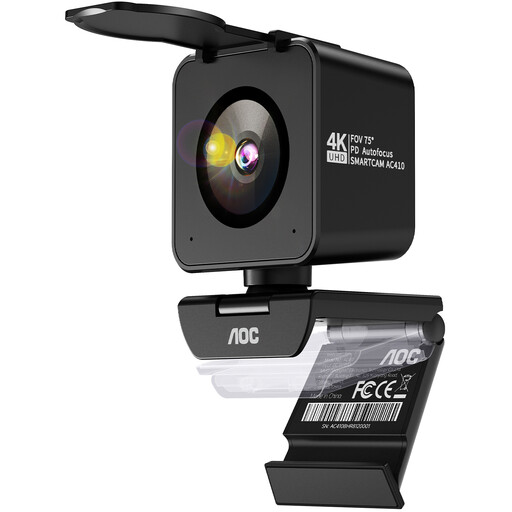 Image unavailable
A webcam option for a fixed computer set-up where autofocus and built-in microphones are useful.
The product name lists a Sony IMX363 sensor, PDAF autofocus, dual microphones, a 75° field of view and USB-A/USB-C connectivity.
The product description lists an included table tripod.
 Image unavailable
A desktop webcam option for anyone who records through a computer and wants autofocus and built-in microphones.
The product name lists 4K UHD, 8 MP, autofocus, dual microphones, a privacy cover and the black EU version.
The product description lists a clip mount for monitors and laptops, and a USB-A connection.
 Image unavailable
A compact option for alternating between moving demonstrations and your fixed recording, provided you can mount it securely above the table.
The product name lists a 1-inch CMOS sensor, 4K/120fps video, 3-axis stabilisation and a 2-inch rotating touchscreen.
DJI lists a minimum subject distance of 20 cm for this model; test whether your stitches appear large enough from your chosen angle.
 Image unavailable
A mirrorless camera option for anyone who wants to adjust the framing to suit their workspace using a zoom lens.
The product name lists an included 16–50 mm zoom lens; the product description also mentions a vari-angle screen.
Before you buy, check that the lens shows both stitches and hands large enough from your mounting height.
 Image unavailable
A webcam option for recording through a computer, with features to keep the subject in shot.
The product name lists a 4K webcam for PC/Mac, a 1/2-inch sensor, HDR and a microphone. The product description mentions autofocus and auto-framing.
Check that the camera angle keeps both hands and the step you want to show in shot while you crochet.
No. First check whether the camera can focus at your working distance and whether the framing shows the stitch large enough without cutting off your hands. A resolution specification alone cannot answer those questions.
Use a stable mount, check the focus range and make a test recording with both hands in shot. In OBS, you can add a webcam as a video source and position the frame in your scene; before the tutorial, check that both picture and sound are actually being recorded.
Check whether the chosen version includes the lens, mount, storage and the microphone you want. In the Netherlands, consumer purchases come with the right to a product that is fit for purpose; the Government of the Netherlands states that there is no fixed statutory warranty period, and the seller is your point of contact if a product is faulty.
Consider the applicable privacy rules and the circumstances of the people being filmed. According to the Dutch Data Protection Authority, the exception for strictly personal or household use of images does not apply to wider publication; an applicable GDPR legal basis is needed to process images of identifiable people. The relevant legal basis depends on the specific circumstances.