Camera brands to consider
The examples below relate to the camera models and versions mentioned; a brand name here is not a general recommendation.
Canon
The PowerShot V10 reviewed here is a compact camera with a fixed lens, designed for a simple set-up and spoken explanations.
- Canon lists a tripod socket, built-in microphones and a 3.5 mm input for an external microphone.
- The built-in stand isn’t automatically suitable for mounting above a bookbinding table.
Sony
The ZV-E10 II kit reviewed here is worth considering if you’re looking for a mirrorless camera with an E-mount lens for different framings.
- Sony lists an E PZ 16–50 mm F3.5–5.6 OSS II zoom lens with this kit.
- Check that the chosen lens can focus at the working distance you need for your bookbinding close-ups.
Nikon
The Z 30 reviewed here is a mirrorless camera for creators considering longer demonstrations with spoken instructions.
- Nikon lists 4K UHD 30p, an external microphone option and up to 125 minutes of continuous recording.
- The maximum recording time is subject to conditions. Test your own settings and check the lens you choose.
DJI
The Osmo Pocket 3 is a compact gimbal camera for anyone who wants to capture moving portfolio footage as well as fixed lesson recordings.
- DJI specifies three-axis stabilisation and focusing from 0.2 m.
- The specifications don’t show that the camera can be safely mounted above a worktable; it uses microSD storage.
Cameras at Joybuy
These cameras are suited to filming bookbinding, with options for a wide work surface, close-ups and additional portfolio videos. For your lesson, always check the mount, focusing distance, audio set-up and accessories you’ll need.
 Image unavailable
Osmo Pocket 4P Vlog Combo, black
The wide-angle lens mentioned may suit a shot where you want the book and your hands to stay in frame together. Check the framing from your own mounting height.
The description lists a 1-inch CMOS sensor, a 20 mm wide-angle lens and 4K video. According to the description, 4K/240 fps is only available in slow-motion mode.
View at Joybuy
 Image unavailable
Osmo Pocket 4 Creator Combo
The handle with a 1/4″ thread may be useful if you want to attach the camera to a suitable mount. Check that the mount is suitable for the overhead position you have in mind.
The title lists 4K/240 fps, 2× lossless zoom, 107 GB of built-in storage and a handle with a 1/4″ thread. The description lists three-axis stabilisation.
View at Joybuy
 Image unavailable
DJI Osmo Pocket 3 Creator Combo
The included microphone may be useful for spoken explanations. Test how clearly you can be heard while working.
The title lists 4K/120 fps and three-axis stabilisation. The description mentions a rotatable screen.
View at Joybuy
 Image unavailable
Sony ZV-E10 with 16–50 mm zoom lens, black
The zoom lens can help you switch between a wide view and a tighter frame. Check that it can focus at the distance you’ll be filming from.
The description lists an APS-C sensor, 4K video, a Sony E-mount and an included 16–50 mm lens. An SD memory card isn’t included.
View at Joybuy
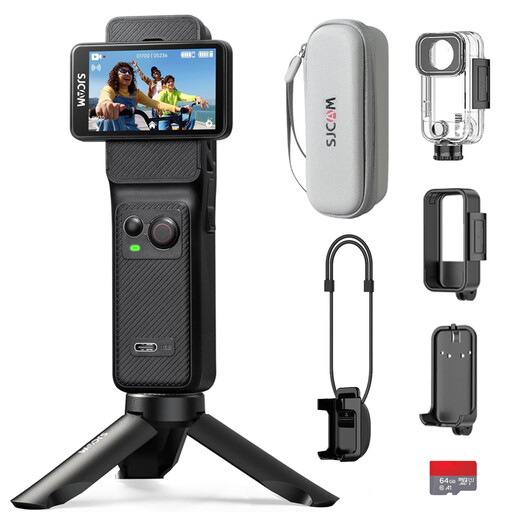 Image unavailable
SJCAM C400 action camera with 64GB card
The wide angle of view can help capture a large work surface, but small details may appear relatively smaller in the frame.
The description lists 4K recording, a 154° field of view, 6-axis stabilisation and two touchscreens. The product name mentions an included 64 GB card.
View at Joybuy
Frequently asked questions
Is a compact camera’s built-in stand enough for an overhead view?
Not necessarily. Canon describes an adjustable stand and a separate tripod socket on the PowerShot V10. Work out what you’ll need to mount the camera securely above the table.
How can you check whether small stitches will be in focus?
Make a test recording from the distance you plan to use and check the smallest detail. Compare the focusing distance of the exact camera and lens combination. DJI specifies a focusing range starting at 0.2 m for the Osmo Pocket 3.
What should you have ready for a longer lesson recording?
Before you start, check the power supply, available storage and recording conditions for the settings you want to use. DJI lists microSD storage and no built-in memory for the Osmo Pocket 3; Nikon lists up to 125 minutes of continuous recording for the Z 30 under the stated conditions.
What are your rights if a camera bought online turns out to be faulty?
For a consumer purchase in the Netherlands, the product must be of satisfactory quality and the seller is responsible for putting things right if there’s a fault. The Dutch Government says there is no fixed statutory guarantee period. Online purchases from a business also come with a 14-day cooling-off period in many cases; this is separate from your rights if the product is faulty.
Can you publish recognisable students in a portfolio video?
If other people are recognisable in the video and you share it more widely or use it professionally, the exception for purely personal or household use doesn’t apply. You’ll need a legal basis under the GDPR; consent is one possible example, but not the only possible basis. If you film only your own hands and work, with no other recognisable people, that specific question about their personal data doesn’t arise.


