First decide whether you mainly want to film fine fabric details, the entire loom or a fixed computer setup. A mirrorless camera gives you a choice of lenses, a camcorder has built-in optical zoom, a compact gimbal camera lets you move around while filming, and a webcam is designed for computer-based recording. Whichever type you choose, check the framing, focus, colour and audio recording at your own workstation. The features mentioned here are not a comparative ranking based on image quality.
Who is this choice relevant to?
Creator of fabric detail videos
You want to show the texture of the yarn and the actions involved in weaving up close. The lens or focusing distance, and the working distance available, are key. Canon and DJI describe features relevant to these considerations.
Filmer of the full weaving process
You want to show a larger loom or switch between an overview and close-up details. The framing from a practical camera position is important here; Canon and Panasonic offer different ways to choose your framing.
Online retailer with a fixed filming desk
You record demonstrations at a computer and want a consistent angle and clear speech, without having to set up a mobile camera for every video. Logitech describes a webcam mode for showing work on a desk.
What should you consider when choosing?
First decide what viewers need to be able to follow: small weaving details, the entire process or an explanation filmed at a fixed computer station. The four setups differ mainly in how you frame your shot and where you use the camera.
Mirrorless camera with a suitable lens
Suitable if: you want to film both an overview and separate shots of yarn or fabric texture from a fixed position, and can choose a lens to suit your working distance.
Keep in mind: a camera body or kit lens does not guarantee that small weaving details will appear large enough in the frame.
Camcorder with optical zoom
Suitable if: you want to reframe your shot during a demonstration without changing lenses. Panasonic lists 24× optical zoom for the Dutch HC-VX3E-K.
Keep in mind: zoom specifications alone do not tell you whether both the whole loom and a small detail will fit in the frame from your position.
Compact gimbal camera
Suitable if: you want to move the camera along the loom or record a compact, mobile demonstration.
Keep in mind: DJI lists a fixed lens and a focusing range starting at 0.2 m for the Osmo Pocket 3. Test whether details appear large enough in the frame at your filming distance.
Webcam connected to a computer
Suitable if: you give live explanations at a fixed workstation or record directly to your computer.
Keep in mind: a computer-focused viewing angle will not automatically suit every loom. Check the mounting options and the view of your work surface.
| What to consider |
What should you check? |
Who is this important for? |
| Keeping fine yarn in focus |
Check the focusing range and framing of your chosen lens from the planned filming distance. Record a test shot of the smallest detail. |
If I want to show the texture of the yarn and my hand movements clearly, the detail needs to be both sharp and large enough. Around 29% of consumers rank fabric detail as their top purchasing priority. |
| Getting the whole work surface in shot |
Test the framing from a position where the camera will not get in the way of your weaving. If you are buying a kit, check which lens is included. |
If I want to show the loom, my hands and the sequence of steps, I do not want a close-up to leave important actions out of shot. Around 23% of consumers prioritise showing the whole work surface. |
| Comparing fabric colours |
Record test clips under your own lighting and check the white balance and exposure settings available on the model. |
If I make a series of online shop videos, I want the same fabric to look consistent under similar conditions. Around 18% of consumers prioritise consistent fabric colour. |
| Audio and recording the full demonstration |
Check the microphone options, power supply and storage, then record a full demonstration in your preferred video mode. |
If I want to record a spoken explanation in one take, I want to know in advance that audio and recording will work throughout the demonstration. Around 18% of consumers give top priority to a complete, easy-to-understand explanation. |
| Recording via a computer |
Check that the camera, mount, connection and recording software work together to show and save the entire weaving process. |
If I always film at the same computer workstation, I want a fixed angle and a workflow that suits my computer. Around 12% of consumers prioritise a computer-based workflow. |
Common pitfalls
-
Assuming a mirrorless camera body or kit zoom lens is a macro setup
The Canon and Sony kits include specific zoom lenses, but that does not confirm that the smallest weaving details will appear clearly from your working distance.
Check the lens name, focusing performance and framing where you plan to mount the camera.
For a business purchase, return or repair costs may depend on the agreed terms.
Camera brands to consider
Canon
The EOS R50 V is a mirrorless camera with an RF lens mount, suited to a fixed setup where you choose the lens and framing yourself.
- Canon lists autofocus, interchangeable lenses and microphone and headphone connections.
- The Dutch kit includes an RF-S 14–30 mm lens, but this does not guarantee that fine details will appear large enough from every working distance. Canon does not list in-body sensor-shift image stabilisation.
Sony
The ZV-E10 II is a mirrorless camera with an E-mount; the Dutch kit mentioned includes the SELP16502 power zoom lens.
- Sony describes a Product Showcase mode and a camera with interchangeable lenses.
- Product Showcase mode does not prove that the kit lens will show fine yarn large enough from your filming position. Check what is included in the kit and record a test shot.
Panasonic
The HC-VX3E-K is a camcorder with built-in optical zoom, designed for a setup where you want to switch between different framings.
- For the Dutch version, Panasonic lists 24× optical zoom and 4K.
- The UK specifications page lists manual white balance. Check whether this applies to the exact Dutch version and test the close-up you want at your working distance.
DJI
The Osmo Pocket 3 is a compact gimbal camera for demonstrations where you move the camera around.
- DJI lists mechanical three-axis stabilisation and a focusing range starting at 0.2 m.
- The camera has a fixed lens and digital zoom. Test whether fabric details appear large enough at your filming distance; a microSD card is required for local storage.
Logitech
The MX Brio is a webcam for explanations from a fixed workstation connected to a computer.
- Logitech describes Show Mode for showing work on a desk, as well as adjustable white balance and exposure.
- These features do not confirm that a larger loom will fit into the frame at your preferred angle. Check the mounting options and make sure you can see your entire work surface.
Joybuy products for weaving videos
These Joybuy products are suited to compact, moving demonstrations or a fixed computer setup with a webcam.
 No image available
DJI Osmo Pocket 4P Vlog Combo (Black)
Suited to a compact setup for filming the weaving process on the move.
View at Joybuy
 No image available
Razer Kiyo V2 X webcam, 1440p/1080p at 60 FPS, USB, Quartz
Suited to recording at a fixed computer workstation; the listed compatibility includes Windows 10 and Windows 11.
- USB webcam
- 1440p/1080p at 60 FPS
View at Joybuy
 No image available
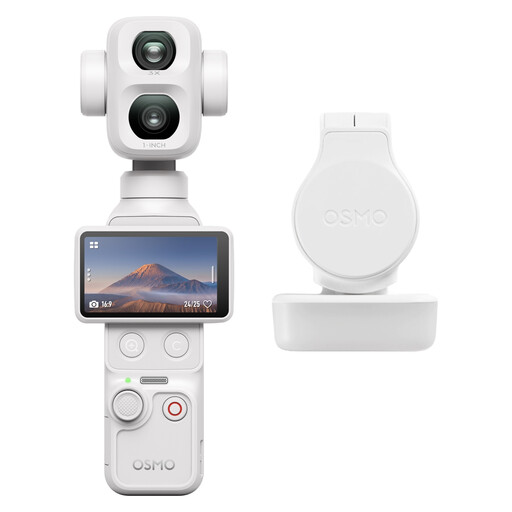
DJI Osmo Pocket 4P Standard Combo (White)
Suited to a compact demonstration setup with a camera you can move while filming.
View at Joybuy
 No image available
AOC 4K PRO Webcam with Sony IMX363 sensor and PDAF autofocus
Suited to a computer setup for recording a demonstration at a fixed workstation.
- 4K video and 75° field of view
- Dual microphones
- USB-A and USB-C connections
View at Joybuy
 No image available
AOC PC webcam with microphone, 4K and 99° field of view
Suited to a computer setup where you want to show a larger work surface.
- 4K video
- 99° field of view
- USB connection
- Built-in microphone
View at Joybuy
Frequently asked questions
How can you check whether both the whole loom and the fabric details are in focus?
Record two test shots from your planned camera position: an overview with both hands in frame, and a close-up of the smallest weaving detail. If you are using a mirrorless camera, check which lens is actually included; DJI lists a focusing range starting at 0.2 m for the Osmo Pocket 3.
What should you prepare for a long recording with spoken explanations?
Test the recording mode, storage, power supply and audio monitoring in advance by recording for the intended length of time. Canon lists a microphone and headphone connection for the EOS R50 V. DJI states that the Osmo Pocket 3 has no built-in storage and saves recordings to a microSD card.
Do consumer cancellation rights and guarantees also apply if you buy a camera for business?
Not automatically. According to Ondernemersplein, sales to a business generally fall outside consumer law, so there is no statutory consumer cancellation period and different rules apply to guarantees. Check the sales agreement and warranty terms. Ondernemersplein notes that some small businesses may be treated differently.
Can you show an identifiable employee in an online shop video without making any further arrangements?
There must be a valid legal basis under the GDPR. The Autoriteit Persoonsgegevens states that consent is the appropriate legal basis in most cases when showing identifiable employees, and that consent can be withdrawn. Also assess separately whether a recording without identifiable people may still contain personal data.
Can you add existing commercial music to a demonstration video?
Not without the necessary rights. BumaStemra explains that you need permission from the rights holders in advance to use commercial music in an audiovisual production; additional permission may be required for public publication. Check that the rights to your own music or royalty-free music also allow you to publish it in your online shop.


