
Weaver who wants to show each step
You want to frame both the loom and the movement of your hands and threads in the space available. The lens, zoom and focusing distance all affect what you can see.


Choose a mirrorless camera if you want to select a lens for wide shots and close-up details from a fixed position; a camcorder if you want to reframe using built-in optical zoom while filming; or a compact gimbal camera if you’ll be moving between workstations. Before setting up, check the field of view and focusing distance, how clearly spoken explanations can be heard, and whether the power and storage are suitable for your planned recording time. Stabilisation is no substitute for secure mounting.
You want to frame both the loom and the movement of your hands and threads in the space available. The lens, zoom and focusing distance all affect what you can see.
You want to record an explanation in a space where other people are working too. A suitable microphone input and the ability to monitor audio may be important.
You want to keep a fixed recording running while you weave. Make sure your setup, power and storage are suitable for the planned recording.
A good fit if: you want to film both the whole loom and small movements from a fixed position, and can choose a lens yourself.
Bear in mind: the camera body alone won’t guarantee the right field of view or close-up performance at your working distance. Check your audio setup too.
A good fit if: you want to reframe from a wide shot to a close-up during a demonstration, without changing lenses. Panasonic specifies 24× optical zoom for the HC-VX3.
Bear in mind: the 25 mm-equivalent wide angle quoted by Panasonic is only available in certain modes. Test the framing in the setting you plan to use.
A good fit if: you want to follow the weaver or move between workstations while filming. DJI specifies three-axis mechanical stabilisation for the Osmo Pocket 3.
Bear in mind: the fixed lens and digital video zoom limit your choice of field of view. Check that small details are clearly visible from your recording distance.
| What to consider | What to look for when buying | Who should pay particular attention? |
|---|---|---|
| Framing the loom and details | Test the field of view and focusing from the actual camera position, using your chosen lens or the camcorder mode you plan to use. | I want to show both the loom and small movements in one shot, without the details looking too small. Around 36% of consumers filming this kind of demonstration prioritise framing and detail. |
| Recording spoken explanations | Check the microphone input, placement and audio monitoring. Make a test recording with the actual sounds in your workspace. | I want my explanations to remain clear while other people are working nearby. Around 29% of consumers prioritise clear speech. |
| Recording from one fixed position | Check that power, storage, mounting and recording mode are suitable for the exact model and planned session. | I want to film the weaving without interrupting the recording to deal with power or storage. Around 21% of consumers prioritise continuous recording from a fixed position. |
| Filming between workstations | Compare the fixed field of view and focusing distance with your route and the way you plan to hold or mount the camera. | I want to move between the loom and other workstations while filming. Around 14% of consumers prioritise mobile filming. |
With a mirrorless camera, your chosen lens and audio setup help determine whether hands are clearly in shot from the available working distance and explanations can be heard.
Compare the complete kit and test the framing and sound from your planned camera position.
A suitable lens and, if needed, separate audio equipment may be part of your setup.
Panasonic states that the HC-VX3’s 25 mm-equivalent wide angle is only available in specific modes.
Test the wide shot in the recording setting you actually plan to use.
Sony states that the ZV-E10 II does not record sound during S&Q recording.
Make a test clip in your chosen mode before recording a demonstration with spoken explanations.
If you record the video and explanations separately, you’ll need to combine them afterwards.
The EOS R50 V is a mirrorless camera, so you can choose a suitable RF lens yourself.
The HC-VX3 is a camcorder with built-in zoom, letting you reframe as you film.
The Osmo Pocket 3 is a compact gimbal camera for anyone who changes position while filming.
The ZV-E10 II is a mirrorless camera with E-mount lenses and support for an external microphone.
These camera options are suited to filming from a fixed position, reframing and moving between workstations. Before setting up, check that the field of view, focusing and listed features suit your planned demonstration.
 No image available
The clip mount may be useful for hands-free filming. Check that the mounting point and field of view suit your recording position.
The product name lists a 140° field of view and a 1.54-inch display.
 No image available
This pocket gimbal camera may suit a recording where you change position. Check the version you’re choosing and its field of view for your route.
The product name lists 3-axis stabilisation, 2× lossless zoom, 107 GB of built-in storage, a 1-inch CMOS sensor and 4K/240fps.
 No image available
The listed optical zoom may be useful if you want to reframe while filming without changing lenses. Test the framing from your intended distance.
The product name lists 12× optical zoom and 4K video.
 No image available
This version is listed with a zoom lens. Check that its range captures both the loom and the movements from your camera position.
The product name lists a 16–50 mm zoom lens.
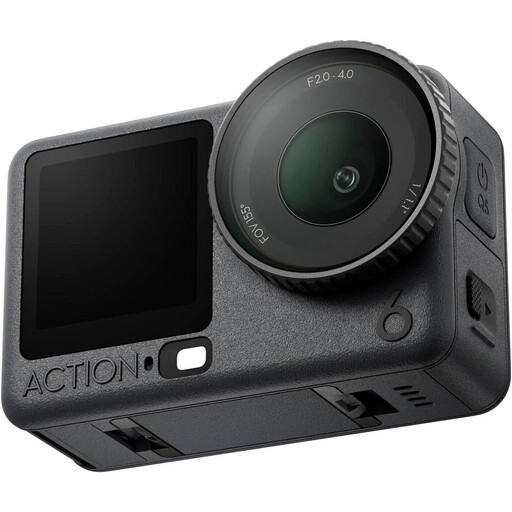 No image available
The product name identifies this as an action camera. Check whether the included version suits the way you plan to film your demonstration.
It depends on who is filming and how the footage will be used. The Dutch Data Protection Authority says that identifiable people are personal data; filming and publishing for professional or commercial purposes requires a lawful basis under the GDPR. For footage of employees made and published by an employer, the regulator says that in most cases the lawful basis is consent from the employee shown. Where possible, keep the frame focused on the demonstration, and consider how you plan to use the footage before publishing it.
No. Stabilisation doesn’t determine whether the whole loom will fit in the frame from your chosen distance. Test the field of view with the lens and recording mode you plan to use. For example, Panasonic states that the HC-VX3’s quoted wide angle is only available in certain modes.
For the exact model and chosen mode, check how to power the camera and where the recording will be stored. Panasonic lists power options for the HC-VX3; DJI states that the Osmo Pocket 3 requires a microSD card for storage.
No. ACM ConsuWijzer distinguishes between the statutory guarantee and any seller’s or manufacturer’s guarantee. With normal use, your statutory rights depend on what you could reasonably expect from the product. The seller is your point of contact if a product is faulty.