Who is this choice relevant to?

Artist who wants to capture their work faithfully

You want to photograph your own watercolour for a portfolio or for records, and above all, be able to assess the colours and the areas of paper. A grey card or colour reference, along with controlled lighting, can help. National Museums Scotland describes using colour references when photographing collections.

Photographer capturing fine brushwork

You want to photograph smaller sections as well as the whole piece. The framing you need and the distance you can shoot from both affect the choice between a fixed lens and an interchangeable lens.

Artist with a simple home setup

You want to take consistent photos without an extensive lens system. So compare a compact camera with a built-in lens against the complete setup you’ll need for a mirrorless camera.

What should you look for when choosing?

Compact camera with a built-in lens

Choose this option if: you want a straightforward, all-in-one setup and the fixed lens can fit the whole piece in the frame from your shooting distance.

Bear in mind: the lens can’t be changed, so check in advance that its angle of view and controls will suit your watercolour.

Mirrorless camera with a suitable lens

Choose this option if: you want to select your own lens for the full piece and, if needed, smaller details.

Bear in mind: a camera body on its own isn’t a complete setup; check the lens and exactly what’s included in the kit you’re considering.

What to consider What should you check? Who will find this most relevant?
Paint and paper colour Check the white balance and photograph a grey card or colour reference under the same lighting as the artwork. If I want to assess colours accurately for my portfolio or records, I need a consistent reference point. Around 33% of consumers put colour control first when photographing watercolours.
Light areas and dark background Take a test shot and check the exposure compensation and detail in both the paper and the background. If I want to keep the background dark without losing detail in the light areas of the paper, I need to assess both in a test shot. Around 27% of consumers prioritise this exposure balance.
Full piece and fine details Measure the artwork and the available shooting distance; check the angle of view and focusing capabilities of the exact camera-and-lens combination. If I want to capture both the whole piece and fine brushwork, I need to consider the framing available from my shooting distance. Around 20% of consumers prioritise this flexibility.
Complete, consistent setup Check whether the kit includes a lens and whether your setup, lighting and any accessories suit the way you work. If I want to photograph my watercolours in a dedicated spot, I need to know in advance which items I’ll actually need. Around 20% of consumers prioritise a simple, complete setup.

Pitfalls to avoid

  • Confusing a dark background with low light

    The background doesn’t automatically determine how much light falls on the watercolour. National Museums Scotland explains that a black or grey background reflects less light than a white one.

    First, check that the artwork is lit evenly and assess the shot before choosing a camera for its low-light performance.

  • Letting the dark background dictate the automatic exposure

    A scene with unusually bright and dark areas can throw off the automatic exposure, making details in the paper harder to see.

    Take a test shot, adjust the exposure compensation if needed, and check the light areas of the paper separately.

  • Comparing a mirrorless camera body on its own with a complete compact camera

    With a mirrorless camera, the body and lens work together as a usable combination. A compact camera such as the Canon PowerShot G7 X Mark III has a built-in lens.

    Check exactly what’s included in the kit and whether the lens suits the size of your watercolour and the distance you’ll be shooting from.

Camera brands to consider

Canon

Canon offers both a compact camera with a built-in lens and mirrorless cameras with interchangeable lenses.

  • Canon lists a built-in zoom lens for the PowerShot G7 X Mark III, with a 35mm-equivalent focal length of 24–100 mm and manual focus.
  • The fixed lens can’t be changed. Check which lens is included with the exact EOS R50 kit you’re considering. These features alone don’t indicate how accurately it will reproduce watercolour colours.

Fujifilm

The X-S20 is an interchangeable-lens option for anyone who wants to factor lens choice and RAW processing into their workflow.

  • Fujifilm lists 14-bit RAW for the X-S20.
  • RAW shooting is no substitute for even lighting and a colour reference; the lens’s suitability depends on the combination you choose.

Nikon

The Z50II is a mirrorless camera for anyone considering the Nikon Z lens system alongside other interchangeable-lens options.

  • Nikon describes the Z50II as having adjustable Picture Control presets.
  • A creative colour preset isn’t a proven method for faithfully reproducing watercolours. Check which lens is included in the exact kit and assess colour using a reference.

Camera options at Joybuy

These camera options suit a compact photography setup or give you a choice of framing. The camera features listed don’t, on their own, prove that watercolour colours or paper details will be captured faithfully; check with a test shot.
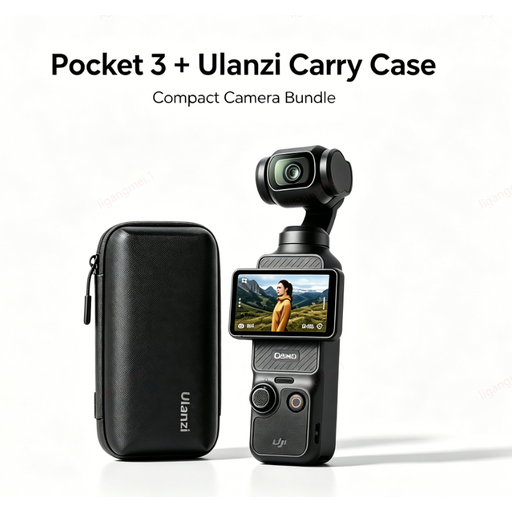
DJI Pocket 3 camera with Ulanzi storage case

DJI Pocket 3 camera with Ulanzi storage case

A handheld camera and carry case make a suitable combination for anyone looking for a compact photography setup.

View at Joybuy
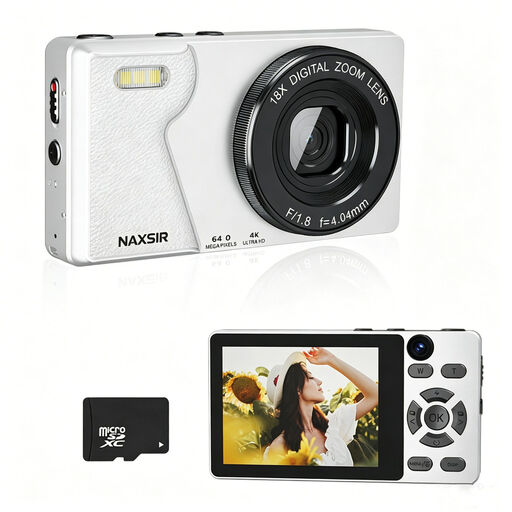
NAXSIR digital camera, 64 MP, pink

NAXSIR digital camera, 64 MP, pink

This camera is advertised with autofocus, 18x digital zoom and a 32 GB memory card.

Digital zoom and the stated photo resolution don’t, on their own, tell you how much detail an image will show in watercolour colours or paper. Check with a test shot.

View at Joybuy

DJI Osmo Pocket 3 Creator Combo

DJI Osmo Pocket 3 Creator Combo

This compact camera could suit anyone looking for a portable photography setup.

The product title lists a 1-inch CMOS sensor and 4K/120fps video. That video specification isn’t a measure of colour accuracy when photographing watercolours.

View at Joybuy

Songdian pocket camera, pink

Songdian pocket camera, pink

The product title describes a pocket camera for photography and video, with 4K, 44 MP and 16x zoom.

Take a test shot to see whether the framing and how the light areas of the paper appear suit your watercolour.

View at Joybuy

Sony ZV-E10 with 16–50mm zoom lens, black

Sony ZV-E10 with 16–50mm zoom lens, black

The listed 16–50mm zoom lens could be useful if you want to vary the framing without adding a separate lens to your setup.

Check with your watercolour and shooting distance whether the lens can capture the full piece and the details you want.

View at Joybuy

Frequently asked questions

Do I need to photograph in a dark room to keep the background dark?

No. A dark background doesn’t mean there needs to be little light on the watercolour. National Museums Scotland explains that a black or grey background reflects less available light than a white one. Direct the light onto the artwork and, in a test shot, check both the background and the light areas of the paper.

How can I keep the colours consistent across future shots?

Keep your lighting setup as consistent as possible and photograph a grey card or colour reference under the same lighting as the watercolour. National Museums Scotland describes this kind of reference as a tool for colour correction and also discusses RAW processing.

What extra items should I check for with a mirrorless camera?

Check whether the offer includes just a body or a lens as well, and whether that lens can frame your artwork from the distance available. What other items or setup equipment you need depends on what you already have and how you take photos.

What are my rights when I buy a camera online in the Netherlands?

According to ACM ConsuWijzer, online purchases generally come with a 14-day cooling-off period from the date the product is delivered. You’re also covered by the statutory guarantee: if a product used normally doesn’t meet what you could reasonably expect, the seller must offer a solution.

Can I publish a photo of the watercolour?

If the watercolour belongs to someone else and is protected by copyright, you need to consider the rights involved in making it public. The Dutch Government states that a private copy of a protected work can’t be made public. This rule doesn’t mean you need someone else’s permission to share your own work; any agreements may vary from one work to another.
