What should you look for when choosing?
Compact camera with a close-up mode
Choose this option if: you mainly want to photograph maker’s marks, cut patterns or small chips up close, without having to fit separate lenses on the table.
Bear in mind: being able to focus up close doesn’t guarantee that a larger vase will fit fully in the frame from your camera position. OM SYSTEM lists macro modes and RAW shooting for the Tough TG-7.
Mirrorless camera with a compact standard zoom lens
Choose this option if: you want to switch between framing a whole glass and capturing details, and have room for the camera, lens and a small lighting setup.
Bear in mind: the focusing distance can vary depending on the zoom setting. Canon lists different distances for the RF-S 18-45mm depending on focal length and focusing method; Nikon lists a minimum focusing distance of 0.2 m for the Z DX 16-50mm.
Keep using your smartphone
Choose this option if: you want to check whether your phone can focus on the glassware from the available distance and frame it as you want.
Bear in mind: assess test shots of both your smallest details and largest item; suitability varies by phone and photo.
Lighting and the background need separate consideration when photographing glass: Adobe explains the importance of a controlled product setup, while Proshoots highlights reflections on glass.
| What to consider |
What should you look for? |
Who is this important for? |
| Framing the whole object |
Check the field of view and zoom setting at the distance available on your table. |
If you want to photograph a whole glass or vase without being able to move the camera further away, framing is your main concern. Around 33% of consumers prioritise this. |
| Reflections and lighting |
Allow room for a background and movable lighting; try adjusting the position of the light. |
If reflections in transparent or glossy glass are your biggest concern, you’ll want to be able to control the lighting setup. Around 27% of consumers prioritise this. |
| Capturing small details |
Compare close-focusing performance and, where specified, the maximum magnification of the exact lens combination. |
If maker’s marks, cut patterns or signs of wear matter more than an overall shot, look for a suitable close-focusing distance. Around 20% of consumers prioritise detail photography. |
| Managing equipment and costs |
Check which lens is included with the kit and how much extra equipment you’ll need for your setup. |
If you want to avoid buying a camera that only becomes useful after you’ve chosen extra components, check what’s included and what equipment you’ll need. Around 20% of consumers make this their main priority. |
Cameras on Joybuy
The Joybuy products below are digital cameras for a range of photography and everyday uses. For vintage glassware, check the focusing distance and field of view separately, as well as how much room you have for your setup.
 No image available
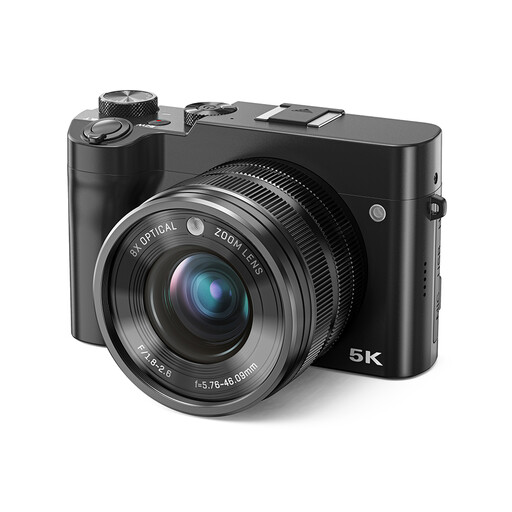
Songdian Digital Camera, 8× Optical Zoom, Black
If you want to try different framing options, the product name lists 8× optical zoom; that figure alone doesn’t tell you the close-focusing distance for detail shots.
Joybuy
 No image available
Songdian Pocket Camera, 4K, 44MP, 16× Zoom, Pink
If you want to try different crops, the product information lists 16× digital zoom; this feature doesn’t confirm whether the camera can focus up close.
Joybuy
 No image available
Songdian Digital Camera, 5K, 56MP, 10× Optical Zoom, Black
If you want to try different framing options, the product name lists 10× optical zoom; the zoom figure alone doesn’t tell you what focusing distance is achievable.
Joybuy
 No image available
KOMERY G7-A Digital Camera, 4K, 80MP, 18× Zoom, White
If you want to try a zoom lens, the product name lists 18× zoom; for close-ups, also check whether the camera can focus at your preferred distance.
Joybuy
 No image available
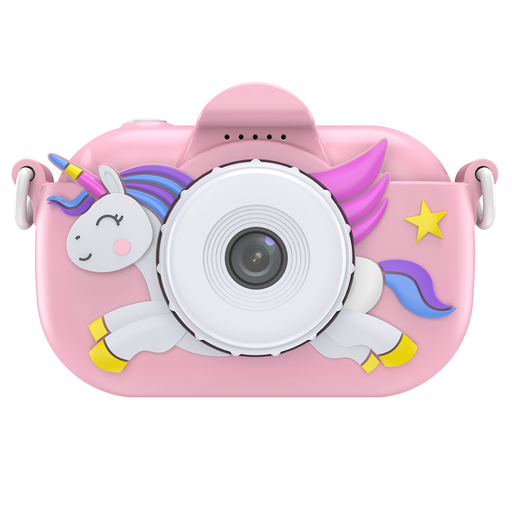
Songdian Kids Camera with Cartoon Soft Cover, Pink
The product name describes this model as a children’s camera; for glassware, check whether its focusing and framing suit your item.
The product description lists 1080P.
Joybuy
Frequently asked questions
Is macro mode enough to photograph a whole vase on a small table?
No. A short focusing distance doesn’t guarantee that the whole vase will fit in the frame from the camera position available to you. Check the zoom setting too, and, if possible, test the framing with an object of a similar size.
How can I keep the framing consistent across a series of glassware photos?
Keeping the camera in a fixed position or using a tripod can help you maintain the same composition and background. Then adjust the lighting for each piece of glass to manage distracting reflections.
What can I do if a camera I bought in the Netherlands is faulty?
If a product is faulty, the seller must put things right; a manufacturer’s warranty doesn’t replace your statutory rights. According to the Dutch government, the Netherlands has no fixed statutory warranty period: what you can expect depends, among other things, on the product and how it is used.
Do I have a cooling-off period if I buy a camera online?
According to the Dutch government, consumers buying online from a business usually have a 14-day cooling-off period. A purchase from a private individual isn’t covered by the same distance-selling rules; check the relevant terms and exceptions.
Can I use an existing product photo in my sales listing?
Don’t assume you can reuse a photo without permission. KVK explains that photos are protected by copyright and that using an online photo on a business website without permission may infringe those rights. Photographing the glassware yourself avoids reusing someone else’s photo.


