
Trading card seller
If you regularly photograph complete cards for listings, look for recognisable colours, legible details and a white background that you can set up the same way each time.


If you mainly photograph complete trading cards, start with your existing smartphone, a fixed set-up and even lighting; buying a new camera won’t automatically be the first improvement. A compact camera with a close-up mode may suit you if you want close-ups without interchangeable lenses, while a mirrorless camera gives you more choice of lenses. However, the supplied lens still needs to suit your shooting distance. Take test shots of both a complete card and small details, and check sharpness, colour and reflections.
If you regularly photograph complete cards for listings, look for recognisable colours, legible details and a white background that you can set up the same way each time.
If you want to show small print, corners or surface features, assess focus and lighting at close range. The minimum focusing distance alone won’t tell you whether the whole card will fit in the frame.
If you only take card photos now and then, first test whether your existing phone meets your needs with a fixed background and controlled lighting.
Choose this option: if you occasionally photograph complete cards and want to try your existing equipment first.
Bear in mind: take test shots and check for yourself whether text, colours and shine come through clearly; this hasn’t been established for every phone.
Choose this option: if close-ups matter and you don’t want to use interchangeable lenses. OM Digital Solutions says the TG-7 can shoot from 1 cm away in close-up mode.
Bear in mind: from such a short distance, a whole card may not fit in the frame and your set-up could cast a shadow; test each separately.
Choose this option: if you photograph cards regularly or want to be able to choose a specific lens for close-ups.
Bear in mind: a camera body with a kit zoom lens isn’t automatically a macro set-up. Canon lists a maximum magnification of 1:2 for the separate RF 35mm F1.8 MACRO IS STM, not for every lens bundle.
| What to consider | What should you check? | Who is this important for? |
|---|---|---|
| Sharp text and details | Take shots of a complete card and a small detail. Check how well the specific lens or camera focuses at the distance you plan to use. | If I want to show small text, edges or card features clearly, I prioritise sharpness. Around 31% of consumers say detail and sharpness are their top priority. |
| Colour and a white background | Compare test shots under the same lighting and check whether you can adjust the white balance. Adobe explains that you can set the white balance to suit the light source. | If I want the card colours to remain recognisable against a white background, I compare images in the same light. Around 25% of consumers prioritise colour and white. |
| Reflections on glossy cards | Move the light first and take new test shots. Nikon notes that a polarising filter can reduce certain reflections; this doesn’t prove it will work with every card finish. | With glossy cards, I want to stop glare from obscuring illustrations or text. Around 25% of consumers say controlling reflections is their main consideration. |
| Cost and ease of use | Test your existing equipment first. Then check exactly what’s included in the bundle and whether you’ll need another lens or lighting for the close-ups you want. | If I want to take useful photos without unnecessary spending or extra steps, I start with a test set-up. Around 19% of consumers prioritise cost and convenience. |
For close-ups, framing and the lens you use matter too. The camera body’s specifications won’t tell you whether small card details will look sharp at your shooting distance.
Check which lens comes with the camera and, where possible, take a test shot of both the whole card and a detail.
White balance depends on the light source, and reflections can obscure text or illustrations. A filter isn’t a guaranteed solution for every glossy card.
Compare test shots under the same lighting and try moving the light before considering a filter.
It can take time to adjust the position of the light and find a fixed set-up you can repeat.
The OM SYSTEM TG-7 manual describes focusing from 1 cm away in close-up mode. That distance doesn’t prove that a complete card will fit in the frame or be lit without shadows.
Test a complete card and the smallest detail you want to show separately.
The EOS R50 is a mirrorless camera option if you want to start with a kit lens and perhaps choose a compatible close-up lens later.
The TG-7 is a compact camera for trying close-ups without an interchangeable lens.
The ZV-E10 II is a mirrorless camera option if you expect to use it for other types of photography as well as card photos.
The Z50II is another mirrorless camera option if you want to choose a suitable lens within the Nikon Z system.
These cameras are options to compare for card photography. Take a test shot to see whether the exact model is suitable for the card size and level of detail you want to photograph.
 No image available
If you want to compare a camera with zoom, the product name lists 18× zoom; test whether it lets you frame the card and the detail you want clearly.
The product name lists 5K, 80MP UHD and 18× zoom. Take a test shot to check the sharpness and colour reproduction of your cards.
 No image available
If you’re looking for a camera supplied with a zoom lens, the product name lists the Sony ZV-E10 with a 16–50mm zoom lens.
The zoom lens name alone doesn’t confirm whether it’s suitable for macro shots of cards. Test your preferred shooting distance and check that small details look sharp.
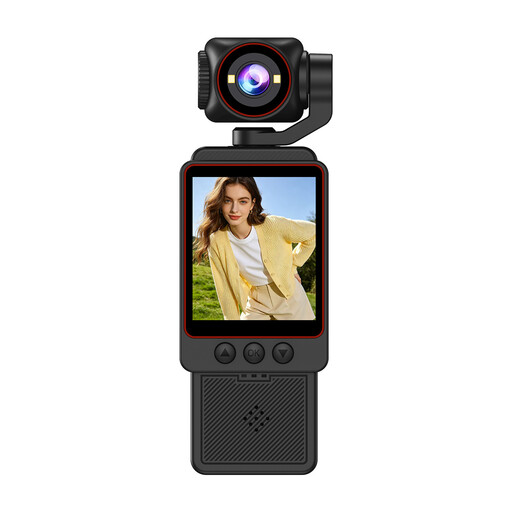 No image available
If you’re comparing a compact camera for card photos, the product name mentions HD photos and fast focusing; check with a test shot whether card text and edges are clear enough.
The product name lists 1080P HD video and an HD photo function. These labels alone don’t tell you how sharply small card details will be captured.
Not simply because you’re photographing a trading card. First check whether the lens can frame the whole card sharply at your shooting distance. A separate macro lens is mainly relevant if you want to capture smaller details up close; Canon lists a maximum magnification of 1:2 for the RF 35mm F1.8 MACRO IS STM, not automatically for an EOS R50 kit lens.
Use a fixed set-up with even lighting and take a test shot. Adobe explains that you can set the white balance to suit the light source. If your camera supports RAW images and you edit them, you can adjust the white balance later.
Before taking a series of shots, check that the background, lighting and camera position are consistent, then look at a test photo for dust, sharpness and glare. A controlled environment helps you repeat a set-up, but one fixed setting won’t necessarily suit every card.
For an online product purchase by a consumer, there is generally a 14-day cancellation period from delivery, with some exceptions. ACM ConsuWijzer also explains that you’re entitled to a product that meets what you could reasonably expect; there is no fixed statutory period of exactly two years. These consumer rights don’t necessarily apply in the same way to a business purchase.