Who is this choice relevant to?

Photographer taking colour-critical product photos

You photograph different tile options for a catalogue or portfolio and want to keep colours as consistent as possible between shots. MPB and Nikon USA describe tools for creating a stable setup and controlling white balance.

Photographer of glossy glazed tiles

You want to manage distracting reflections without losing the visible sheen of the tile. Nikon USA explains how a polarising filter can reduce unwanted reflections.

Photographer taking detailed close-ups

You want to show texture, edges or small patterns, so you need to check whether your chosen lens can achieve the framing you want from your available table setup. Canon Netherlands notes that lens specifications can vary depending on the focus mode.

What should you look for when choosing?

Camera with a standard zoom lens

Choose this if: you mainly want to photograph whole tiles and try different compositions, and the lens gives you a wide enough field of view from your table.

Bear in mind: the exact kit contents and lens determine the framing; the camera body alone won’t tell you that.

Camera with a dedicated close-up lens

Choose this if: texture, grout lines or glaze details matter more than an overall shot, and a standard zoom can’t achieve the framing you want.

Bear in mind: the lens needs to fit the mount and may need to be bought separately.

Existing camera with an adjusted setup

Choose this if: your current camera already gives you the framing you want, but the angle, white balance or reflections still need attention.

Bear in mind: a tripod and controlled lighting won’t change what a lens can capture from your working distance.

What to consider What to look for when buying Who should pay particular attention?
Colour consistency Check the adjustable white balance and the file formats you need; Nikon USA describes using a white reference when setting the exposure. I want to compare tile colours accurately between photos, so I look for a consistent setup and white balance. Around 29% of consumers in this choice context prioritise colour consistency.
Reflections on glazed tiles First, try different lighting and camera angles. Nikon USA explains that a suitable polarising filter can reduce unwanted reflections. I want to manage reflections while keeping the surface’s sheen visible. Around 29% of consumers in this choice context prioritise controlling reflections.
Fitting the tile into the frame Measure the tile and available working distance; check the focal length, mount and exact lens included in the kit. I need the whole tile to fit in the frame on my small table, from the camera height available. Around 21% of consumers in this choice context prioritise framing the subject within their workspace.
Capturing small details Check the minimum focusing distance and magnification of the exact lens, including the focus mode to which the specifications apply. I mainly want to show texture, an edge or a detail in the glaze, so I check whether my lens can make that detail large enough in the frame from my working distance. Around 21% of consumers in this choice context prioritise close-up details.

Common pitfalls

  • Comparing camera bodies alone

    The Dutch Sony α6400 configuration reviewed is body-only. Without a suitable lens, you can’t tell whether you’ll get the framing you want from your table.

    Before buying, check what’s included in the kit, the lens mount and the lens you’ve chosen. Sony Netherlands lists the configuration in question as body-only.

  • Assuming more pixels will solve reflections

    Reflections depend on your lighting and shooting setup. A polarising filter can change how reflections appear, but more pixels won’t get rid of them.

    First, take test shots from different lighting and camera angles. If needed, compare photos taken with and without a suitable polarising filter.

  • Assuming a close-up distance applies at every lens setting

    Canon Netherlands specifies that the RF-S 18-45mm’s 15 cm focusing distance and 0.25× magnification apply when focusing manually.

    Read the conditions attached to the specification and test whether you can achieve the framing you want from your working distance.

Camera brands to consider

Canon

The EOS R50 is an interchangeable-lens option. The RF-S 18-45mm could work as a standard zoom if it’s actually included in the kit you choose.

  • Canon Netherlands lists a 24.2-megapixel APS-C sensor and RF mount for the EOS R50.
  • The RF-S 18-45mm’s specified focusing distance of 15 cm and 0.25× magnification apply when focusing manually. Check what’s included in the kit and whether the framing suits your tile and working distance.

Fujifilm

The X-S20 is an X-mount body for anyone who wants to include RAW files in their workflow and choose a suitable lens separately.

  • Fujifilm lists 26.1 million effective pixels, an X mount and RAW shooting.
  • The body specifications won’t tell you whether a tile or close-up will fit in the frame from your table. Check your chosen lens and what’s included in any kit.

Sony

The α6400 is an E-mount option for anyone who wants to choose their own lens for wide or detailed shots.

  • The E mount gives you a starting point for choosing a lens to suit the shot you want.
  • The Dutch Sony configuration reviewed is body-only, so you’ll need to choose or buy a suitable lens separately.

Nikon

The Z50II is a Z-series option with a tilting touchscreen for checking your framing in a tabletop setup.

  • Nikon Netherlands describes a tilting touchscreen monitor and Picture Control presets.
  • Colour presets don’t guarantee that tile colours will look true to life. Also check which Z-mount lens is included in the configuration you choose.

Cameras at Joybuy

These cameras are options to compare for tabletop photography. For each model and configuration, check that the lens and available working distance suit your tile.

KOMERY G7 5K digital camera

KOMERY G7 5K Digital Camera

Worth considering for tabletop photography, provided you first check that you can achieve your chosen framing from your working distance.

The product name describes a digital camera. Check the exact lens and shooting specifications for the configuration you choose.

View at Joybuy

KOMERY W6 12X optical zoom 4K digital camera

KOMERY W6 12X Optical Zoom 4K Digital Camera

Worth considering if you want to try different framings. Test whether the lens can capture the tile the way you want on your small table.

The product name lists 12X optical zoom, 4K and 64MP. Check which specifications apply to the configuration and whether its minimum focusing distance suits your close-up shots.

View at Joybuy

DJI Osmo Pocket 3 camera

DJI Osmo Pocket 3

Compare this camera with your tabletop setup and check whether its lens and focusing options allow you to frame the tile as you want.

The product name lists a 1-inch CMOS sensor, 4K/120fps video and a 2-inch rotating touchscreen.

View at Joybuy
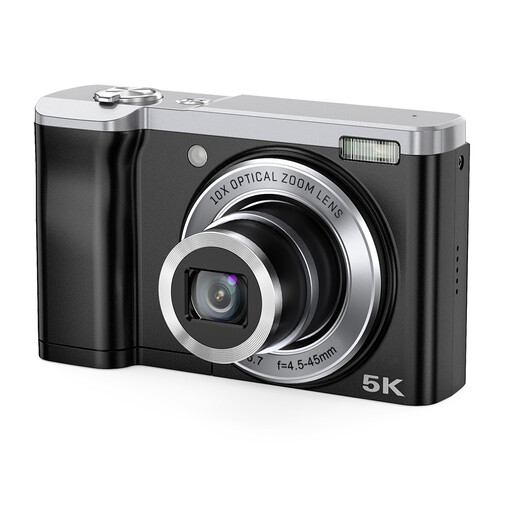
Songdian 5K digital camera with 10X optical zoom

Songdian 5K Digital Camera 56MP

Worth considering if you want to test your framing on a table. Before choosing, check that the lens can capture the whole tile or the detail you want from your working distance.

The product name lists 56MP and 10X optical zoom. Check the framing with the camera at the distance you’ll actually have available.

View at Joybuy

Sony ZV-E10 with 16–50mm zoom lens

Sony ZV-E10 + 16-50mm Zoom

The zoom lens listed gives you a range of options for comparing different framings. Check whether the whole tile fits in the frame from your table.

The product details list a 24.2MP APS-C sensor and a 16–50mm zoom lens.

View at Joybuy

Frequently asked questions

Should I buy a polarising filter straight away for glossy tiles?

No. Try different lighting and camera angles first. Nikon USA says a suitable polarising filter can reduce unwanted reflections. If you want to keep the surface’s sheen visible, also compare a shot taken without the filter.

How can I make photos of different tile colours easy to compare?

Keep your setup as consistent as possible and check the white balance, for example by using a white reference under the lighting you’re using. Nikon USA describes using a white reference to set the white balance.

What should I look out for when buying a camera body?

Check that the configuration you choose includes a suitable lens. The Dutch Sony α6400 configuration reviewed is body-only. The lens mount, kit contents and working distance all help determine whether you can frame the tile as you want.

Is the legal guarantee on a camera bought in the Netherlands always exactly two years?

No. Dutch law doesn’t specify a fixed duration for the legal guarantee. ACM ConsuWijzer explains that what you can expect in terms of a product’s lifespan depends, among other things, on the product, its price and the brand. A manufacturer’s warranty is separate.

Do I have a cooling-off period if I buy the camera online?

For online consumer purchases, you generally have a legal cooling-off period of up to 14 days after the product is delivered. ACM ConsuWijzer notes that exceptions and conditions may apply, so check what applies to your purchase.
