
Maker demonstrating their work
You film a work surface or object from a fixed position and want to frame actions and small details clearly. Choose based on your working distance and lens, rather than video resolution alone.


If you mainly film small details of your work from a fixed table, first decide on the framing and focusing distance you need, then look for a suitable lens and a stable set-up. If you often switch between filming yourself and your work, consider a flip-out screen and ways to monitor the sound. If you mainly film while moving, a compact gimbal camera is practical, but its fixed lens limits your choice of angle of view. This advice is based on the stated features, not a comparative hands-on test of the models mentioned.
You film a work surface or object from a fixed position and want to frame actions and small details clearly. Choose based on your working distance and lens, rather than video resolution alone.
You record the instructions yourself and need to monitor the picture and sound while filming. A flip-out screen and suitable microphone connections are useful here; Canon, for example, lists a microphone input and headphone output on the EOS R50 V.
You often switch between filming your workspace and presenting to camera. A compact camera with stabilisation can simplify your set-up, while a fixed lens gives you less choice of angle of view. DJI describes the Osmo Pocket 3 as a gimbal camera with 3-axis mechanical stabilisation.
Choose this if: you want to frame both a wide view and small details of your work from a fixed position, and are happy to choose a lens to suit your working distance.
Bear in mind: choosing a lens and finding a stable way to mount the camera both need careful thought. A kit zoom lens alone does not guarantee that small details will appear large enough in shot.
Choose this if: you move around a lot while explaining things and want to switch quickly between filming yourself and your workspace. DJI lists a flip-out screen and 3-axis mechanical stabilisation for the Osmo Pocket 3.
Bear in mind: the fixed angle of view limits your framing options. Check that you can get your work details large enough in shot from the available filming distance.
| What to consider | What to check before buying | Who should pay particular attention? |
|---|---|---|
| Framing details of your work | Measure the distance to your workspace and check the focusing distance and angle of view of your chosen lens or fixed-lens camera. | If your subject is small, precise actions, you’ll want to film them sharply and large enough from your usual workspace. Around 36% of consumers prioritise framing details of their work clearly. |
| Recording clear spoken instructions | Check the microphone connection, where the microphone will be positioned and whether you can monitor the sound while recording. | If you won’t be right next to the camera while explaining things, you’ll want to check that your voice is being recorded clearly. Around 29% of consumers prioritise clear spoken instructions. |
| Recording a long lesson on your own | Check the screen from your working position, the recording indicator, storage, power supply and the conditions attached to the stated recording time. | If you’re demonstrating and recording on your own, you’ll want to monitor the recording and framing without a second person operating the camera. Around 21% of consumers prioritise long solo recordings. |
| Switching between viewpoints | Consider stabilisation and the fixed angle of view, and check that you have enough room to move away from your subject. | If you film alternately at your worktable and in front of the camera, a set-up that’s easy to move is important. Around 14% of consumers prioritise filming on the move. |
Resolution doesn’t tell you whether your subject will look large enough and sharp from your filming distance.
Test the angle of view and focus at your intended workspace with the exact lens or fixed-lens camera.
If the framing doesn’t work, you may need a different lens or an adjusted camera set-up.
A camera body, lens kit and bundle are different versions. DJI also states that the Osmo Pocket 3 has no built-in storage.
Check exactly what’s included with the version you’re buying and what accessories you’ll need for filming.
Depending on the version you choose, you may need to buy a lens, microphone or memory card separately.
A microphone input and, on the Canon EOS R50 V, a headphone output give you ways to monitor the sound, but they won’t set the audio levels correctly for you.
Make a short test recording from your usual speaking position and listen back before recording the lesson.
If the recording is unusable, you may have to record the lesson again.
The EOS R50 V is a video-focused mirrorless camera for anyone looking to choose an RF or RF-S lens to suit their working distance.
The ZV-E10 II is an APS-C camera with an E-mount, for creators who want to frame shots in different ways using interchangeable lenses.
The Osmo Pocket 3 is a compact gimbal camera for lessons that are filmed partly on the move.
The Z 30 is a mirrorless camera for anyone who wants to record a lesson from a fixed set-up with an interchangeable lens.
The Joybuy products below include mirrorless cameras, compact cameras, action cameras and a webcam. For each version, check that the framing, audio and accessories suit the way you teach and film.
 No image available
This compact gimbal camera could suit you if you move between your workspace and the camera while teaching. DJI lists 3-axis mechanical stabilisation and focusing from 0,2 m. Check that the fixed angle of view and minimum focusing distance work for your details.
 No image available
A mirrorless camera kit with a zoom lens could suit you if you want to try different framings from a fixed position. Test the framing from your working distance and check that small details are clearly visible in the shot.
Check which accessories are included with this version before you buy.
 No image available
This PC/Mac webcam could suit a fixed computer set-up for your lesson. Check that your set-up shows your work and the actions you want to demonstrate clearly.
 No image available
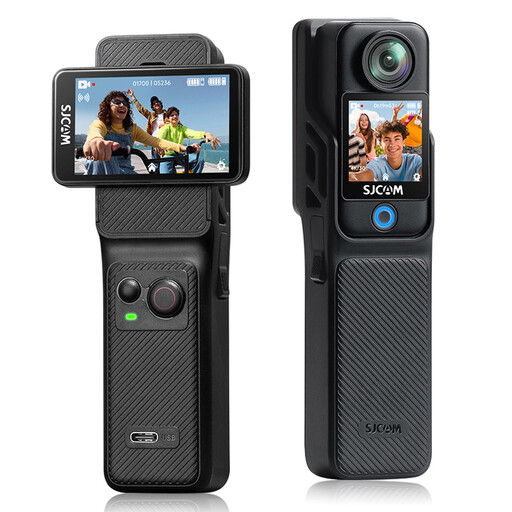
This action camera could suit you if you move the camera around while teaching; the version is listed as having a flip-up screen and a second touchscreen. Check that the angle of view and controls work for the details at your workspace.
The stated maximum recording time depends on the handgrip and extra battery.
 No image available
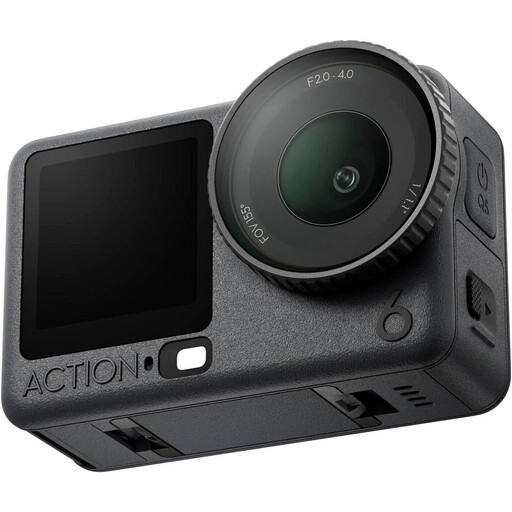
An action camera could suit a lesson that you film partly on the move. Before buying, check which audio accessories are included with the Adventure Combo and whether the set-up will show your work details clearly enough.
According to the product information, the stated maximum recording time of four hours applies under normal conditions.
Set the camera up at the planned working distance and test the smallest action in the final frame. Check the focusing distance and angle of view of your chosen lens or fixed-lens camera; 4K alone won’t answer that question.
Before the demonstration, check the framing, that the recording indicator is visible, make a short voice-recording test, and check the available storage and power supply. Nikon lists up to 125 minutes of continuous recording for the Z 30; this figure is subject to conditions and doesn’t guarantee the length of a lesson.
No, an extra warranty isn’t a condition of your statutory guarantee. ACM ConsuWijzer says that if a product is faulty despite being used normally, the seller must offer an appropriate free remedy; what you can expect also depends on the product.
First, consider which privacy rules apply. The Dutch Data Protection Authority says that the GDPR applies when recognisable images are taken and published for business or commercial purposes, and that a valid legal basis is needed, such as consent. For recognisable pupils in school publications, the regulator sets out specific considerations, including consent and the pupil’s age.
According to the Dutch government, you need the creator’s permission to use other people’s copyright-protected photos or music publicly. A private copy for your own use doesn’t give you permission to distribute or publish the work.