For full plates and table settings, a suitable standard lens may be all you need. For small maker’s marks, glaze textures or relief details, check the magnification and working distance of the specific lens. You may need a dedicated macro lens, but that means extra equipment, and a short working distance can leave less room for lighting. For a consistent portfolio, also consider your lighting setup, white balance and the complete kit you’ll need.
Who is this for?
Maker focusing on tableware details
You want to capture glaze, texture and small maker’s marks clearly. Compare the magnification and working distance of the lens you’ll actually use. Sony Netherlands explains what working distance means, while Nikon Netherlands describes a DX macro lens as an option for close-ups.
Maker building a consistent portfolio
You photograph several pieces in a recognisable setup and want to keep framing, lighting and colour consistent. Canon Netherlands discusses using a tripod and setting white balance; Nikon Netherlands recommends a tripod for macro photography.
Beginner with a limited equipment budget
You want to present whole pieces well to start with, and decide whether you need a new camera body and lens. The Consumers’ Association discusses interchangeable-lens cameras, while Canon Netherlands explains which lens comes with a specific camera kit.
What should you look for when choosing?
Existing camera or simple setup
Choose this approach when: you mainly photograph complete pieces and table settings, and your current lens can capture the framing you want in sharp focus.
Trade-off: a standard lens won’t necessarily be suitable for filling the frame with very small details.
Mirrorless camera with a dedicated macro lens
Choose this approach when: fine textures, maker’s marks or small decorations are an important part of your portfolio.
Trade-off: the lens is an additional purchase on top of the camera body, and a short working distance can leave less room for lighting.
| What to consider |
What should you check? |
Who is this important for? |
| Small details and glaze |
For the specific lens, compare the maximum reproduction ratio, focusing distance and working distance. Also check the lens mount. |
If small stamps or glaze textures need to fill the frame, your choice of lens is crucial. Around 33% of consumers prioritise magnifying details. |
| Consistent colour |
Check whether the camera supports RAW shooting and adjustable white balance. Also consider how you’ll make your lighting setup repeatable. |
If you want white tableware and coloured glaze to look consistent across portfolio photos, pay particular attention to lighting and white balance. Around 27% of consumers prioritise colour consistency. |
| Repeatable composition |
Check whether you can mount the camera on a tripod and whether the lens can capture whole pieces or sets at your setup distance. |
For series of full plates or table settings, a fixed setup helps you repeat the framing. Around 20% of consumers prioritise full shots and a consistent composition. |
| Complete kit and equipment |
Check which lens is actually included and compare it with the equipment you already own, such as a tripod and lighting. |
If you want to photograph whole pieces with as few new items as possible to start with, you can begin with your existing equipment. Around 20% of consumers prioritise keeping additional equipment to a minimum. |
Common pitfalls
-
Assuming a kit lens has the macro capabilities of a separate lens
Magnification depends on the lens you use, not just the camera body. So the specifications of a separate macro lens won’t automatically apply to an included kit lens.
Before choosing a camera for close-ups, check the full lens name and what’s included in the kit.
-
Confusing a short focusing distance with plenty of space in front of the lens
Working distance is the space between the subject and the front of the lens. With tableware, this can affect how easily you can position your lighting.
Compare the working distance at the magnification you want to use for your details.
-
Comparing megapixels alone
Changing light sources can affect how white tableware and coloured glaze look in photos. A consistent lighting setup and careful white balance take planning; changing conditions can also mean extra editing or retaking photos.
Plan a repeatable setup and check the white balance and RAW options on the camera you’re considering.
Camera brands to compare
Canon
The EOS R50 is an APS-C mirrorless camera suited to a first setup. A separate RF 85mm F2 Macro IS STM lens is also available for the EOS R system.
- Canon lists 24.2 MP for the EOS R50 and 0.5× maximum magnification for the separate RF 85mm F2 Macro IS STM lens.
- The magnification of the separate macro lens doesn’t automatically apply to a kit lens. Check which lens is included with the kit you choose.
Nikon
The Z50II is part of the Z system. The separate NIKKOR Z DX MC 35mm f/1.7 is a DX lens to consider for small details.
- Nikon lists an actual reproduction ratio of 0.67× for this lens and a working distance of 0.16 m at the minimum focusing distance.
- Nikon’s description, ‘1:1 in FX equivalent’, doesn’t make the actual magnification on the sensor 1:1. Also consider whether the short working distance leaves enough room for your lighting.
Sony
The α6700 is an APS-C camera body with an E-mount. You’ll need to choose the specific lens separately to suit the close-ups you want to take.
- Sony specifies approximately 26.0 effective megapixels for still images and an E-mount.
- The camera body’s specifications alone don’t tell you the macro magnification of the lens you buy.
Fujifilm
The X-S20 is an APS-C mirrorless camera with interchangeable lenses, for anyone who wants to take close-up detail shots as well as full shots.
- Fujifilm lists 26.1 MP for the X-S20.
- Close-up capabilities depend on the X-mount lens you choose; the megapixel specification doesn’t show how well it will capture tableware details.
OM SYSTEM
The OM-5 Mark II is a compact mirrorless camera. The separate M.Zuiko ED 60mm F2.8 Macro is a lens option to consider alongside the camera body.
- OM SYSTEM lists 20 MP and a weight of 418 g for the body, including the battery and SD card.
- For the separate macro lens, check the magnification, working distance and what’s included in the kit. A compact camera body alone doesn’t guarantee better tableware photos.
Joybuy products
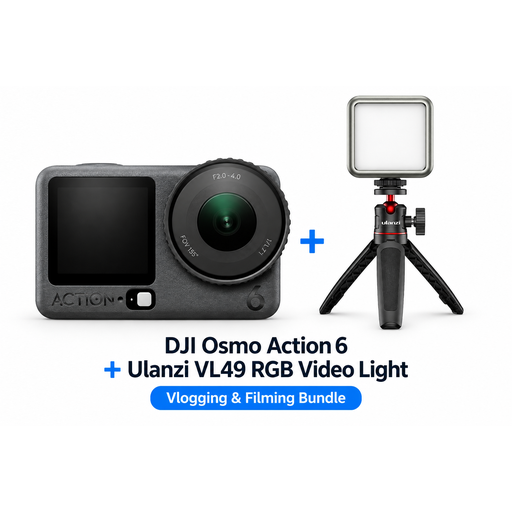
This selection features bundles with the DJI Osmo Action 6 and DJI Osmo Pocket 3, sometimes with a Ulanzi VL49 RGB light. The product information doesn’t confirm macro magnification or suitability for specific tableware details, so check that the camera format and lens options suit your fixed setup and the framing you want.
 No image available
DJI Osmo Action 6 Adventure Combo with Ulanzi VL49 RGB LED video light
The description lists the light as additional lighting for product photography. Check whether this action camera suits the framing you need for tableware.
The bundle name lists a Ulanzi VL49 RGB LED video light.
View at Joybuy
 No image available
DJI Osmo Pocket 3 Creator Combo with Ulanzi VL49 RGB LED video light
The bundle description mentions additional lighting for product photography. Check whether the camera suits your preferred fixed framing and close-ups.
The description lists a 1-inch CMOS sensor, 3-axis gimbal stabilisation and a Ulanzi VL49 RGB light.
View at Joybuy
No image available
DJI Osmo Pocket 3 with Ulanzi VL49 RGB LED video light
The bundle description lists the light as additional lighting for product photography. Check whether the camera suits the framing you want for your tableware.
The description lists a 1-inch CMOS sensor, 3-axis gimbal stabilisation and a Ulanzi VL49 RGB video light.
View at Joybuy
 No image available
DJI Osmo Pocket 3 Creator Combo with microphone
The product description mentions fast focusing for still images. Check whether the camera and its lens options meet your requirements for tableware details.
The description lists 4K/120fps video, 10-bit D-Log M colour and an included microphone.
View at Joybuy
 No image available
DJI Osmo Pocket 3 with rotating screen
The description mentions focusing for still images. Consider separately whether the camera suits the fixed compositions your portfolio requires.
The product description lists a 1-inch CMOS sensor, 4K/120fps video and a 2-inch rotating touchscreen.
View at Joybuy
Frequently asked questions
Do I need a macro lens straight away to photograph a full plate or table setting?
Not necessarily. First check whether your current lens can capture the framing you want in sharp focus from the distance you’re shooting at. For very small details, you can then compare the magnification and working distance of a specific lens.
How can you take tableware photos with consistent framing and less colour variation?
For stationary tableware, use a fixed setup and a tripod. Consider your light source and set the white balance carefully. RAW files give you room to adjust the white balance when editing, as Canon Netherlands explains.
What else should you consider besides the camera body?
Check which lens comes with the specific kit and whether you need a suitable separate lens for the smallest details. Also consider whether you need a tripod and lighting: a camera body’s specifications don’t describe the magnification of a lens that isn’t included in the kit.
What warranty applies in the Netherlands if you buy the camera for your portfolio?
When you buy as a consumer, statutory warranty applies alongside any commercial warranty. The seller must offer an appropriate solution if a product develops a fault sooner than you could reasonably expect under normal use. According to ACM ConsuWijzer, consumer protection rules don’t necessarily apply if you use the agreement mainly or exclusively for business purposes. So consider how you’re making and using the purchase.
Can you use other people’s photos in your online portfolio?
According to the Dutch government, you may generally only publish other people’s copyright-protected photos with the creator’s permission. You automatically hold the copyright to photos you take yourself. This answer doesn’t assess any other rights that may apply to individual elements shown in the photos.


