
Detail-focused tabletop filmmaker
Want to show perforations, edges or printing in a fixed overhead shot? Pay particular attention to focus and framing at the distance where you plan to mount the camera.


If you mainly film a fixed work surface from above via a computer, a document camera suits the way you work. If you want to switch between filming yourself and capturing small details, a mirrorless camera with a suitable lens is a better option. A compact gimbal camera is worth considering if you also move the camera around, but always check that the exact model can focus at your working distance and make the stamp large enough in the frame.
Want to show perforations, edges or printing in a fixed overhead shot? Pay particular attention to focus and framing at the distance where you plan to mount the camera.
Do you switch between filming yourself, your collection and a stamp on the table? Your choice of lens, framing and clear narration all play a part.
Want a consistent shot against a white background, without the camera, support and lighting getting in the way of handling stamps?
| What to consider | What should you check? | Who should pay particular attention? |
|---|---|---|
| Capturing small details clearly | Measure the distance between the lens and the stamp, then check the focusing range of the exact camera and lens. If possible, record a test clip at that distance. | If I want to show perforations or small print, the stamp needs to be in focus and large enough in the frame at my mounting distance. Around 33% of consumers rank clear, readable details as their top priority. |
| Fixed overhead shot with room to work | Measure the work surface and mounting height. From the planned camera position, check how much room you will have for your hands. | I want to move stamps around without them leaving the frame or my hands unnecessarily obscuring the image. For around 27% of consumers, stable overhead framing comes first. |
| Keeping whites and colours consistent | Record a test clip using the lighting you plan to use. Check the white balance and exposure, and make sure details remain visible against the light background. | If I want the background and stamp colours to look consistent between recordings, I need to be able to repeat the lighting and settings. Around 20% of consumers put colour and background consistency first. |
| Narration and a complete set-up | Check the computer or recording connection you need, what is included in the camera kit, and what you will need for support and lighting. Test spoken narration in your recording space, too. | I want to record a guide with clear narration and know in advance which components suit the way I work. Around 20% of consumers start with their recording workflow and the complete set-up. |
Video resolution alone does not tell you whether the camera will focus at your planned distance or make the stamp large enough in the frame.
Test a stamp at the intended mounting height and check the focusing range of the exact camera and lens.
The Canon EOS R50 supports RF and RF-S lenses, but the maximum 0.5× magnification specified by Canon applies to the separate RF 35mm F1.8 MACRO IS STM lens. That lens is not automatically included with the body.
Check which lens the kit actually includes, and factor the camera support and lighting into your choice as well.
A suitable lens, stable mounting and lighting may need to be bought separately.
White balance and exposure affect how a bright scene and the colours of a stamp appear on screen.
Compare test clips using the lighting you will actually use. Nikon explains how to use a white reference to adjust the white balance; also check that details remain visible in the bright scene.
The V4K PRO is a USB document camera for filming a table or document via a computer.
The EOS R50 supports RF and RF-S lenses, so you can choose a lens to suit your desired angle of view.
The ZV-E10 II is a mirrorless camera with a choice of E-mount lenses for tabletop and presenter shots.
The Osmo Pocket 3 is a compact gimbal camera for creators who also want to film while on the move.
The DC-G100DW is a Micro Four Thirds kit that Panasonic Netherlands describes as coming with two lenses.
These products suit a mobile gimbal camera set-up or a mirrorless camera with a zoom lens. Check each model to make sure it can focus at your distance and work for the overhead shot you want.
 No image available
Suited to mobile guide filming where you also want to use a camera support.
The product listing specifies 4K/240fps for slow-motion recording, 2× lossless zoom, 3-axis stabilisation and a handle with a 1/4″ thread.
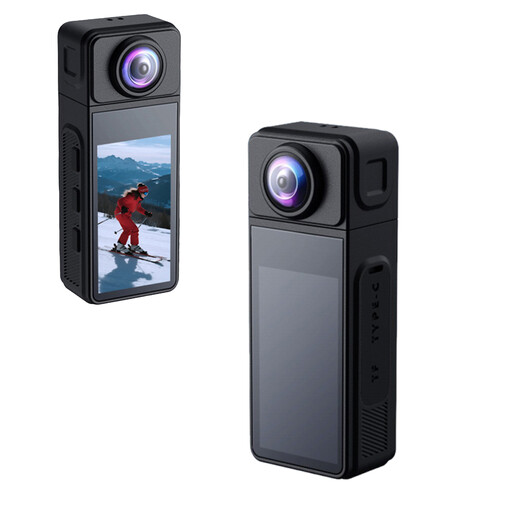 No image available
Could suit anyone looking for a compact camera with a rotating lens; test whether the framing works for a fixed tabletop shot.
The product name specifies 2K, a 270° rotating wide-angle lens, a magnetic housing and electronic image stabilisation.
 No image available
Suited to anyone who wants to move a compact camera between tabletop shots and other recordings.
The bundle includes a Ulanzi VL49 RGB LED light. DJI specifies a focusing range from 0.2 m for the Osmo Pocket 3; check whether the stamp appears large enough in the frame from that distance.
 No image available
Suited to anyone looking for a compact gimbal set-up that can be mounted on a support.
The product name specifies a 1″ CMOS sensor, 4K/240fps, 3-axis stabilisation, 2× lossless zoom, 14-stop dynamic range, 107GB of built-in storage and a handle with a 1/4″ thread.
 No image available
Suited to guide makers who want to use a mirrorless camera with a zoom lens for different framing options. Check that the lens can focus at your preferred working distance.
The product name specifies a 16-50mm zoom lens.
No. 4K alone does not guarantee that small details will be readable. Check that the exact camera and lens can focus at your recording distance, and see how large the stamp appears in the frame.
Keep the lighting and camera position as consistent as possible, and record a test clip with a white reference surface. Also check the white balance and make sure the camera does not underexpose the bright scene.
ACM ConsuWijzer states that online purchases generally come with a 14-day cooling-off period after delivery, subject to exceptions and conditions. You are also covered by the legal guarantee if a product does not perform as you could reasonably expect under normal use; the seller is your point of contact.
The Dutch government states that electronic devices offered for sale in the EU must carry a CE mark. Check the product information and marking on the specific version; that general rule does not confirm that an individual item complies.
If you film and publish on behalf of an organisation for professional or commercial purposes, the Dutch Data Protection Authority says the GDPR applies and you need a valid legal basis, such as consent. If your footage shows only stamps and no identifiable people, this question about identifiable people does not arise.