Who is this choice relevant to?

Creating a consistent portfolio

You photograph several sculptures and want to capture their shape, lighting and colour as consistently as possible. National Museums Scotland recommends, among other things, using a neutral background, controlled lighting and a grey card or colour reference.

Capturing miniature details

You want to show surface texture or small marks from the making process on their own. Magnification and the space in front of the lens for lighting both matter; Nikon and Sony specify these features for their individual macro lenses.

Working in a small photography space

You want to keep your set-up simple and need to fit your camera, sculpture and lights on your work table. So check the working distance of the exact lens and how much space your lighting set-up needs.

What should you look for when choosing?

Compact camera with close-up mode

Choose this option: if you want to photograph both whole sculptures and details with one camera, and the working distance suits your work. OM SYSTEM lists a microscope mode for the TG-7, with close-ups from around 1 cm.

Bear in mind: the lens is fixed. Working very close can also limit the space available for lighting.

Mirrorless camera with kit zoom

Choose this option: if overview shots and less extreme close-ups are enough, and you want the option to choose a different lens later. The Canon EOS R50 kit includes an RF-S 18–45mm lens.

Bear in mind: Canon specifies a maximum magnification of 0.26× at 45 mm with manual focus for this zoom, so don’t assume it offers 1:1 macro.

Mirrorless camera with a separate macro lens

Choose this option: if small textures are a subject in their own right and you want to choose a suitable lens and working distance. Nikon and Sony specify 1:1 magnification for the macro lenses mentioned.

Bear in mind: a macro lens is a separate item unless it’s included in the exact bundle. Nikon gives around 5 cm of space in front of the 50mm lens, and Sony 2.4 cm in front of the 30mm lens, at their closest focusing distances.

Existing camera with a better photography set-up

Choose this option: if your current camera can already capture the crops you need, but variations in colour or shadows are making your portfolio less consistent. Start with a neutral background, controlled side lighting and a colour reference.

Bear in mind: adjusting your lighting and colour settings won’t increase the maximum magnification of your existing lens.

What to consider What should you check? Who should give this more weight?
Framing small details Compare the maximum magnification of the exact camera and lens combination, as well as the distance in front of the lens. If I want to show small textures filling the frame, I look at both magnification and space for my lights. Around 31% of consumers give detail magnification their highest priority when buying.
Sharpness across the sculpture’s depth Decide whether a single plane of focus is enough. If not, check whether the exact camera offers focus bracketing and what post-processing this involves. With a deep sculpture, I want to assess whether the front and back will be sharp enough in my shot. Around 25% of consumers prioritise sharpness across the sculpture’s depth.
Colour and consistency Plan to use a neutral background and a grey card or colour reference under the same lighting conditions. For a portfolio featuring several pieces, I want to capture materials and colours as consistently as possible. Around 25% of consumers prioritise colour and repeatable shots.
Space and set-up Check what’s included in the bundle, and try out the planned distance between your camera, sculpture and lights in your photography space. If space on my work table is limited, I want a set-up that fits my camera and lighting. Around 19% of consumers prioritise simplicity and the space available for setting up.

Buying points not to overlook

  • Confusing the minimum focusing distance with the free space in front of the lens

    The focusing distance is measured from the sensor. For positioning your lights, the shorter distance from the front of the lens is what matters.

    Compare both distances for the exact lens, and draw your table set-up to scale.

  • Assuming a mirrorless camera kit is ready for macro photography

    The Canon EOS R50 kit reviewed here includes an RF-S 18–45mm zoom with a maximum magnification below 1:1.

    First decide how small a detail you want to show, then check the magnification and what’s included in the exact bundle.

  • Buying a new camera when the main issue is inconsistent lighting and colour

    A coloured background, changing light or the lack of a colour reference can affect how materials and colours appear.

    First try a neutral background, repeatable lighting and a grey card with your current camera.

Brands to compare

OM SYSTEM

The Tough TG-7 is a compact camera with a fixed lens, for close-ups without a separate lens.

  • OM SYSTEM lists a microscope mode, RAW shooting and close-ups from around 1 cm.
  • The lens isn’t interchangeable. Check that the working distance and framing suit your sculptures and lighting.

Canon

The EOS R50 kit with RF-S 18–45mm zoom is a good option for overview shots, with the flexibility to choose a different RF lens later.

  • Canon lists focus bracketing for the EOS R50.
  • Canon specifies a maximum magnification of 0.26× at 45 mm with manual focus for the kit zoom; it isn’t a 1:1 macro lens.

Nikon

The Z system offers the NIKKOR Z MC 50mm f/2.8 as a separate lens for close-up photography.

  • Nikon specifies 1:1 magnification for this lens.
  • Nikon gives around 5 cm of space in front of the lens at its closest focusing distance. Check whether the exact camera bundle includes this lens.

Sony

The E system has the separate E 30mm F3.5 Macro lens for close-up photography.

  • Sony specifies 1:1 magnification for this lens.
  • Sony gives a working distance of 2.4 cm at the minimum focusing distance, so allow for space for your lights.

PENTAX

The WG-8 is a compact camera option to compare if you prefer a fixed-lens camera for documentation.

  • Ricoh Imaging Europe lists a 1/2.3-inch sensor and 5× optical zoom for the WG-8.
  • Check that the close-up framing suits your work and that the specific offer is intended for consumers.

Cameras at Joybuy

Cameras at Joybuy whose product titles mention photography. Check each model to see whether its close-up capabilities and included accessories are suitable for small sculptures.
Compact camera with 1080P HD video and 18× zoom

Compact camera, 1080P HD, 18× zoom

The product title mentions photography and HD photos; check whether the close-up capabilities suit the details you want to capture.

The title lists 1080P HD video and 18× zoom. An SD card is not included.

View product at Joybuy

KOMERY W6 digital camera with 12× optical zoom

KOMERY W6, 12× optical zoom

The product title describes a camera for photography; check separately whether its close-up capabilities are suitable for sculpture details.

The title lists 12× optical zoom, Wi-Fi, 4K and 64MP.

View product at Joybuy
KOMERY G7 5K digital camera, pink

KOMERY G7 5K, pink

The product title mentions photography; check whether the camera can capture the close-up framing you want for small sculptures.

The title lists 5K, 80MP and 18× zoom. An SD card is not included.

View product at Joybuy

DJI Osmo Pocket 3 Creator Combo

DJI Osmo Pocket 3 Creator Combo

The product title mentions photography as a use; check whether its close-up capabilities are suitable for your sculptures.

The title lists a 1-inch CMOS sensor, 4K/120fps video, 3-axis stabilisation and an included microphone.

View product at Joybuy

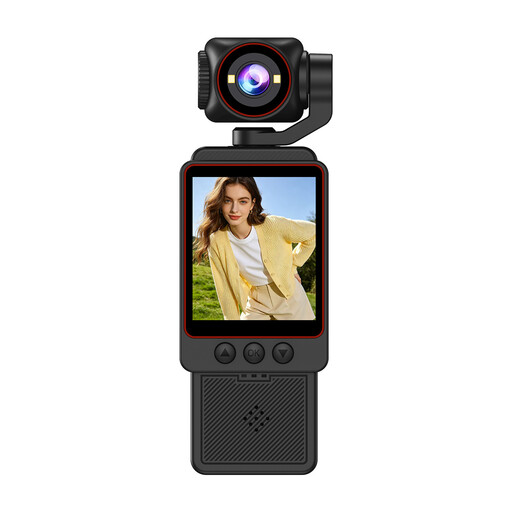
DJI Osmo Pocket 3 with rotating touchscreen

DJI Osmo Pocket 3

The product title mentions photography as a use; check whether its close-up capabilities suit the details you want to show.

The title lists a 1-inch CMOS sensor, 4K/120fps video, 3-axis stabilisation and a rotating 2-inch touchscreen.

View product at Joybuy

Frequently asked questions

Do I always need a 1:1 macro lens for small sculptures?

No, it depends on the smallest detail you want to show on its own. A kit zoom may be enough for a whole sculpture, while a separate 1:1 lens may suit very small details. Also compare the working distance with the space your lighting needs.

How do I get started with a repeatable photography set-up?

Use a neutral background, keep your lighting as consistent as possible, and photograph a grey card or colour reference under the same light. National Museums Scotland describes editing RAW files using a colour reference. Change the angle of the light deliberately when you want to emphasise texture.

Is an extra light or macro lens included?

That depends on the exact bundle. The Canon EOS R50 kit described here includes an RF-S 18–45mm lens, not a 1:1 macro lens. Before buying, check everything included and whether you need extra lighting or a colour reference.

What warranty and cooling-off period apply to online purchases in the Netherlands?

When you buy as a consumer, the product must be fit for purpose; according to the Dutch government, the Netherlands has no fixed statutory warranty period. For distance purchases from a business, a 14-day cooling-off period applies in many cases, with some exceptions. Don’t assume you have the same consumer rights when buying as a business.

Can I publish photos of sculptures in my portfolio?

According to the Dutch government, copyright in your own original work arises automatically and belongs to its creator. If the sculpture belongs to someone else, don’t assume you have the right to publish a photo just because you took it or own the object: publishing photos of protected works of art generally requires permission from the rights holder, subject to any applicable exceptions.
