If you film mainly from one fixed position, choose a set-up that can capture both the whole open book and small details from your filming distance. Then check the lighting, white balance and sound. A webcam suits a computer-based workflow, a compact camera needs little equipment, a mirrorless camera gives you a choice of interchangeable lenses, and a gimbal camera is most relevant if you also want to capture moving footage. These are features specified by manufacturers, not the results of a comparative hands-on test.
Who is this camera guide for?
Illustration or sketchbook seller
You want to present pages and drawing colours clearly in a fixed-format online shop video. In that case, a controllable work area, good lighting and white balance matter more than features for filming while moving. Canon Netherlands and Nikon Netherlands explain how white balance affects colour reproduction.
Creator with a small filming set-up
You want to film an open book and your hands in a limited space. Consider whether a computer-based webcam set-up is right for you, or whether you would prefer to mount a standalone camera. Logitech Netherlands describes a desk view for notes and sketches; Canon Netherlands lists a built-in stand and tripod socket for the PowerShot V10.
Creator of spoken and moving reviews
You switch between turning pages, on-camera explanations and possibly moving close-up shots. Consider the focusing distance you need and check which microphone options are compatible with your chosen camera. Sony Netherlands, Nikon Netherlands and DJI describe features for interchangeable lenses, external microphones and moving footage.
What should you look for in a camera for sketchbook reviews?
Webcam connected to a computer
Suitable if: you film in one fixed position and your computer is part of your recording workflow. Logitech describes a downward-facing Show Mode for the MX Brio, designed for showing sketches on a desk.
Bear in mind: you’ll need a suitable mount and a computer; test whether the whole book stays in frame and in focus from your filming distance.
Compact standalone vlogging camera
Suitable if: you want to record simply without a computer. Canon lists a built-in stand, tripod socket and 3.5 mm microphone socket for the PowerShot V10.
Bear in mind: the built-in stand is not proof that the camera can be mounted directly above the book.
Mirrorless camera with a suitable lens
Suitable if: you want to create different compositions and match the lens to your working distance. Sony’s ZV-E10 II uses E-mount lenses; the Nikon Z 30 is also an interchangeable-lens camera.
Bear in mind: your chosen lens and mounting set-up will affect whether pages and small details fit in the frame; assess the complete set-up, not just the camera body.
Compact gimbal camera
Suitable if: you want to move around the sketchbook as well as film pages from a fixed position. DJI describes the Osmo Pocket 3 as having a gimbal.
Bear in mind: DJI specifies a minimum subject distance of 20 cm; the gimbal is no substitute for a secure mount above a stationary book.
| Consideration |
What should you check? |
Who is this important for? |
| Colour and fine lines |
Record a test shot of the actual paper under the planned lighting. Check the white balance and whether lines remain visible at the final display size. |
I want the paper, lines and colours to look clear because the drawing is the focus of my online shop video. Colour and fine details are a top priority for around 36% of consumers. |
| The whole book in frame |
Measure the distance between the camera and the book, then test whether both pages and your hands turning them fit in the frame. Also check that the mount is secure and doesn’t cast a shadow on the page. |
I want to show both pages from a stable position without having to keep adjusting the frame while recording. Around 29% of consumers prioritise framing the entire open book. |
| Spoken explanations |
Record a short test from the planned camera position. Check that the exact model has a suitable microphone socket or is compatible with a wireless system. |
When I explain my choice of paper or drawings, I want my voice to come through clearly even when the camera is some distance away. Spoken explanations are the main buying consideration for around 21% of consumers. |
| Static and moving footage |
Think about how much moving footage you want to capture and check the minimum focusing distance. DJI specifies a minimum distance of 20 cm for the Osmo Pocket 3. |
I want to switch between desk shots and moving footage without losing sight of the details I want to show. Around 14% of consumers prioritise being able to switch easily between these types of shot. |
Common buying mistakes
-
Assuming a built-in tabletop stand guarantees an overhead view
Canon lists a built-in stand and tripod socket for the PowerShot V10, but that doesn’t guarantee you can film a fully open book directly from above.
Before buying, test whether the mount sits securely on your desk and gives you the composition you want.
You may also need a separate, suitably positioned camera mount to get a direct overhead view.
-
Confusing a 4K label with accurate drawing colours
High resolution won’t correct an inaccurate white balance. A colour cast can change how the paper and drawings look.
Record a test shot of the actual paper under the planned lighting and check the colours; adjust the white balance if needed.
-
Assuming stabilisation means very close details will be in focus
DJI specifies a minimum subject distance of 20 cm for the Osmo Pocket 3. Stabilisation doesn’t change that focusing distance.
From the specified distance, check whether the detail you want to show appears large enough in the frame.
Camera brands to compare
Logitech
The MX Brio is a webcam for presenting your work on a desk as part of a computer-based set-up.
- Logitech describes Show Mode for showing notes and sketches on a desk, and lists software controls for white balance and exposure.
- A desk demonstration doesn’t prove that every sketchbook will fit fully in frame and stay in focus with every type of mount.
Canon
The PowerShot V10 is a compact standalone vlogging camera for simple recording with its built-in stand or a separate tripod.
- Canon specifies 4K video, stereo microphones and a 3.5 mm microphone socket.
- The built-in stand is not the same as a mount positioned directly above an open book.
Sony
The ZV-E10 II is a mirrorless camera that lets you choose an E-mount lens to suit your preferred composition.
- Sony specifies interchangeable lenses and 4K video up to 60p.
- Your choice of lens and mounting set-up will affect whether pages and small details fit within the available space.
Nikon
The Z 30 is an interchangeable-lens camera for a fixed review set-up with spoken commentary.
- Nikon lists 4K UHD up to 30p and the option to use an external microphone.
- Check that your chosen lens and set-up are suitable for the distance between the camera and sketchbook.
DJI
The Osmo Pocket 3 is a compact gimbal camera for supplementary moving footage of a sketchbook.
- DJI specifies a gimbal and a minimum subject distance of 0.2 m.
- Bear that distance in mind when filming small details; the gimbal alone doesn’t show that the camera can be mounted above a book.
Joybuy cameras for desk reviews
These product picks are aimed at computer-based webcam recordings of a work surface and compact cameras for supplementary moving footage. For each model, check that the mount and recording distance suit your sketchbook.
 No image available
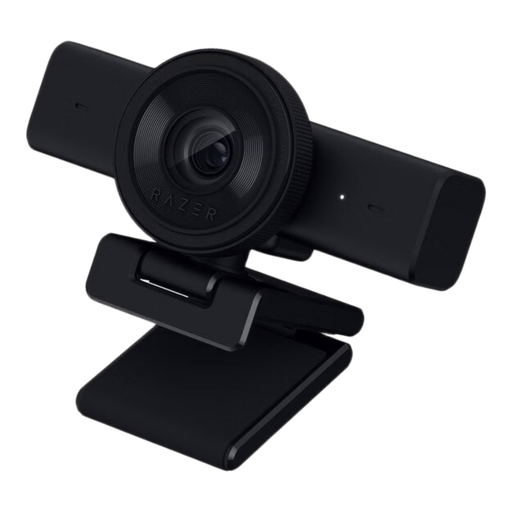
Razer Kiyo V2 X webcam
A webcam option for a computer-based desk set-up; test whether its adjustable field of view includes the whole open book.
1440p at 30 fps, autofocus, an 80° field of view and a tripod socket.
Joybuy
 No image available
Philips 4000 Series 4K UHD webcam SPL6408BT/00
A desktop webcam for a fixed computer set-up; use a test recording to check whether pages and details are clearly visible.
4K UHD, 8 MP, autofocus, dual built-in microphones and a privacy cover. EU Version, Black.
Joybuy
 No image available
Philips 2K QHD PC webcam SPL6308S/00
A clip-on webcam for a desktop or laptop set-up; check whether the mount allows you to get the overhead view you want.
2K QHD video and a noise-cancelling microphone. EU Version, Silver.
Joybuy
 No image available
DJI Osmo Pocket 3 Creator Combo
A compact camera for standalone and supplementary moving footage. DJI specifies a minimum subject distance of 20 cm for the Osmo Pocket 3; bear this in mind when filming small details.
1-inch CMOS sensor, 4K video up to 120 fps and 3-axis mechanical stabilisation. The title states that a microphone is included.
Joybuy
 No image available
Insta360 Link 2C Standard Bundle
A webcam option for presenting your work surface as part of a computer-based set-up; test the frame to check that the whole sketchbook fits.
4K webcam for PC and Mac, 1/2-inch sensor, autofocus and DeskView mode. Graphite Black.
Joybuy
Frequently asked questions
Do you need 4K to show the lines in your sketchbook?
Resolution alone won’t tell you that. Record a test from your actual working distance and assess the sharpness, lighting and final display size. White balance also affects how colours look; Canon Netherlands and Nikon Netherlands explain how to check it.
Can a compact vlogging camera’s built-in stand replace an overhead tripod?
The specifications don’t confirm that. Canon lists an adjustable built-in stand and a tripod socket for the PowerShot V10; test separately whether you can safely position it above the book as required.
How can you keep recordings of consecutive pages consistent?
Keep the lighting and camera position the same, and check the white balance with a test shot of the paper before filming a series of pages. This lets you check whether the colour reproduction suits your recording set-up.
What costs and service terms should you check before buying?
Check whether your chosen model includes a lens, a suitable mount, storage and, if needed, a microphone. For a business purchase, ask which warranty and returns terms apply to that specific order; consumer terms don’t necessarily apply to business purchases.
Can you publish any drawing and any identifiable person in your online shop video?
First check the relevant rights and privacy rules. The Dutch Ondernemersplein states that original drawings may be protected by copyright. According to the Dutch Data Protection Authority, images of identifiable people are personal data; for business publication, you must have a valid GDPR legal basis. Whether you can show a specific drawing or person depends on the rights and circumstances.


