For a fixed overhead set-up, a mirrorless camera with a suitable lens is a sensible choice if you want to frame both full pages and close-up details. A webcam is better suited to a desk-based review, while a compact camera can be handy if you switch viewpoints while filming. Whichever you choose, test colour, focus and visible flicker with your own lights and sketchbook.
Which set-up is right for you?
Creators who want to show the colours in their drawings
Do you film under lights and want the paper and pigments to look true to life? Adjustable white balance and a short test recording can help you assess how your lighting performs. Canon Netherlands explains how artificial light can affect colour reproduction; Nikon identifies the combination of shutter speed, frame rate and lighting as a possible cause of flicker.
Creators making overhead reviews
If you want to switch between a full page and fine details, check that the lens and working distance suit the space available above your book. The minimum focusing distance can vary depending on the zoom setting, and on its own it doesn't tell you how much of the page will fit in the frame. Canon Netherlands lists different distances for the RF-S 18–45mm at different focal lengths.
Reviewers filming at a computer
If you record or stream from your desk, a webcam with a downward-facing presentation mode could suit your workflow. Logitech describes Show Mode on the MX Brio as a way to show notes and sketches on your desk; check for yourself that the camera angle and focus work for your set-up.
What should you look for when choosing?
Mirrorless camera with interchangeable lens
Suitable for: a fixed set-up where you want to film both a full page and close-up details.
Bear in mind: the lens, mounting and working distance all need to suit your desk set-up.
Webcam connected to a computer
Suitable for: recording or streaming from a desk as part of a computer-based workflow.
Bear in mind: the camera angle and compatibility with your computer or software.
Compact gimbal camera
Suitable for: reviews where you regularly switch between the book, yourself and other viewpoints.
Bear in mind: a gimbal isn't a substitute for a fixed mount for a straight-down view.
| What to consider |
What should you check? |
Which consumers? |
| Colour and flicker |
Check the white balance and exposure; record a test video with your own lights and check the paper looks white, the colours look right and there is no flicker. |
If I want pigments and paper to look true to life under my lights, I'll make a test recording first. Around 31% of consumers give colour and lighting top priority. |
| Framing and detail |
Measure the book and mounting height; check the angle of view and minimum focusing distance for your chosen lens and zoom setting. |
If I want to show both a full page and close-ups, my camera needs to frame both from the available height. Around 25% of consumers put the page and its details first. |
| Recording time and sound |
Check the recording time for your chosen video mode, the power supply, the microphone connection and what is included in the kit. |
For a review with a lot of explanation, I want to avoid interruptions to my recording or audio. Around 19% of consumers consider uninterrupted recording and commentary most important. |
| Computer workflow |
Check compatibility with your computer and software, the camera angle and which settings you can adjust. |
If I record or stream from my desk, I want to be able to use the camera with my existing computer set-up. Around 13% of consumers prioritise this workflow. |
| Switching viewpoints |
Test the angle of view, focus and mounting for both the book and any other viewpoints you want to use. |
If I also want to film myself or my workspace during a review, being able to switch viewpoints quickly matters. Around 12% of consumers put this flexibility first. |
Buying pitfalls
-
Choosing based on 4K alone
Resolution alone won't tell you whether the full page will fit in the frame, fine lines will look sharp or colours will appear true to life under your lights.
Check the lens and working distance, then make a test recording with the actual sketchbook and lighting you plan to use.
-
Assuming the maximum recording time is guaranteed
The stated maximum recording time won't necessarily apply to every resolution, power supply or set of operating conditions.
Check the conditions for the video mode and session length you actually want to use.
-
Assuming a desk webcam will work for an overhead set-up
A presentation mode for showing sketches doesn't guarantee that a whole book will appear straight and in focus from your desk.
Test the framing and mounting position before choosing a stand or other accessories.
Camera brands to consider
Canon
The EOS R50 with RF-S 18–45mm kit is a mirrorless camera option for anyone who wants to tailor the lens and set-up to full-page and close-up shots.
- Canon Netherlands lists 4K 30p and a microphone socket for the EOS R50.
- The minimum autofocus distance of the RF-S 18–45mm varies by zoom setting; on its own, this doesn't determine whether a full page will fit in the frame.
Sony
The ZV-E10 II is a mirrorless camera with an interchangeable lens for creators who also want to use different lenses and video settings.
- Sony Netherlands lists an APS-C sensor and video up to 4K 60p for this model.
- Choose the lens and check the working distance and kit contents separately; the video mode alone doesn't show whether sketchbook footage will look better.
Nikon
The Z 30 is a mirrorless camera that could suit a video set-up with an external microphone.
- Nikon Netherlands lists 4K UHD and the option to use an external microphone.
- Check the recording conditions for the resolution, power supply and recording time you need.
Logitech
The MX Brio is a webcam option for anyone who wants to show sketches from a computer desk.
- Logitech describes Show Mode and adjustable image settings for the webcam.
- These features alone don't tell you whether your whole sketchbook will appear straight and in focus from your intended position.
DJI
The Osmo Pocket 3 is a compact camera option for reviewers who also film outside a fixed overhead set-up.
- DJI lists a focusing range from 0.2 m and several focus modes.
- Check that the fixed lens and chosen mount frame the book straight and in full.
Panasonic
The LUMIX G100D kit with 12–32mm lens is a compact mirrorless camera option for video.
- Panasonic lists 4K 30p, FHD 60p and USB-C charging for the kit.
- Check the version and kit contents you're considering; these specifications alone don't tell you whether the camera will suit your book set-up.
Cameras at Joybuy
Below are Joybuy cameras for video recording. Test the angle of view, focus and mounting with your sketchbook and lights to see whether they're suitable for a straight-down view.
 Image unavailable
Osmo Pocket 4P Standard Combo, black
The compact camera format could work well for filming on the move; check separately whether the lens and mount frame your whole sketchbook.
The product description lists a 20 mm f/2.0 lens and 4K video. It only mentions 4K/240 fps for slow-motion mode.
Joybuy
 Image unavailable
Mini Action Camera 4K with clip, 1.54-inch screen and 140° angle of view
The clip and app controls may be useful for a compact mounted recording; check that the fixed position shows the book straight and in focus.
The product name lists a 140° angle of view and a 1.54-inch screen. The product description mentions app control for iOS and Android, as well as built-in lighting.
Joybuy
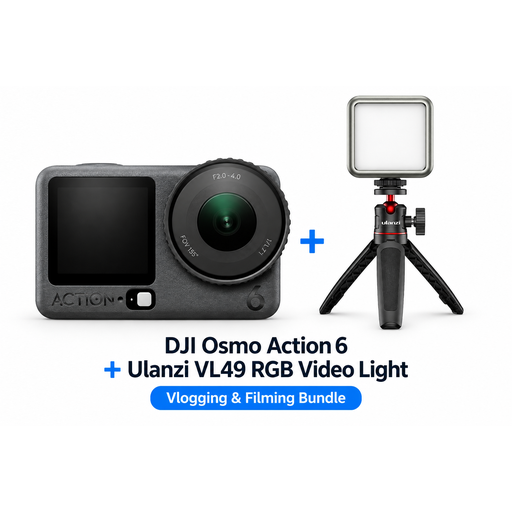 Image unavailable
DJI Osmo Action 6 Adventure Combo with Ulanzi VL49 RGB LED video light
This bundle could be useful if you want extra lighting for indoor recording; test for yourself how the light renders paper and pigments.
The product name lists a Ulanzi VL49 RGB LED video light in the bundle. Extra lighting doesn't guarantee accurate colour reproduction.
Joybuy
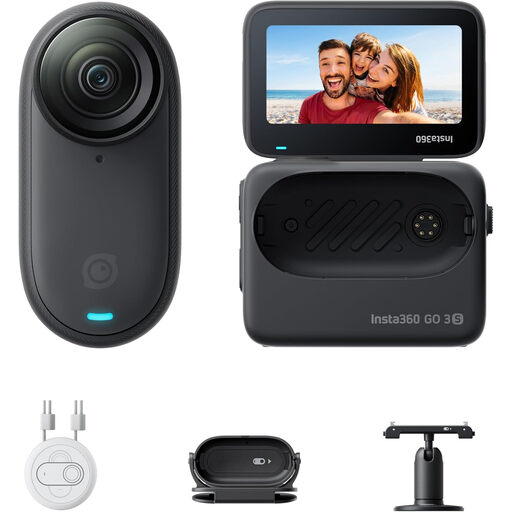 Image unavailable
Insta360 GO 3S 128GB portable 4K mini camera
The product description mentions hands-free filming and mounting accessories; check whether your chosen mount gives you a useful overhead view.
The product description lists 4K recording and FlowState stabilisation. According to the product text, the magnetic pendant must not be worn or used by anyone with a pacemaker.
Joybuy
 Image unavailable
Sony ZV-1 compact vlog camera
This compact vlog camera could suit video recording; check that positioning it above your sketchbook captures the page and details you want.
The product description lists 4K video, a tilting touchscreen, image stabilisation and a microphone socket.
Joybuy
Frequently asked questions
How do you make a test recording under lights?
Use the same lighting set-up as you will for your review and, if necessary, adjust the white balance to suit the light. Film white paper and coloured drawings, then check for a colour cast, flickering or stripes. Nikon describes shutter speed and frame rate as settings to test with the light you're using.
Is the minimum focusing distance enough to film a sketchbook from above?
No, that distance doesn't tell you whether the whole page will fit within the angle of view. Measure the available mounting height and test both requirements with the lens and zoom setting you want to use. With the Canon RF-S 18–45mm, the minimum autofocus distance varies by focal length.
What costs and rights should you check when buying?
Check whether the lens, memory card, power supply, mount and microphone you want are included with the version you're buying. For online consumer purchases in the Netherlands, there is generally a statutory 14-day cooling-off period after delivery, subject to exceptions. According to ACM ConsuWijzer, your statutory guarantee depends on what you could reasonably expect from the product under normal use.
Can you show someone else's drawings or recognisable people in a review?
Don't assume you can share someone else's protected work publicly just because you own the sketchbook; the Dutch government states that copyright arises automatically and using protected work may require permission. Recognisable people in published images may be personal data. Whether a specific excerpt can be used without permission depends on its content and circumstances.


