What should you look for when choosing?
When reviewing a sketchbook against a white background, your main priorities are clear pages, consistent paper colour, commentary and the ability to film away from a fixed tabletop setup.
| What to consider |
What should you check? |
Who is this important for? |
| Detail and framing |
Measure the book and the available shooting distance. Check the lens or angle of view and the minimum focusing distance. |
I want pencil lines and text to remain clear while the whole book fits in the frame; around 36% of consumers give page detail and framing top priority. |
| Paper and background colour |
Check whether you can set or adjust the white balance and exposure, and take a test shot using your own lighting. |
When I film under artificial light, I want white paper and the background to keep their colour; around 29% of consumers prioritise colour and exposure. |
| Commentary and workflow |
Consider whether you want to record using a computer or independently, and check which audio connection, microphone and software you’ll use with your setup. |
I want to show pages and record clear commentary without a complicated workflow; around 21% of consumers prioritise presentation and recording workflow. |
| Moving footage |
Decide how much handheld filming you’ll do; for tabletop recording, also check the angle of view and mounting position. |
If I also film around my workspace, I want a camera that suits those moving scenes; around 14% of consumers give filming away from a fixed setup top priority. |
Joybuy products for video recording
These product picks are aimed at compact video recording and filming on the move. For each model, check that the angle of view, mounting position and chosen bundle suit a fixed overhead shot.
 Image unavailable
Osmo Pocket 4P Vlog Combo – Black
The product name positions this combo for vlog video; check the angle of view and mounting position for an overhead shot.
Variant: Vlog Combo, Black.
View at Joybuy
 Image unavailable
Osmo Pocket 4P Standard Combo – Black
The product name describes a compact vlog camera; check that the mounting setup and angle of view suit your book size.
Variant: Standard Combo, Black.
View at Joybuy
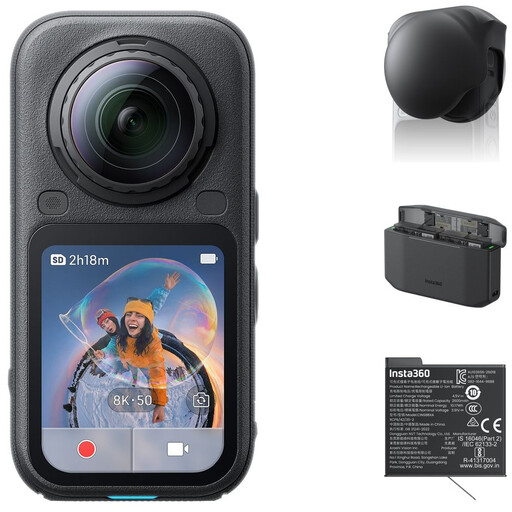 Image unavailable
Insta360 X6 All-in-One Bundle (Standard Bundle + Lens Cap + Xtreme Battery + Fast Charge Case)
The product name mentions 360° video as well as flat 4K video; check that the viewing format suits your review.
Bundle contents according to the product name: Standard Bundle, Lens Cap, Xtreme Battery and Fast Charge Case.
View at Joybuy
 Image unavailable
DJI Osmo Pocket 4 Standard Combo
The product name positions this model for filming on the move; check the angle of view and mounting setup separately for a fixed sketchbook shot.
The product name lists a 1″ CMOS sensor, 4K/240fps, 3-axis stabilisation, 2× lossless zoom, 107 GB of built-in storage and a rotatable screen.
View at Joybuy
 Image unavailable
Osmo Pocket 4 Creator Combo
The product name describes a pocket gimbal camera for vlogging; check that the included combination suits your recording plans.
The product name lists a 1″ CMOS sensor, 4K/240fps, 3-axis stabilisation, 2× lossless zoom, 14-stop dynamic range, 107 GB of built-in storage and a handle with a 1/4″ thread.
View at Joybuy
Frequently asked questions
How can I stop white paper looking yellow or green?
Check the white balance under the lighting you’ll use to record. Canon Netherlands explains that white can appear yellow under artificial light and green under fluorescent light. Take a test shot too, to see whether the exposure needs adjusting for the bright scene.
Can a webcam film my sketches from above?
According to Logitech, the MX Brio has a Show Mode for displaying notes and sketches on a desk. Check that the mount, computer connection and recording software show the whole book in sufficient detail.
What should I check before making a long review?
Check the power supply, storage and recording time for the settings you plan to use. Nikon lists up to 125 minutes of continuous recording for the Z 30; this manufacturer’s figure isn’t guaranteed for every setup, temperature or setting.
What are the cancellation period and warranty rules for online purchases in the Netherlands?
According to ACM ConsuWijzer, online consumer purchases usually come with a cooling-off period of up to 14 days after delivery, subject to legal exceptions. Your statutory guarantee also depends on what you could reasonably expect from the product; there isn’t one fixed period that applies to all cameras.
Can I publish footage of other identifiable people in my review?
First, check which privacy rules apply to recording and publishing the footage. The Dutch Data Protection Authority distinguishes between images for personal use and professional or commercial recordings; for the latter, you may need a legal basis under the GDPR if people are identifiable. Consent is one possible example. If you film only yourself and the book, this information doesn’t imply that you need a separate camera permit.


