Who is this camera setup for?

Photographers focusing on fine tool details

If you want to show engravings, ground surfaces or small components, focus on lens magnification, working distance and depth of field. Sony Netherlands explains that working distance partly determines how much space there is in front of the lens.

Makers taking product photos regularly

If you photograph several tools on the same table, a repeatable frame, fixed background and controllable lighting can make a real difference. Canon Netherlands recommends using a tripod for consistent composition.

Beginners looking for a complete kit

If you want to photograph tools in their entirety, check whether an offer includes just the camera body or a lens as well. The Consumers’ Association recommends considering how you plan to use the camera and how easy it is to set up when choosing one.

What should you consider when choosing?

Mirrorless camera with a standard zoom lens

A good fit if: you mainly want to photograph entire tools and choose the framing on your workbench. For example, the Canon Netherlands Store describes the EOS R50 as a kit with an RF-S 18–45mm lens; check what’s included in the kit you choose.

Keep in mind: a standard zoom lens isn’t necessarily suitable for filling the frame with tiny components.

Mirrorless camera with a macro lens

A good fit if: you want small markings, teeth or surface textures to appear large in the frame. Nikon Netherlands specifies 1:1 magnification for the Z MC 50mm f/2.8, as does Sony Netherlands for the E 30mm F3.5 Macro.

Keep in mind: check that the lens fits the camera body. Shooting close up can also leave less room for lighting.

Keep your current camera

A good fit if: your camera already captures the tool clearly and at a large enough size, but the framing or lighting varies from shot to shot. A fixed tabletop setup could be a sensible first step.

Keep in mind: a tripod won’t solve the problem if your lens can’t focus close enough.

What to consider What should you check? Who is this important for?
Small details Check the maximum magnification and working distance of the exact lens. For deep components, also consider whether focusing at several distances suits the way you work. If I want to show engravings or cutting edges filling the frame, I need to know how much detail the lens can capture at close range. Around 36% of consumers make small details their top priority.
Repeatable setup Check that the camera fits your tripod and that you can see the screen from your chosen shooting angle. Plan the lighting and background as part of your setup. If I’m photographing several tools in a row, I want to keep the framing and lighting consistent more easily. Around 29% of consumers share this priority.
Complete kit Check which lens and other components are included, and make sure the body and lens are compatible. If I’m looking for a starter kit, I want to know in advance what I can use straight away and which parts I still need. Around 21% of consumers prioritise a complete kit.
Controls and file transfer Check the screen position and controls on the exact model, and make sure your preferred way of transferring files suits your workflow. If I regularly photograph new tools, I want to frame shots and transfer files quickly. Around 14% of consumers put this first.

Common buying mistakes

  • Comparing megapixel counts alone

    A higher pixel count doesn’t guarantee that a small component will appear large enough in the frame. The lens also affects magnification.

    For the smallest tool details, compare the maximum magnification and working distance of the exact lens.

  • Assuming every lens with ‘Macro’ in its name shoots at 1:1

    Canon Netherlands lists lenses with ‘Macro’ in their name that don’t offer life-size reproduction.

    Check the stated maximum magnification, not just the product name.

  • Confusing a camera body with a complete studio setup

    How useful a camera is also depends on the lens and the accessories you need for your workflow.

    Before buying, check exactly what’s included in the kit and note whether you still need a lens, memory card, tripod or lighting.

Brands to compare

Canon

EOS R mirrorless cameras are an option for both overview shots and workflows involving focus stacking. The specific lens included in a kit makes a difference for close-ups.

  • Canon Netherlands specifies a 24.2-megapixel APS-C sensor and an adjustable screen for the EOS R50.
  • Canon Netherlands warns that ‘Macro’ in a lens name doesn’t necessarily mean 1:1 magnification. These model specifications don’t prove that the camera takes better product photos than other models.

Nikon

A Z-series mirrorless camera paired with a compatible NIKKOR Z MC lens is one option if small details are your main focus.

  • Nikon Netherlands specifies 1:1 magnification for the Z MC 50mm f/2.8 and lists it as compatible with full-frame and DX-format Z cameras.
  • The lens is a separate part of your choice, so check compatibility and exactly what’s included in the kit.

Sony

Alpha cameras with an E-mount offer a route from an APS-C body to a compatible macro lens for tabletop photography.

  • Sony Netherlands specifies a 24.2-megapixel APS-C sensor for the α6400 and 1:1 magnification for the E 30mm F3.5 Macro.
  • Sony Netherlands gives this lens a working distance of around 2 cm. Bear in mind that there’s limited space in front of the lens when positioning your lights.

Cameras at Joybuy

Here are some camera options for photographing tools. For small details, check the lens magnification; for a workbench setup, check exactly what’s included in the kit.

KOMERY W6 digital camera

KOMERY W6 digital camera

The stated zoom offers options for framing tools in different ways, but on its own it doesn’t tell you how much magnification you’ll get for small details.

The product title lists 64 MP, 12× optical zoom, 4K and Wi-Fi.

View at Joybuy

Songdian 4K pocket camera, 44 MP, black

Songdian 4K pocket camera, 44 MP, black

This pocket camera offers zoom controls for different distances; the zoom described is digital, not optical.

The product title lists 4K, 44 MP and 16× zoom. The description mentions autofocus; a memory card isn’t included.

View at Joybuy
Sony ZV-E10 with 16–50mm zoom lens, black

Sony ZV-E10 with 16–50mm zoom lens, black

The included zoom lens offers different ways to frame entire tools. For small details, check the lens’s magnification.

The description lists a 24.2 MP APS-C sensor, an adjustable screen and an E PZ 16–50mm lens. A memory card and adapter/charger aren’t included.

View at Joybuy
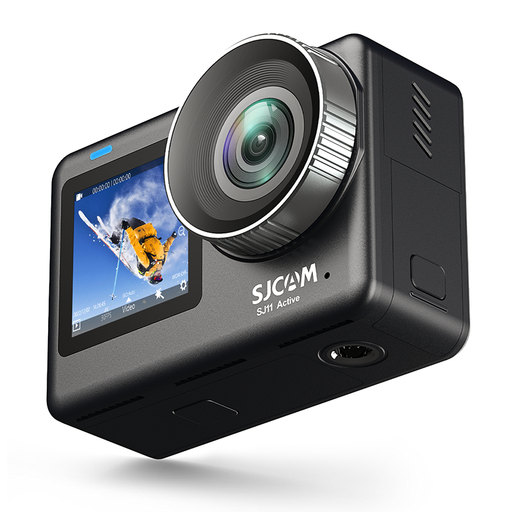
SJCAM SJ11 Active action camera with two screens

SJCAM SJ11 Active action camera

The two screens give you options for checking the composition from different camera positions. Consider whether the action camera format suits your tabletop setup.

The product title lists 4K video at 30 fps and 2.33- and 1.3-inch screens. The description lists photos up to 20 MP and an included 64 GB memory card.

View at Joybuy
Sony Alpha A6100 with 16–50mm f/3.5–5.6 OSS II lens

Sony Alpha A6100 with 16–50mm f/3.5–5.6 OSS II

The included zoom lens offers different ways to frame entire tools. For close-ups, check this lens’s magnification.

The description lists a 24.2 MP APS-C sensor, a tilting touchscreen, an electronic viewfinder, and Wi-Fi and Bluetooth for transferring files.

View at Joybuy

Frequently asked questions

Do you mainly need more megapixels for small screws or engravings?

Not necessarily. First check how much of the small component the chosen lens can capture in the frame. Maximum magnification and working distance are important factors; more megapixels won’t automatically make a lens suitable if it can’t focus close enough.

How can you keep the framing consistent across a series of tool photos?

Put the camera on a tripod and, where possible, keep the same camera position, background and lighting setup. Canon Netherlands recommends using a tripod for consistent composition. Before each series, check that the whole tool fits within the frame.

What can you do if only the front is in focus in a close-up?

Depth of field can be shallow in close-ups. You can take a series of shots at different focus positions and combine them. Check whether your camera model supports this and keep the setup steady throughout the series. Canon Netherlands describes focus stacking as combining images taken at different focus distances.

Does every lens with ‘Macro’ in its name shoot at 1:1?

No, the name alone doesn’t guarantee 1:1 magnification. Canon Netherlands lists lenses with ‘Macro’ in their name that don’t offer life-size reproduction, so check the stated maximum magnification of the exact lens.

What are your rights when you buy a camera online?

When you buy from a business at a distance, you’ll often have a 14-day cooling-off period in the Netherlands, according to the Dutch government, although there are exceptions. Your statutory rights if a product is faulty are separate from the cooling-off period. Check which terms and conditions apply to your purchase.
