
Online shop owner taking consistent set photos
You regularly photograph complete stationery sets and want consistent framing, a clean background and reliable colours. Compare the camera alongside the lighting and tripod.


For consistent overview shots, a good smartphone you already own, paired with a tripod and even lighting, may be enough if test photos show sufficient detail, framing and colour. Consider a mirrorless camera if you need more control over your shots or interchangeable lenses; a dedicated macro lens can help capture small lettering. Compare magnification and working distance, as limited space in front of the lens can make it harder to position your lighting.
You regularly photograph complete stationery sets and want consistent framing, a clean background and reliable colours. Compare the camera alongside the lighting and tripod.
You also want to show print, pen nibs or paper texture in close-up. Check the magnification, lens mount and the working distance available for your lighting.
You want to see whether your current phone will do the job with a better set-up before buying a camera body and lens.
Start with the type of image you need most often: photographing complete sets calls for different considerations from close-ups of small details.
Choose this option: if you mainly photograph complete sets and test photos already show enough detail, colour and good framing.
Consider: testing the close-up quality and settings on your own phone; general photography advice cannot tell you how your particular device will perform.
Choose this option: if you regularly shoot from the same position and want manual control, RAW or interchangeable lenses.
Consider: a camera body is not a complete set-up, and a standard zoom is not automatically a macro lens; check what the kit includes.
Choose this option: if you need pen nibs, textures or small lettering to appear large in individual shots.
Consider: magnification varies between lenses, and a short working distance may leave little room for lighting.
| What to consider | What to look for when buying | Who is this important for? |
|---|---|---|
| Consistent set photos and colour | Check the white balance, tripod options and whether the lens can frame the entire set from your shooting distance. | If you want to show complete stationery sets consistently, focus on a fixed set-up, even lighting and white balance. Around 33% of consumers rank consistent set photos and colour reproduction as their top purchase priority. |
| Small details | Check the lens mount, maximum magnification and working distance of the exact camera-and-lens combination. | If you want to show small lettering or paper texture in close-up, compare magnification and the space in front of the lens for lighting. Around 27% of consumers rank detail as their top purchase priority. |
| Complete set-up | Take stock of your current equipment and check which lens and accessories are included in the exact kit. | If you want to make the most of your existing phone or other equipment first, you’ll want to know what you actually still need. Around 20% of consumers prioritise avoiding unnecessary new equipment. |
| Photography workflow and editing | Check RAW support and test a series of shots from the same position, using the same exposure and white balance. | If you take lots of product photos in one go, consider whether you can repeat your workflow and how much time editing will take. Around 20% of consumers rank a smooth, repeatable process as their top priority. |
For overview shots and close-ups, the lens, a stable set-up and lighting all play a part. A standard zoom is not automatically a macro lens.
Check exactly what the kit includes and take stock of what you already own before comparing camera bodies.
According to Canon, the Canon RF 35mm F1.8 MACRO IS STM offers a maximum magnification of 1:2; Sony, Nikon and Fujifilm state 1:1 for the separate lenses discussed here. Sony gives the SEL30M35 a working distance of around 2 cm at its minimum focus distance.
For your smallest subject, compare magnification, mount and the space available for lighting.
A higher pixel count will not automatically correct for changing light sources. Nikon recommends checking the white balance again when lighting conditions change.
First, test even lighting and a suitable white balance with your current equipment.
The EOS R50 is an APS-C camera body; the separate RF 35mm F1.8 MACRO IS STM is an option for close-ups.
The α6400 is an APS-C camera body with an E-mount; the separate E 30mm F3.5 Macro is an option for small details.
The Z50II is a DX mirrorless camera; the separate NIKKOR Z MC 50mm f/2.8 is an option for 1:1 close-ups.
The X-S20 is an APS-C camera body with an X-mount and a RAW option; the separate XF30mmF2.8 R LM WR Macro is an option for close-ups.
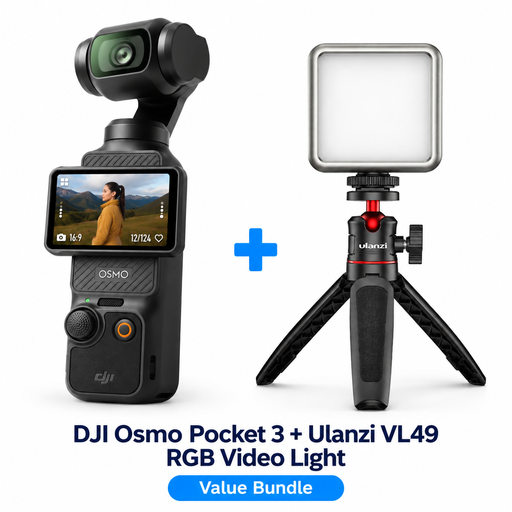
This selection includes cameras for product photography, including mirrorless cameras supplied with a zoom lens and a compact Osmo Pocket 3 bundle. Check the lens and bundle contents for each offer, and test whether the smallest details appear sharp and large enough in the frame.
 No image available
The bundle is listed for product photography and includes a Ulanzi VL49 RGB LED light for additional lighting.
The product description mentions a 1-inch CMOS sensor and 3-axis stabilisation. Use test photos to decide whether this camera suits your preferred framing and small details.
 No image available
The product description mentions photography and zoomed-in shots; take test photos to see whether the camera captures your small stationery details.
The listing specifies 64 MP, 12× optical zoom, 4K and built-in Wi-Fi.
 No image available
This mirrorless camera kit is an option if you want a zoom lens included; the listing mentions Product Showcase Setting, which shifts focus from your face to an object.
The product information specifies a 24.2 MP APS-C sensor and a vari-angle touchscreen. According to the listing, a compatible SD card and adapter/charger are not included.
 No image available
This kit may suit you if you’re looking for a mirrorless camera supplied with a zoom lens; use test photos to check whether this combination can capture the close-ups you need.
The product description specifies a 24.2 MP APS-C sensor, autofocus, touchscreen and electronic viewfinder.
Not necessarily. Start by taking test photos with your existing phone, a tripod and even lighting. Check whether the detail, colour and framing are good enough for your online shop; general product photography advice cannot test your phone for you.
Use consistent lighting as much as possible and check the white balance before taking a series of photos. Nikon recommends checking the white balance again when the lighting changes. RAW can give you more scope for editing, but requires more storage and processing.
You can’t tell from the name of the camera body. Check the exact kit contents and lens mount: the Canon RF 35mm, Sony SEL30M35, Nikon Z MC 50mm and Fujifilm XF30mm mentioned are separate lenses. The Nikon standard kit mentioned includes a 16–50mm zoom lens.
Don’t assume you have permission. The Chamber of Commerce explains that photos are protected by copyright and that using an online photo on your business website without permission may infringe those rights. Take your own photos or arrange the necessary usage rights.
Make sure your photos and product information don’t give customers a misleading impression of what’s on offer. The Authority for Consumers & Markets describes incorrect, misunderstood or omitted important information as potentially misleading. Make it clear which items are included in the set for sale.