Who is this camera set-up for?

Artist filming from above

You want to keep the whole sheet of paper, the pencil tip and your moving hand in frame without distracting camera movement. Test the framing with your own paper and mounting height to see if it works; De Videomakers describes filming directly from above as a set-up for demonstrations.

Online shop owner who also takes product photos

You want to capture the drawing process and present the finished portrait separately. Your choice of lens and consistent rendering of the paper and graphite matter here; Canon UK and Sony UK describe their mirrorless cameras as having interchangeable lenses.

Artist filming long drawing sessions

You want to record a large part of the creative process, so you need to check the recording time, power supply and storage for the exact camera and settings. Nikon gives the Z 30 a maximum continuous recording time of 125 minutes, subject to the manufacturer's conditions.

What should you look for when choosing?

USB document camera

A good fit if: you work at a fixed desk with a computer and want to capture paper directly from above.

Check: make sure the field of view and working height show the whole sheet, and that the software can save video.

Downward-facing webcam

A good fit if: you work at a computer and often want to switch between showing yourself and sketches on your desk.

Check: a sketch demonstration mode doesn't guarantee that a full portrait sheet will fit in frame without distortion.

Mirrorless camera with interchangeable lens

A good fit if: you want to take photos of the finished work as well as process videos, or choose your own lens and framing.

Check: a camera body or kit lens won't necessarily suit your mounting height and paper size. Check the exact kit and the recording time you need.

What to consider What should you check? Who is this important for?
Usable overhead view Measure your paper and available mounting height. Make a test recording that includes the sheet, your pencil tip and your hands. I want to keep the whole work area in frame while drawing, without a moving mount. Around 33% of consumers say a usable overhead view is their main buying concern.
Clear graphite and paper detail Test light and dark lines under your intended lighting, and check whether you can adjust the white balance. I want light pencil lines to remain legible and the paper to look true to life. Around 27% of consumers prioritise tone and detail.
Recording time for a drawing session Check the recording time, power supply, storage and selected video mode for the exact model. I want to capture a long session without an unexpected interruption, so I'll also check the power supply and storage I need. Around 20% of consumers say long recording time is their main concern.
Working with your computer Check that the connection and software work with your computer, and that you can record and save the video you need. I want to use my existing computer and a fixed desk set-up, without an unsuitable camera mode. Around 20% of consumers prioritise ease of use with a computer.

Common buying mistakes

  • Choosing based on resolution alone

    A high resolution doesn't determine whether the whole sheet and your moving hand will fit in frame. Working height, field of view and a stable mount matter too.

    First, test the framing with the paper you actually use and check that your pencil tip and hands stay visible.

    You may need a suitable arm, tripod or different lens to achieve the working height you want.

  • Assuming the maximum recording time is guaranteed

    Nikon gives the Z 30 a maximum continuous recording time of 125 minutes, but this is a manufacturer's figure subject to certain conditions. It isn't a guaranteed duration for every setting or working environment.

    Check the conditions for the exact model and make a test recording as long as your planned session.

  • Assuming a document camera records video on its own

    IPEVO states that the V4K needs computer software to work. The connection and software you choose also determine whether you can record and save your video.

    Before buying, check that the software works on your computer and has the video recording features you need.

  • Assuming consumer rules automatically apply to a business purchase

    The Netherlands Authority for Consumers and Markets and Ondernemersplein distinguish between consumer purchases and purchases made by businesses. Consumer rules don't necessarily apply in the same way to a business purchase.

    Decide whether you're buying as a consumer or a business, and check which sales, returns and service terms apply to your purchase.

Brands to consider for this set-up

IPEVO

The V4K document camera is designed to capture paper via a computer.

  • IPEVO lists an 8-megapixel sensor and an image size of up to 3264 × 2448 pixels for the V4K.
  • IPEVO states that computer software is required. Check the video recording features, field of view and working height separately to make sure they suit your set-up.

Canon

The EOS R50 is a mirrorless camera for anyone who wants to take photos of their finished work as well as capture the drawing process.

  • Canon UK lists a 24.2-effective-megapixel APS-C sensor for the EOS R50, with support for RF and RF-S lenses.
  • Choose the lens and overhead mount separately. These specifications don't guarantee that your paper will fit in frame with your set-up.

Nikon

The Z 30 is a mirrorless camera worth considering for longer process videos.

  • Nikon lists 4K UHD up to 30p and a maximum continuous recording time of 125 minutes for the Z 30.
  • The maximum recording time is a manufacturer's figure subject to conditions. Check those conditions and test your desired recording time with your chosen settings.

Sony

The ZV-E10 II is a mirrorless camera to consider if you're looking for interchangeable lenses and more advanced video settings.

  • Sony UK lists recording up to 4K 60p and compatibility with E-mount lenses. The kit mentioned includes a 16–50 mm power zoom lens.
  • The benefits of its video mode may not be obvious for a static overhead shot. Check that the exact lens and mount suit your work area.

Logitech

The MX Brio is a computer webcam with a mode that Logitech describes as showing sketches on a desk.

  • Logitech lists Show Mode and settings via Logi Options+ and G Hub.
  • A downward-facing mode for video calls doesn't guarantee that a full portrait sheet can be recorded directly from above without distracting distortion.

Joybuy products for filming your artwork

This selection features cameras listed for filming the drawing process. Some product names also mention vlogging, photography, or an included lens or light. Always check that the framing and mounting suit your work area.

DJI Osmo Pocket 4P Vlog Combo in black

DJI Osmo Pocket 4P Vlog Combo, black

Worth considering as a vlogging camera for filming the drawing process; check whether your chosen mount can give you a stable overhead view of the entire sheet.

Joybuy

DJI Osmo Pocket 3 Creator Combo with Ulanzi VL49 RGB LED light

DJI Osmo Pocket 3 Creator Combo with Ulanzi VL49 RGB LED light

This bundle combines a camera with an included LED light. Check how you can mount the camera above your desk and whether the light suits your paper and set-up.

Joybuy
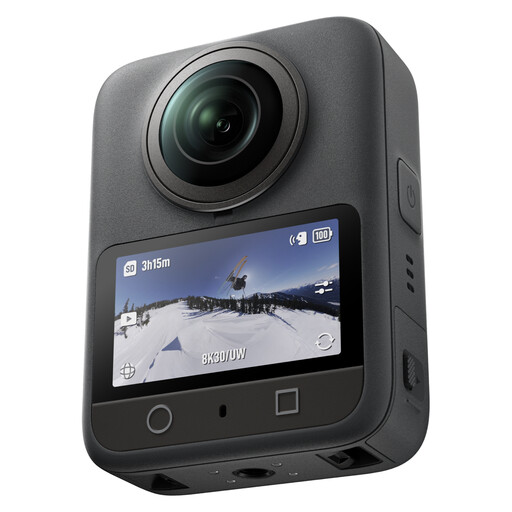
DJI Osmo 360 Standard Combo

DJI Osmo 360 Standard Combo

An option to consider for video and photos; check whether its recording format suits a direct overhead view of your drawing paper.

Joybuy

DJI Osmo Pocket 3 Creator Combo

DJI Osmo Pocket 3 Creator Combo

Worth considering for filming the drawing process; check whether the included kit and camera mount are suitable for overhead recording.

The product title lists a 1-inch CMOS sensor, 4K/120fps video and 3-axis stabilisation.

Joybuy
Sony Alpha A6100 with 16–50mm f/3.5–5.6 OSS II lens

Sony Alpha A6100 with 16–50mm f/3.5–5.6 OSS II

Worth considering if you want to take photos of the finished portrait as well as record video. Check whether the listed lens can capture the whole sheet from your mounting height.

Joybuy

Frequently asked questions

How can you stop white paper looking tinted in your video?

Check the white balance under the lighting you'll use to film, and compare a test recording with the paper itself. Canon UK explains that ambient light can affect how white paper looks in a recording.

Do you need a computer to use a document camera?

For the IPEVO V4K, you do. IPEVO states that you need software on a computer or laptop to use this model. Also check that the software you choose can save the video you need.

What can you do if artificial light flickers on camera?

First, make a test recording under the lights you'll actually use. For the Nikon Z 30, the manual recommends testing both the 50 Hz and 60 Hz options if automatic flicker reduction doesn't give you the desired result. Check the instructions for your own camera model.

How can you check whether a camera can record for long enough?

Compare the recording time, power and storage requirements for the exact model with the length of your planned session, then make a test recording. Nikon gives the Z 30 a maximum continuous recording time of 125 minutes, but this manufacturer's figure is subject to conditions and doesn't automatically apply to other cameras or settings.

Can you publish an online shop video featuring recognisable people?

If someone is recognisable in the video, you need to consider the GDPR. The Dutch Data Protection Authority explains that recognisable images are personal data, and that a suitable legal basis is needed to create and publish them for professional or commercial purposes. A recording showing only a drawing doesn't automatically mean that anyone is recognisable.
