
Occasional book seller
You want to show a book cover and any visible signs of wear without much preparation. First, take a test shot with your current device to see whether a separate camera would make a difference.


For the occasional listing, your existing smartphone may be all you need, as long as a test shot clearly shows the cover and any signs of wear. A compact camera is an option if you’d prefer a camera with a built-in zoom; a mirrorless camera suits anyone who photographs books regularly and wants to choose their lens and RAW workflow. Always assess the complete setup with your largest book and glossiest cover, not just the camera body.
You want to show a book cover and any visible signs of wear without much preparation. First, take a test shot with your current device to see whether a separate camera would make a difference.
You regularly photograph several books one after another and want a consistent background, framing and camera position. Canon Europe recommends using a tripod to help keep your framing consistent.
You want to capture small text, colour or a glossy cover carefully, and are happy to check the lighting, angle and settings. Marktplaats recommends taking photos during the day to show colours clearly.
Start by taking a test shot of a full cover and a close-up. Then choose based on what you still find difficult with your window setup.
| What to consider | What should you check? | Who is this important for? |
|---|---|---|
| Readable text and visible condition | Take a photo of the whole cover and a close-up of small text or wear; view both at the size you intend to display them. | If I want buyers to assess details and signs of wear, I want them to show up clearly in a test shot. Around 33% of consumers prioritise readability and visible condition. |
| Colour and reflections | Test both a matt and a glossy cover in the window light you plan to use. If glare is a problem, first change the position of the book or camera. | If the cover is glossy, I want to be able to assess its colour without reflections obscuring the details. Around 27% of consumers prioritise colour and manageable reflections. |
| A repeatable setup | Check that your camera can stand steadily and that you can check the framing from that position. | If I photograph lots of books one after another, I don’t want to work out the whole setup again for each one. Around 20% of consumers prioritise a consistent, repeatable process. |
| Simplicity and a complete kit | Compare a device you already own, a compact camera and a complete mirrorless camera kit. If you choose a mirrorless camera, check which lens and accessories you’ll need. | If I only list books occasionally, I don’t want to buy extra equipment or add steps I don’t need. Around 20% of consumers prioritise simplicity and avoiding extra purchases. |
The megapixel count alone doesn’t tell you whether small text, the full cover and signs of wear will appear sharp. Focusing, framing, lighting and stability all matter too.
Before you choose, take a test shot from the working distance you plan to use for books. Check both the full cover and a close-up.
The lens mount determines which lenses fit; the body on its own doesn’t make a complete camera setup. You may need to buy a suitable lens or stable support separately.
Check the exact body and lens combination, and what comes with the camera.
White balance affects how colours are rendered, but it won’t remove a reflection that obscures details on a glossy cover.
First adjust the angle of the book, camera or window light. Then check whether the colours still look true to life.
Canon offers both a compact camera with a built-in zoom and mirrorless cameras with an RF mount.
The Sony ZV-E10 is an APS-C mirrorless camera with an E-mount, so you can choose a lens to suit your shooting distance.
The Nikon Z50II is a mirrorless alternative with an interchangeable lens.
The Fujifilm X-M5 has an X-mount and supports RAW shooting, for anyone who wants to choose their own lens and editing workflow.
This selection includes compact cameras and a mirrorless camera kit for photographing books. For each camera, check that the specified lens and other components suit your setup.
 No image available
A compact camera option for trying out a book cover shot and a close-up.
The product name lists 4K, 44MP and 16X Zoom. According to the product information, a microSD card is not included.
 No image available
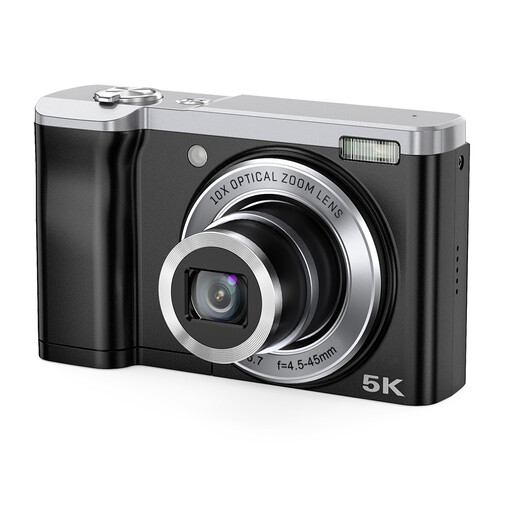
A compact camera option for trying out different book sizes and framing.
The product name lists 5K, 56MP and 10X Optical Zoom.
 No image available
A mirrorless camera kit to consider if you want a zoom lens included with the camera.
The product name lists a 16-50mm zoom lens. According to the product information, a compatible SD memory card and adapter/charger are not included.
No. Start by taking a test shot by the window with your current device. A compact camera may also be enough for a top-down photo; choose a mirrorless camera mainly if you’re actually going to use the lens choice or RAW workflow.
Use the same background and a stable camera position each time, and check the framing for each book. Canon Europe recommends using a tripod to help keep framing consistent and reduce the risk of motion blur.
Change the position or angle of the book or camera, then check the whole cover again. White balance affects how colours are rendered, but it won’t fix a reflection that obscures details.
According to ACM ConsuWijzer, online purchases generally come with a statutory cooling-off period of up to 14 days after delivery; check which exceptions and return conditions apply. You’re also entitled to a product that meets the expectations you could reasonably have. ACM ConsuWijzer does not specify a single fixed warranty period that applies to every camera.