What should you look for when choosing?
First decide whether you want to capture the drawing process as continuous video or as a timelapse made from individual photos. Then check the controls available for your camera model.
Wireless video control
Best suited to: moving freely while you draw, provided your camera supports the video function of your chosen remote.
Bear in mind: pairing and features vary by camera model.
Wired video control
Best suited to: starting and stopping the recording from a fixed drawing spot, provided your camera has the required connection.
Bear in mind: the cable limits where you can place the button.
Interval photos for a timelapse
Best suited to: showing your progress at speed, rather than recording the drawing as continuous video.
Bear in mind: you may still need to combine the individual photos; an interval timer doesn’t prove that video recording can be started and stopped remotely.
Existing app or camera function
Best suited to: when your camera and app already offer the controls you need, so you don’t need a separate button.
Bear in mind: support for remote photo capture doesn’t automatically mean video can be controlled remotely.
| What to consider |
What should you check? |
Who is it important for? |
| Compatibility |
Check the exact camera model, connection or Bluetooth support, the recording function you need and any firmware requirements. |
If I don’t want to touch the camera while drawing, I need to know first whether the button works with my model. Around 34% of consumers make compatibility their top priority. |
| Starting and stopping video |
Check the manual for film recording with your chosen remote, and make sure it supports both starting and stopping. |
If you want to capture the drawing process as continuous video, you need a button that can do both on your camera. Around 33% of consumers prioritise working video controls. |
| Interval shooting |
Decide whether you want individual photos or continuous video, then check whether your camera has a built-in interval timer. |
If I want to show the portrait taking shape at speed, I need to know whether the camera can take photos at set intervals. Around 20% of consumers make interval shooting their top priority. |
| Set-up and convenience |
Compare your camera’s existing controls with a wired or wireless button, and check whether a cable would get in your way. |
For a fixed drawing spot, an existing app or camera function may be enough. I don’t want to choose an extra button without knowing what it adds. Around 13% of consumers prioritise convenience and avoiding an unnecessary accessory. |
Joybuy products for remote smartphone recording
These products are smartphone accessories for remote recording, such as a phone tripod or gimbal. They are not standalone remotes for a camera; if you’re using a smartphone, check which controls suit your recording set-up.
 No image available
Ulanzi JJ03 3-in-1 magnetic tripod with remote control
Could be useful for a fixed smartphone set-up where you want to operate the phone remotely; it isn’t a standalone camera remote.
The product name lists a remote with a 10 m range, magnetic attachment and 360° rotation.
Keep the magnetic attachment at least 15 cm away from pacemakers, defibrillators and medical implants, and check that it is secure before letting go of your device.
Joybuy
 No image available
Ulanzi JJ02 Bluetooth selfie stick and 3-in-1 phone tripod
Designed for remote control in a smartphone set-up, not as a standalone remote for a camera.
The product name lists Bluetooth, a phone tripod, two cold-shoe mounts and compatibility with iPhone and Android.
Joybuy
 No image available
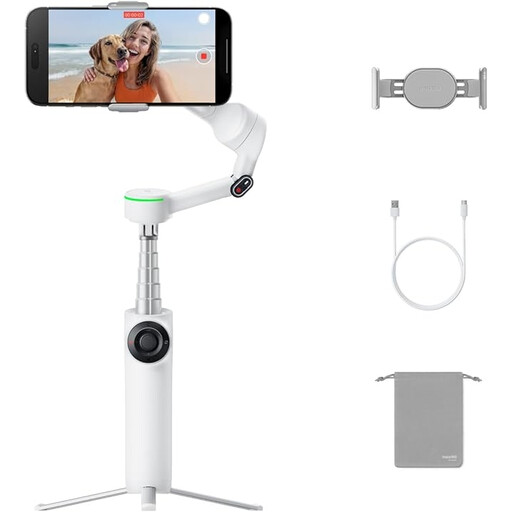
Insta360 Flow 2 Pro Bundle Ice White
Could suit a fixed smartphone set-up if remote control via a second phone works with your workflow; it isn’t a camera remote for a standalone camera.
The product name lists a foldable smartphone gimbal with an integrated tripod and selfie stick. The remote control described uses a second phone.
Joybuy
 No image available
Insta360 Flow 2 Gray
Could suit a fixed smartphone set-up if remote control via a second phone works with your workflow; it isn’t a camera remote for a standalone camera.
The product name lists a smartphone gimbal with an integrated tripod and selfie stick. The remote control described uses a second phone.
Joybuy
Frequently asked questions
Does every remote shutter release work for video too?
No. Check whether your chosen remote supports both starting and stopping film recording on your exact camera model. Panasonic, for example, lists a dedicated video button on the DMW-RS2E.
What should I check if a Bluetooth remote isn’t responding?
First check whether your camera model supports Bluetooth remote control. For the controls described by Sony, Bluetooth and the Bluetooth remote control function must be enabled, and the devices must be paired. If the remote was previously used with another camera, pair it again if necessary.
Do I need an external interval timer for a timelapse?
Not always: some cameras have a built-in interval function. An interval sequence consists of individual photos which, depending on the camera’s features, may still need to be combined into a film. Check your camera’s manual first.
What should I consider when recording for a long time in window light?
Take a test recording beforehand and check the framing and exposure over the planned recording time. Daylight can change while you’re drawing; a remote won’t keep the light constant.
What are my rights in the Netherlands if I buy online or receive a faulty product?
When you buy online from a business, you generally have 14 days to change your mind. Products are also covered by a legal guarantee; if something is faulty, the retailer is your point of contact. Check the terms of the specific purchase, including whether you’re buying from a business or a private seller.


