First, check that the shutter release or app works with your exact camera model and connection; otherwise, you won’t be able to use it to trigger the shutter. A wired release suits a fixed setup nearby, while a wireless one gives you more freedom to move. If you already have a compatible phone, it’s worth trying a supported camera app. A remote release helps you avoid touching the camera, but it won’t control focus or create a white background.
Who would benefit from a remote release?
Miniature photographer using a tripod
You want to keep the composition of small, stationary figures just right without touching the camera for every shot. Canon Netherlands describes remote operation as a way to avoid touching the camera when releasing the shutter. Canon also notes that close-up photography requires precise focusing.
Setting up a small tabletop studio
You move figures or the background between shots and want to trigger the shutter from somewhere else. First, check whether your camera model supports wireless operation; manufacturers often limit compatibility to specific models.
Photographer who already uses a phone
You want to see whether you can control your camera remotely with an existing app before buying a separate accessory. Canon Netherlands lists Camera Connect for a wide range of Canon cameras, but not all models.
What should you look for when choosing one?
Wired remote release
A good choice if: your camera has the right connection and you’re working close to a fixed tripod setup.
Consider: the cable limits where you can stand; check whether you’ll also need an adapter.
Wireless remote release
A good choice if: you want to move around the table while arranging the figures and your camera model supports remote operation.
Consider: check the connection and model-specific compatibility; a stated range isn’t guaranteed in every space.
Existing camera app
A good choice if: your camera and phone can already work together remotely and you want to test whether the controls are sufficient.
Consider: you’ll need a supported camera model, a compatible phone and a working connection.
| Factor to consider |
What should you check? |
Who is this important for? |
| Compatibility |
Compare the full camera model with the compatibility list. For a wired release, also check the connection and whether an adapter is required. |
I want to be sure the release works with my camera before choosing an accessory. Around 36% of consumers prioritise compatibility. |
| Operating without touching the camera |
Check that the release triggers the shutter on your camera and offers the focus control you need. |
I don’t want to touch my tripod setup when taking a close-up. Around 29% of consumers prioritise taking shots without touching the camera. |
| Freedom to move |
Check compatibility and the stated range of wireless operation; performance can vary depending on the conditions. |
I want to be able to move figures without a cable running across the setup. Around 21% of consumers prioritise freedom to move. |
| Avoiding an unnecessary accessory |
First, test remote operation in an app that supports your camera model and see whether its features suit your setup. |
I want to find out whether my existing phone and camera are enough. Around 14% of consumers want to avoid making an additional purchase. |
Avoiding common purchasing mistakes
-
Assuming it will work because of the camera brand or ‘Bluetooth’ alone
Compatibility varies by camera model and connection. So, a remote release from the same brand won’t necessarily work with your camera.
Before buying, check the full camera model and, for a wired release, the connection and whether an adapter is required.
-
Expecting the remote release to make the whole scene sharp
A remote release triggers the shutter, but it doesn’t determine where the focus falls. Precise focusing can be important for close-ups.
Take a test shot and assess the focus and background separately from how the remote release works.
-
Buying a separate button without testing the app
Some cameras can already be operated remotely using a compatible phone app.
If you don’t need a physical shutter release, first try an app that supports your camera model.
Brands to compare
Canon
Canon offers both wireless and wired remote releases for cameras that support the relevant controls.
- Canon lists the EOS R50 as compatible with the BR-E1 and gives the remote a range of 5 metres.
- The RS-80E3 is designed for cameras with a compatible E3 connection. Compatibility varies by model; check the model requirements with Canon Netherlands.
Nikon
Nikon offers the wireless ML-L7 for specific cameras and the wired MC-DC3 for compatible Nikon Z cameras.
- Nikon lists separate shutter and video buttons on the ML-L7. For the MC-DC3, Nikon specifies half-press and lock functions.
- Nikon doesn’t claim that either remote works with every Nikon camera, so check your exact model.
FUJIFILM
The RR-100 is a wired option for compatible X and GFX cameras.
- FUJIFILM lists a 2.5mm connection, half-press and a button lock.
- For some of the models listed, the Dutch product information says that an adapter from another manufacturer is required. Check your camera’s connection.
Sony
The RMT-P1BT is a wireless option for compatible Sony cameras.
- Sony lists cable-free operation and a status light. Sony Netherlands Support gives an estimated communication range of around 5 metres.
- The estimated range depends on conditions and doesn’t confirm that the remote works with every Sony model.
Joybuy products
This product selection includes a Bluetooth controller and phone or camera setups. Check what each product’s remote is designed for and whether it works with your camera model.
 No image available
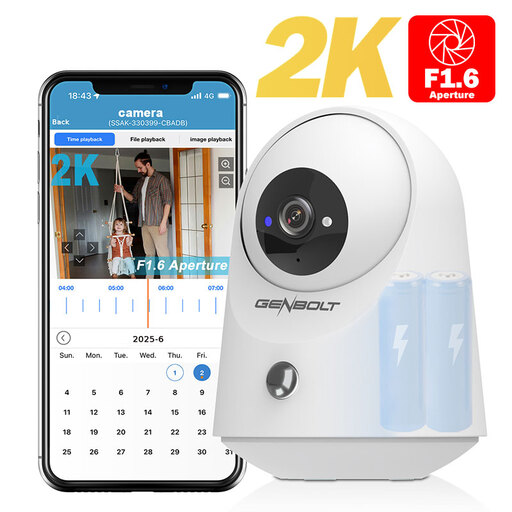
GENBOLT 2K indoor Wi-Fi camera
The product title describes a security camera, not a remote release for a separate camera. Check whether this product suits your photography needs.
The title mentions 2K, PIR and a 5000 mAh battery.
View at Joybuy
 No image available
KINSI selfie stick with tripod, 170 cm
The tripod and Bluetooth remote combination described is designed to control a smartphone camera; check whether it suits your setup.
The title lists a phone holder for smartphones from 4.7 to 6.0 inches.
View at Joybuy
 No image available
KINSI smartphone tripod with Bluetooth remote
This product is described as a smartphone tripod with a remote for the phone’s camera. Check whether controlling your phone this way suits your miniature photography.
The title describes a foldable tripod for tabletop and outdoor use.
View at Joybuy
 No image available
Osmo Action GPS Bluetooth remote
According to the product title, this controller is designed for the Osmo cameras listed. Check whether your camera model appears on the compatibility list.
The title lists Osmo Action 4, Osmo Action 5 Pro, Osmo 360 and Osmo Action 6 as compatible models.
View at Joybuy
Frequently asked questions
What connection does my camera need?
It depends on the remote release and your camera model. According to FUJIFILM, the RR-100 uses a 2.5mm connection; the Canon RS-80E3 is designed for cameras with a compatible E3 remote control connection. Compare the full camera model with the product information and check whether an adapter is required.
Can I try taking photos before buying a separate remote?
Yes, if your camera and phone support app-based remote control. Canon Netherlands describes Camera Connect as compatible with a wide range of Canon cameras. Check whether your model is supported and test the connection with your own setup.
Will a remote release keep every detail of a toy figure in focus?
No, a remote release doesn’t set the focus for the scene. The depth of field can be shallow in close-ups. After taking a test shot, check where the focus falls and adjust your camera settings or setup if needed.


