
Photographer with a fixed table setup
You take photos from a steady position and want to release the shutter without touching the camera. A compatible cable may be all you need, as long as it doesn’t run through your workspace.


First, check which types of control your exact camera model supports. A compatible wired remote can work if the cable stays clear of your small setup. If you move around a lot, a compatible wireless remote may be more practical, while a supported camera app or self-timer could mean you don’t need a separate accessory. None of these options is a substitute for a stable camera setup.
You take photos from a steady position and want to release the shutter without touching the camera. A compatible cable may be all you need, as long as it doesn’t run through your workspace.
You move the tart or decorations between shots and don’t want a cable running across the small table. Check whether your camera supports a specific wireless remote.
You want to see if you can release the shutter using a camera app before buying a separate remote. Canon and Sony describe app-based control for compatible cameras.
Choose this if: your camera body supports the connection used by the specific cable model, and you can keep the cable clear of the work surface.
Bear in mind: the connection and cable route; connections aren’t interchangeable unless compatibility has been confirmed.
Choose this if: you move around while arranging the scene and your camera model supports the remote you’ve chosen.
Bear in mind: support and pairing depend on the camera body. The stated wireless range is a model specification, not a guarantee for every table setup.
Choose this if: your camera supports shutter control through its companion app and you want to try working without a separate accessory first.
Bear in mind: the supported features and the connection to your camera and phone.
Choose this if: you don’t need to take the shot at the exact moment you finish rearranging, and your camera has a suitable self-timer.
Bear in mind: you set up the shot in advance, rather than releasing the shutter at a moment of your choice using a remote in your hand.
| What to consider | What should you check? | Who is this important for? |
|---|---|---|
| Compatibility | Compare the full model names of the camera and remote. For a cable, check the connection and whether you need an adapter. | If I don’t want to buy an accessory that won’t fit my camera body, I check the exact combination. Around 40% of consumers put compatibility first. |
| Space around the table | Consider where the camera and control position will be, and whether you can keep the cable out of your workspace. | If I’m working around the tart, I don’t want a cable crossing my small work surface. Around 30% of consumers give the space around the table top priority. |
| Control while arranging the scene | Check that the remote works with your camera and that it has the buttons you need. | If I want to take a shot straight after rearranging, I want to be able to release the shutter from where I’m working. Around 20% of consumers say this is their most important need. |
| Avoiding an unnecessary accessory | Check whether your camera model offers shutter control through an app or self-timer, and try the feature first. | If I want to use the equipment I already have, I want to know whether a separate remote is really necessary. Around 10% of consumers mainly want to avoid buying one. |
Canon states a range of 80 cm for the RS-80E3 and a specified Bluetooth range of up to 5 m for the wireless BR-E1. These specifications apply to the models named, so compare them with your camera and table positions.
Compatibility lists and connections vary by model. For the Fujifilm RR-100, a separate 2.5mm-to-3.5mm adapter is specified for the X-S10 and X-T200.
Before ordering, check the full model names of both your camera body and the remote, and see whether you need an adapter.
An extra adapter may be needed for one of the camera models mentioned.
Wireless control avoids having a cable running past the tart, but it only works if your camera body supports the remote you’ve chosen. A cable may be suitable if you can keep it clear of the work surface.
First, work out where the camera, tart and control position will be. Then compare the cable route with a wireless option that’s compatible with your camera body.
Canon describes shutter control through Camera Connect for many compatible cameras; Sony describes the same feature through Imaging Edge Mobile for compatible models.
Check the app features for your exact camera model and try the connection before choosing a separate accessory.
Canon describes both wired and wireless control for specific camera bodies.
Nikon describes the ML-L7 as a Bluetooth remote for specific cameras and the MC-DC2 as a cable for certain DSLR cameras.
The RR-100 is a wired option for the X and GFX cameras specified by Fujifilm.
Sony describes the RMT-P1BT as a Bluetooth remote for supported cameras.
JJC describes the wired S-P1 for the specific Panasonic and Leica cameras listed.
The products below are designed for wireless control of compatible smartphone cameras or Osmo cameras. Before buying, check that the product suits your device and the way you want to use it.
 No image available
The description says the remote can control a compatible smartphone camera.
The title mentions a foldable tabletop and outdoor tripod with adjustable height.
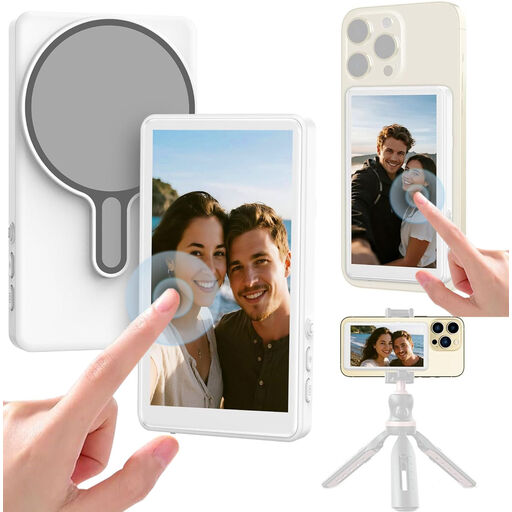 No image available
The title mentions a Bluetooth shutter release for mobile vlogging, selfies and live streams.
The title also mentions a monitor; check that the controls suit your phone and how you plan to record.
 No image available
The description says you can take photos wirelessly without touching the camera.
The title lists compatibility with Osmo Action 4, Osmo Action 5 Pro, Osmo 360 and Osmo Action 6. Check that your model is on the list.
Compare the cable connection with the information for your exact camera body. Canon specifies a 2.5mm E3-type connection for the RS-80E3; for the RR-100, Fujifilm specifies an additional adapter for the X-S10 and X-T200.
No, not necessarily. First check whether your camera has a suitable self-timer or app control. Canon describes Camera Connect as a way to release the shutter from a phone on many compatible cameras.
According to the Dutch government, the seller must provide a solution if a product is faulty. In the Netherlands, there is no set general statutory guarantee period; what you can expect depends, among other things, on the product and the sales information.
For many distance purchases from a business, you have a 14-day cooling-off period, according to the Dutch government. This doesn’t automatically apply to every purchase, such as an online purchase from a private seller. Check the terms that apply to your order.