What should you look for?
First, check compatibility with your camera model. Then decide whether you’ll be staying by the table, moving around the setup or whether a supported camera app will do the job.
| What to consider |
What to check before buying |
Who is this most important to? |
| Compatibility |
Compare the full camera model with the compatibility information. For a cable, check the connector type too. |
I want to make sure the remote fits my camera body first. Around 36% of consumers prioritise model compatibility. |
| Taking pictures without touching the camera |
Check whether the remote operates the shutter and whether the camera can remain steady. |
For close-ups, I want to take pictures without touching the camera. Around 29% of consumers give priority to minimising camera shake. |
| Space around the table |
Compare the cable length with your workspace. For wireless control, check that your camera supports the connection. |
If I move accessories or lighting, I don’t want a cable running through my workspace. Around 21% of consumers prioritise freedom of movement. |
| Avoiding an extra accessory |
Look up the remote shooting feature for your exact camera and try the app first. |
I’ll check whether my camera app already lets me take pictures remotely before buying anything else. Around 14% of consumers prioritise avoiding a separate purchase. |
Joybuy products for wireless control
This selection focuses on wireless control for compatible smartphones and the Osmo cameras listed. Check each product’s compatibility with the device you plan to use for your tabletop setup.
 Image unavailable
KINSI smartphone tripod with Bluetooth remote control
For a tabletop smartphone setup: the product description mentions remote control of a compatible smartphone camera and a stable stand on a flat surface.
The title mentions a foldable tripod with adjustable height.
View at Joybuy
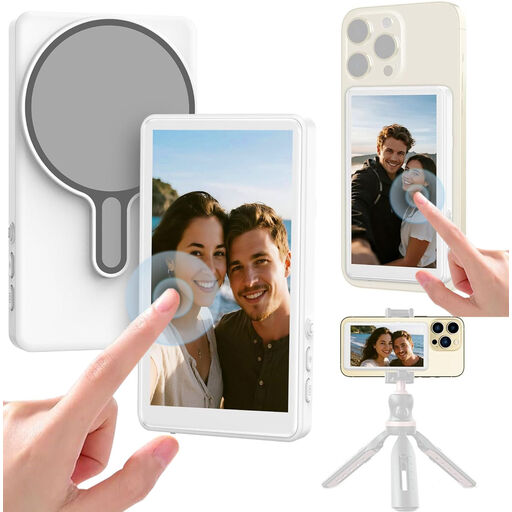 Image unavailable
Selfie stick with 1080P monitor and Bluetooth shutter
This option is designed for remote control of a compatible smartphone camera.
The product title mentions a 1080P monitor and Bluetooth shutter; the description says it’s compatible with most smartphones.
View at Joybuy
 Image unavailable
Osmo Action GPS Bluetooth Remote Controller
The product description mentions wireless control for taking photos without touching the camera.
The product title lists compatibility with Osmo Action 4, Osmo Action 5 Pro, Osmo 360 and Osmo Action 6. Check that your camera model is on this list.
View at Joybuy
Frequently asked questions
Do I always need a remote control for small accessories?
No, not always. First check whether your camera can take pictures remotely using a supported app from the camera brand. If you do choose a separate remote, check that it’s compatible with your exact camera model. Taking pictures without touching the camera can help prevent you from disturbing a tripod setup.
How do I connect a wired remote and keep my setup practical?
Before connecting it, check the type of remote connector on your camera body and the remote’s cable. Position the cable so you won’t pull on it while moving accessories. For example, Sony specifies an 800 mm cable for the RM-VPR1. For focusing and releasing the shutter, also consult the manuals for your camera and remote.
What should I look for in a remote’s power supply?
Check the power information for the exact model, as it can vary between versions. Hähnel specifies AA batteries for Captur for Nikon; JJC describes the wired SR-F2 as battery-free. This information doesn’t automatically apply to other models from these brands.
What if a remote I bought online doesn’t fit my camera?
For a distance purchase from a business by a consumer, there’s generally a 14-day cooling-off period in the Netherlands, according to the Government of the Netherlands. There are exceptions, and the rules for distance purchases don’t apply in the same way when buying from a private seller. Check who the seller is and their returns policy before ordering.
What rules apply to wireless camera remotes in the Netherlands?
Radio equipment must meet the applicable European product requirements. According to the Dutch Authority for Digital Infrastructure, manufacturers, importers and sellers must comply with these requirements. When radio equipment meets all the requirements, the manufacturer applies the CE marking. This alone doesn’t establish whether a specific product meets all the requirements.


