What should you look for when choosing?
Wired shutter release
Choose this if: your camera has a confirmed remote-control socket and you’re working with a fixed tripod setup.
Bear in mind: the plug type and cable length; Canon Netherlands, for example, distinguishes between E3 and N3 connections.
Bluetooth shutter release
Choose this if: you want to move around the setup without a cable to the shutter button, and your camera model supports the release.
Bear in mind: compatibility and pairing. Canon’s stated 5 m range for the BR-E1 applies to that model and isn’t a general promise for wireless releases.
Camera app
Choose this if: you want to operate the camera from a supported phone or tablet and the camera offers the app features you need.
Bear in mind: available features depend on the combination of camera and smart device; Canon describes Camera Connect and Nikon describes SnapBridge for supported devices.
Wireless timer with receiver
Choose this if: scheduled or repeated shots are part of your workflow and your camera works with the set.
Bear in mind: the set may include a receiver, camera cable and batteries; Pixel lists these components for the TW-283 set.
The most important thing is to make sure your chosen control works with both your camera and your shooting position. The points below will help you choose the right option for photographing coins against a white background.
| What to consider |
What to check before buying |
Who is this important to? |
| Camera compatibility |
Note the full camera model. For a cable, check the connection and the cable included; for a wireless option, check the compatibility information and pairing process. |
If my main concern is avoiding a shutter release that won’t work with my camera, checking the model comes first; around 36% of consumers say compatibility is their main concern. |
| Taking pictures without touching the camera |
Check that the shutter button offers the shooting function you want, and that the cable reaches your workspace without pulling on the camera. |
When taking close-ups on a tripod, I don’t want the camera to move when I take a picture; around 29% of consumers give touch-free operation top priority. |
| Freedom to move and screen control |
Check the features available for your camera model and, if possible, try the existing camera app first. |
If I want to stand by the lighting or the coin while taking pictures, I’m looking for control without a cable running to my hand; around 21% of consumers prioritise freedom to move or screen control. |
| Repeated shots and timer |
Decide whether you need interval or scheduled shots, and check that the set includes a suitable camera cable. |
For a workflow involving scheduled or repeated shots, a timer may matter more than a single shutter button; around 14% of consumers name this workflow as their main concern. |
Brands to consider
Brands offer different wired and wireless options. Always check the connection or support for your exact camera model.
Canon
Canon describes wired shutter releases with different connections, the wireless BR-E1 and Camera Connect control for supported cameras.
- Canon Netherlands distinguishes between E3 and N3 connections and provides information about camera models supported by the BR-E1.
- Don’t assume that every Canon camera supports every Canon accessory; check the connection or compatibility information for your model.
Nikon
Nikon describes wired MC-DC shutter releases and SnapBridge control on supported cameras and smart devices.
- For the MC-DC3, Nikon describes half-press and full-press operation, and also provides information about control via SnapBridge.
- The MC-DC2 is designed for certain cameras; check that your model and connection are supported before buying.
Sony
Sony offers the RMT-P1BT Bluetooth shutter release for cameras that support this model.
- Sony describes operation through the built-in Bluetooth receiver of a compatible camera, without an additional wired receiver.
- Check that your exact camera model supports the RMT-P1BT before choosing Bluetooth control.
JJC
JJC offers wired shutter releases with model-specific plugs, including the MA-F for cameras listed in its compatibility information.
- JJC describes the MA-F as having a two-stage button and a lock, and operating without its own battery.
- A camera brand being listed doesn’t mean this MA-F fits every model from that brand; check the specific list of models.
Pixel
Pixel describes the TW-283 as a wireless timer shutter release for cameras with a suitable external connection and connecting cable.
- The manufacturer documents timer and interval features, and lists a set with a transmitter, receiver and camera cable.
- Check the cable version, what’s included and which batteries are required; timer features aren’t essential for taking individual coin photos.
Joybuy products
These products include smartphone controls, phone holders, an Osmo controller and a smartphone gimbal. They aren’t a collection of generic shutter releases for digital cameras; check whether the phone or camera family specified for each product suits your setup.
 No image available
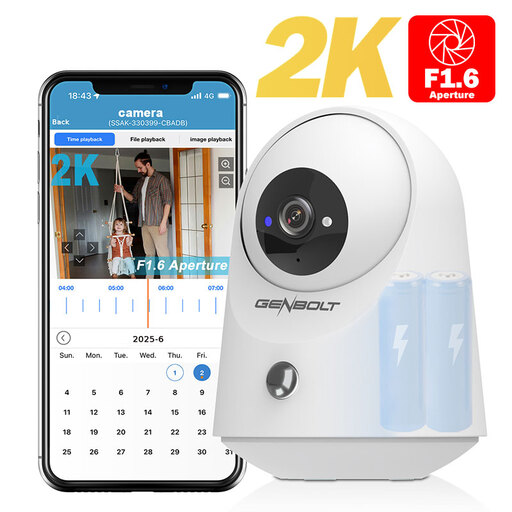
GENBOLT 2K wireless Wi-Fi security camera with PIR and 5000 mAh battery
The product title describes a security camera, not a dedicated shutter release for photographing coins; the product description also mentions a Bluetooth remote for a compatible smartphone camera.
The title specifies 2K, PIR and a 5000 mAh battery.
View at Joybuy
 No image available
KINSI selfie stick with tripod, 170 cm
This is a selfie stick with a tripod and Bluetooth remote for a compatible smartphone camera, not a shutter release for a separate digital camera.
The product title specifies a 360° rotating phone holder suitable for smartphones from 4.7 to 6.0 inches.
View at Joybuy
 No image available
KINSI foldable smartphone tripod with Bluetooth remote
The product description focuses on operating a smartphone camera while the phone is mounted on the tripod; check whether it suits your phone setup for photographing coins.
The product title specifies a foldable tripod and a Bluetooth remote.
View at Joybuy
 No image available
Osmo Action GPS Bluetooth remote
This controller is described as operating supported Osmo cameras remotely; check that your camera appears in the stated compatibility list.
The product title names Osmo Action 4, Osmo Action 5 Pro, Osmo 360 and Osmo Action 6.
View at Joybuy
 No image available
Insta360 Flow 2 Gray smartphone gimbal
The product description mentions control and preview via a second phone; check whether this setup suits your smartphone and workflow for photographing coins.
The product title specifies a foldable gimbal with a built-in tripod and support for iPhone and Android.
View at Joybuy
Frequently asked questions
Do I need a cable release if my camera can already be operated remotely via an app?
Not necessarily. Canon Netherlands describes shutter control via Camera Connect, while Nikon Netherlands describes it via SnapBridge for supported combinations. Check that your camera and smart device support the feature you need; a compatible cable is still an option if you prefer a physical button.
How can I avoid buying the wrong connection for my camera?
Look up the full camera model in the compatibility information. Canon Netherlands, for example, distinguishes between E3 and N3 connections; if you’re buying a set with a receiver, the connecting cable must also be compatible with your camera.
Will a camera remote automatically give me a well-lit coin against a white background?
No. A remote lets you take a picture without touching the camera, but it won’t fix issues with lighting, shadows or blown highlights. Assess these separately in a test shot.
Where can I take used batteries from a wireless shutter release for recycling?
In the Netherlands, don’t put used household batteries in your general rubbish. According to the Dutch Government, you can return them to shops and supermarkets that sell batteries, among other places.
Is the manufacturer’s warranty my only right if a shutter release is faulty?
No. For consumer purchases in the Netherlands, statutory consumer rights may apply in addition to a manufacturer’s warranty. The ACM explains that if, under normal use, a product doesn’t do what you could reasonably expect, the seller is responsible for providing an appropriate solution free of charge; there is no single fixed statutory warranty period for all products.


