
Craft detail filmer
You want to show the shape of the clay and your hand movements clearly. The focusing distance and lens at your working distance matter; DJI lists the Osmo Pocket 3 as focusing from 0.2 m.


Start with your setup: a webcam is a good fit if you’re recording via a computer, while a compact camera may suit a more independent setup. A mirrorless camera lets you choose a lens to suit the distance from the clay; a camcorder offers zoom without changing lenses, but zoom alone won’t tell you whether close-ups will be sharp. Also check that your voice is clear and that the camera can record the entire lesson.
You want to show the shape of the clay and your hand movements clearly. The focusing distance and lens at your working distance matter; DJI lists the Osmo Pocket 3 as focusing from 0.2 m.
You explain techniques as you work and want both your project and your voice to be recorded clearly. So check the microphone and the distance between you and the camera.
You film a whole lesson or record from the same worktable each time. Nikon lists up to 125 minutes of continuous recording for the Z 30; also check the power supply and storage for the camera you choose.
First, work out what is most likely to limit your recording: seeing small movements clearly, audible instructions, recording without interruption or having a simple fixed setup.
| What to consider | What to check before buying | Who is this important for? |
|---|---|---|
| Sharp detail in the clay | Measure the distance from the lens to the clay and check the minimum focusing distance of the camera and, where applicable, the specific lens. Also test whether both hands stay in shot. | When I show small modelling steps, I want the clay to be sharp without my hands being cropped out. Around 36% of consumers put clay detail first. |
| Clear spoken instructions | Make a test recording from your actual speaking and working position. If you’re using an external microphone, check the connection and compatibility in advance. | When I explain techniques as I work, my voice needs to be easy to hear in the recording. Around 29% of consumers prioritise clear instructions above all else. |
| Recording a whole lesson | Check the recording time for the exact model and video mode, and test the available storage and power supply in advance. | I don’t want to miss an important step because the recording stops; around 21% of consumers prioritise uninterrupted lessons. |
| Fixed worktable setup | Check that the mount fits your tripod or holder and that the field of view leaves enough room for both hands. If you choose a webcam, remember that you’ll need a computer. | When I film at the same worktable, I want to position the camera easily without it getting in the way. Around 14% of consumers consider a simple fixed setup most important. |
Optical or digital zoom doesn’t tell you how close a camera or lens can focus on the clay. Sony explains that a lens can’t focus properly on a subject that is closer than its minimum focusing distance.
Check the minimum focusing distance for the exact camera and lens, and test the framing at the working distance you plan to use.
A camera body or webcam on its own won’t guarantee the right angle at your worktable or clear audio for your instructions.
For each model, check which connections and mounts will work with your setup, then test the picture and sound from your workspace.
Depending on the setup you choose, you may also need a suitable lens, tripod or holder, storage or a compatible microphone.
The Brio 4K is a webcam option for recording via a computer.
The PowerShot V10 has a fixed lens; the EOS R50 V is a mirrorless camera with interchangeable RF lenses.
The Osmo Pocket 3 is a compact gimbal camera for recording from different angles.
The ZV-1 II has a fixed wide-angle zoom lens; the ZV-E10 II is a mirrorless camera with interchangeable E-mount lenses.
The HC-VX3 represents the camcorder setup, with zoom without changing lenses.
The Z 30 is a mirrorless camera for video creators who want to put together their own lens setup.
This selection includes a webcam and compact vlogging and action cameras for video recording. Check that the focusing, framing, sound and recording time of each model suit your pottery lesson.
 No image available
This webcam is suited to a fixed worktable setup if you want to record via a computer.
Listed features: Sony IMX363 sensor, PDAF autofocus, two microphones, 75° field of view, and USB-A and USB-C connections.
 No image available
This compact gimbal camera is an option if you’re looking for a portable video setup; check in advance that the lens frames your clay and hands clearly.
The product name lists a 1-inch CMOS sensor, 4K video up to 240 fps, 3-axis stabilisation, 2× lossless zoom, 107 GB of built-in storage and a handle with a 1/4-inch thread.
 No image available
This compact camera may suit a standalone recording setup with spoken instructions; make a test recording from your actual working and speaking position.
The product name lists a 1-inch CMOS sensor, 4K video up to 120 fps, 3-axis stabilisation and an included microphone. DJI lists the Osmo Pocket 3 as focusing from 0.2 m; check this against the distance to the clay.
 No image available
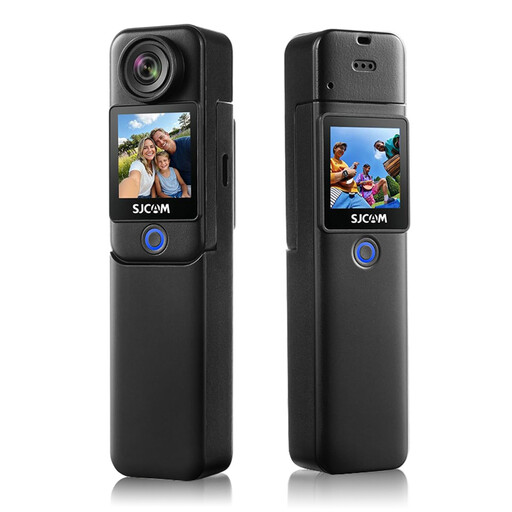
This action camera is worth considering for longer recordings; check that its field of view and focusing distance suit your worktable.
The product name lists 4K video, 6-axis stabilisation and a 1.3-inch touchscreen. The stated recording time of up to 460 minutes applies when used with the handle and extra battery.
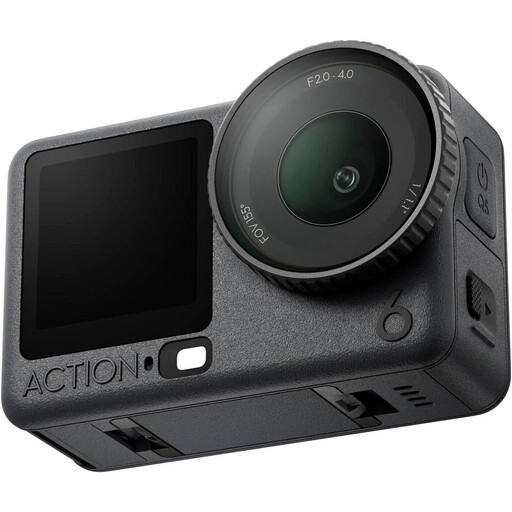 No image available
Before choosing this action camera, consider your preferred working distance, microphone setup and the length of your full lesson.
Measure the distance from the planned lens position to the clay and compare it with the minimum focusing distance of the camera or attached lens. Sony explains that a lens won’t focus properly at a distance closer than this; DJI lists the Osmo Pocket 3 as focusing from 0.2 m. Also test the framing at your own worktable.
Not necessarily: first make a test recording from your working and speaking position. If you want to use an external microphone, check the camera model’s connection and compatibility. The Consumentenbond includes sound quality and microphone connections in its assessment of cameras for video creators.
In the Netherlands, online purchases generally come with a statutory 14-day cooling-off period from delivery, with some exceptions. This is separate from your rights if the camera is faulty: according to ACM ConsuWijzer, if a product breaks down too soon during normal use, the seller must offer an appropriate solution.
First, consider which privacy rules apply to recording and publishing the footage. According to the Dutch Data Protection Authority, identifiable images count as personal data; processing them outside a very limited private context requires an appropriate legal basis under the GDPR. Consent is one possible legal basis, and specific rules apply when a school films and publishes identifiable pupils.