
Makers comparing fabric colours
You photograph pieces at different times and want changing workbench lighting to affect the comparison as little as possible. Nikon USA explains how light and white balance can affect how colours appear.


Start by taking a test shot with the device you already own: you may not need a new camera to photograph the whole patchwork. Choose a compact camera if you mainly want a standalone device that’s quick to put away, or a mirrorless camera with a suitable lens if you often take close-ups and capture small textile details. To keep fabric colours consistent, a fixed shooting position and careful white balance matter more than the megapixel count alone. Canon Europe and Nikon USA explain the importance of a suitable setup and lighting.
You photograph pieces at different times and want changing workbench lighting to affect the comparison as little as possible. Nikon USA explains how light and white balance can affect how colours appear.
You want to photograph the whole piece from above, then quickly clear the setup away from your shared workspace. Canon Europe discusses flat-lay photography, while the Consumers’ Association notes size and ease of use as factors to consider when choosing a camera.
Alongside an overall shot, you want to capture stitches and seams close up; your choice of lens plays a part. Nikon Netherlands and Canon Netherlands specify the magnification of their individual macro lenses.
Start by checking whether your current device already captures your work clearly. Then compare a compact camera with a mirrorless camera, based on whether you value easy storage or interchangeable lenses more.
A good fit if: a test shot clearly shows the whole patchwork and the details you want, and you’d rather not use an additional device.
Keep in mind: white balance, lens and detail rendering vary between devices, so assess them using your own test shots.
A good fit if: you want a standalone device that’s quick to put away and don’t want to change lenses.
Keep in mind: the lens can’t be changed. Check that the specific model can handle both your overall shot and the close-ups you want.
A good fit if: you want to take different shots or regularly photograph stitches and seams separately. Choose a lens to suit the task you do most.
Keep in mind: a body without a lens isn’t a complete setup. A standard zoom isn’t automatically suitable for very small details, and a separate macro lens means buying an additional lens.
| What to consider | What should you check? | Who should pay particular attention? |
|---|---|---|
| Consistent fabric colours | Use the same lighting setup and test the white balance against a neutral reference under the lighting you plan to use at your workbench. | When I compare fabric on different days, I want changing light to distort the colours as little as possible. Around 36% of consumers give consistent fabric colours top priority. |
| Overall shots and workbench space | Measure your project and the available shooting height. Check whether the camera-and-lens combination can frame the whole piece without blocking your workspace for too long. | I want to photograph the whole piece from above and quickly clear the shared table again. Around 29% of consumers prioritise an overall shot that takes up as little workbench space as possible. |
| Stitches, seams and texture | Check the magnification of the supplied lens and take a test crop at the level of detail you want. | If I want to show stitches or seams separately, a crop needs to retain enough detail. Around 21% of consumers give clearly visible textile details top priority. |
| Quick photos and easy pack-away | Try how quickly you can set up the device, check the shot and put everything away again. | I want to take a usable photo between tasks, then quickly put the device away. Around 14% of consumers make convenience their top priority. |
White balance settings and changing light can visibly alter how colours appear. A higher megapixel count won’t solve that on its own.
Compare test shots under the lighting you use at your workbench, and check that you can repeat the settings before comparing cameras by resolution.
Magnification depends on the specific lens. For example, Nikon’s Z50II standard kit doesn’t include the separate NIKKOR Z MC 50mm f/2.8, which has a stated magnification of 1:1.
Check the full lens name and kit contents, then take a test crop of the detail you want to capture.
For an overall shot, framing, available shooting height and lighting all matter too. A small body alone won’t guarantee that the whole patchwork will fit in the frame.
Measure your project and the clear space above the table, and think about where you’ll set the equipment up and store it afterwards.
The EOS R50 is a mirrorless camera that you can pair with a standard zoom or a separate close-up lens.
The Z50II with a 16–50mm standard zoom is an option for overall shots; a separate macro lens is available for high magnification.
The RX100 VII is a compact camera with a fixed lens; the α6100 is a mirrorless camera available as a kit with a 16–50mm II power zoom lens.
The X-M5 is a mirrorless camera body. Choose a separate lens for overall shots or close-up details.
The Joybuy products below include compact cameras and a mirrorless camera with a 16–50mm zoom. If possible, take test shots to see whether the framing, controls and colour rendering suit your workbench.
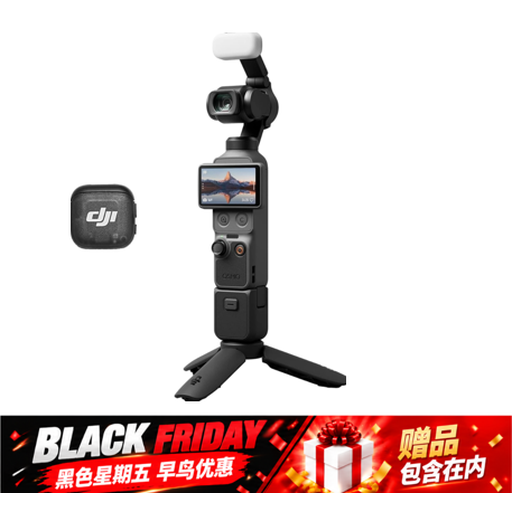 Image unavailable
The product title describes this model as a pocket gimbal camera. The stated sensor and stabilisation are specifications, not a guarantee of accurate textile colours.
The product description lists a 1″ CMOS sensor and 3-axis gimbal stabilisation.
 Image unavailable
The title describes this model as a portable point-and-shoot camera. Take a test shot to see whether it captures the whole patchwork and the details you want.
The product title lists 5K, 80MP UHD and 18X zoom.
 Image unavailable
The title describes this as a pocket camera. Take a test shot to check whether the framing and detail you want suit your workbench.
The product title lists 4K, 44MP and 16X zoom. According to the product description, a microSD card isn’t included.
 Image unavailable
This mirrorless camera is offered with a 16–50mm zoom lens, giving you different focal lengths to choose from when framing your shot.
The product description lists a vari-angle LCD touchscreen and 24,2 MP. According to the description, an adapter or charger isn’t included.
 Image unavailable
The product title describes this model as a compact camera. A compact, fixed setup may suit you if you want to put your camera away quickly.
The product description lists a tilting touchscreen and image stabilisation.
Lay the piece flat, decide on your overhead framing first, then take a test shot with the device you already own. Canon Europe describes flat-lay photography using a standard kit lens or compact camera; check for yourself that the whole piece fits in the frame.
Keep your lighting setup as consistent as possible and set the white balance deliberately. A neutral card can help you assess the shot. Nikon USA explains that white balance settings can make a visible difference, including in mixed lighting.
Not necessarily. Check the magnification of the supplied lens and take a test crop at the level of detail you want. For example, the 1:1 magnification specified by Nikon Netherlands applies to a separate macro lens.
Check whether the offer includes just a body or also the lens you want. For eligible distance purchases, the Government of the Netherlands says you’ll usually have a 14-day cooling-off period. What you can expect if a product is faulty depends on factors including the product and the circumstances; the manufacturer’s warranty doesn’t replace your rights against the seller.
This depends, among other things, on who takes the photo and how it’s shared. The Dutch Data Protection Authority (Autoriteit Persoonsgegevens) distinguishes between private use within a limited circle and public or commercial sharing. The exception for personal or household use doesn’t automatically apply to wider distribution. Photograph only the patchwork if you don’t need to include other people.