
Pastel artist who prioritises colour
You want subtle colour differences to come through, and you can keep the lighting consistent while recording. Set the white balance accordingly, as recommended by Nikon Netherlands.


Start with the complete set-up: the lens needs to capture the entire drawing in sharp focus, and the arm must be able to support the camera and lens securely. Keep the lighting consistent and set the white balance in advance. Then choose a camera based on how long you want to record, and check which lens, power supply and accessories are included with your chosen version.
You want subtle colour differences to come through, and you can keep the lighting consistent while recording. Set the white balance accordingly, as recommended by Nikon Netherlands.
You want to keep the paper and your hands in shot without the set-up getting in the way of your workspace. Choose a suitable lens, and check that the support arm and camera head can hold the camera and lens together.
You want to minimise interruptions, so compare the recording conditions, any heat-related limitations and what’s included in the complete kit. For example, Panasonic states that the LUMIX G97 records in 4K 30p with no set time limit, with a warning about high ambient temperatures.
First decide what matters most for your recording: consistent colour, a stable overhead view, long recording times or a complete kit.
| What to consider | What to look for | Who is this important for? |
|---|---|---|
| Colour consistency | Keep the lighting as consistent as possible and set the white balance before recording; Nikon Netherlands recommends both steps. | I don’t want changing light to alter subtle pastel colours. Around 33% of consumers prioritise colour consistency. |
| Overhead view | Check that the lens frames the entire sheet of paper from the mounting height, and that the arm and camera head can support the weight. | I want to film the whole work surface without the camera moving or cutting off the edges. Around 27% of consumers prioritise a full, stable overhead view. |
| Recording time | Compare the conditions for the exact model. Canon states that the EOS R50 can record for more than 30 minutes; Panasonic warns that the LUMIX G97 may stop in high ambient temperatures. | I want to capture a long drawing session without missing important steps. Around 20% of consumers put long recording times first. |
| Complete set-up | Check whether a lens is included and whether you’ll still need a camera head, support arm, power supply or memory card. | I want to know in advance which parts I need to film above my work surface. Around 20% of consumers focus on having a complete set-up. |
A body on its own isn’t a complete set-up for filming above a worktable. The Panasonic LUMIX G97 is supplied without a lens. For an overhead set-up, you’ll also need to consider the lens, support arm and camera head.
A suitable lens, and possibly a separate camera head and support arm, may be additional parts you need for your set-up.
Check the exact kit contents, lens mount and angle of view. Also make sure the arm and head can support the weight of the camera and lens together.
A higher video resolution or a colour profile doesn’t guarantee consistent colour reproduction. Nikon Netherlands recommends setting the white balance in advance and keeping the lighting as consistent as possible.
Record a test clip in the lighting you’ll use while drawing, and check it with your own pastels.
Panasonic states that the LUMIX G97 records in 4K 30p with no set time limit, but warns that the camera may stop in high ambient temperatures.
Test your desired recording time in your own studio, even if the model has no set time limit.
The EOS R50 is worth considering if you take photos as well as videos and want to choose an RF or RF-S lens to suit your work surface.
The ZV-E10 II is an option if you want to use different video formats and choose your own E-mount lens or kit.
The LUMIX G97 is worth considering if long recordings and connections for audio monitoring are important to you.
These product picks range from webcams to a mirrorless camera kit and a compact gimbal camera. For overhead filming, check how each model can be mounted and whether its angle of view suits your work surface.
 No image available
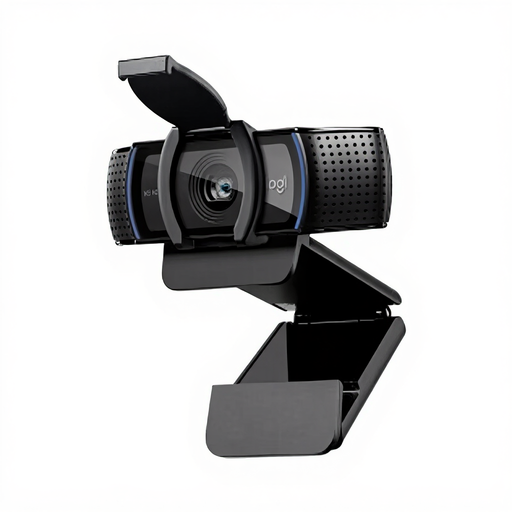
The adjustable clip is described as suitable for mounting on a laptop or external monitor; check whether that position will work for your overhead view.
The listed specifications include 1080p video, autofocus and a 78° angle of view.
 No image available
This pocket-sized gimbal camera is a portable option. For filming above a table, check that the mounting position you choose suits the way you work.
The product name lists a 1-inch CMOS sensor, 4K/240fps, 3-axis stabilisation, 107 GB of built-in storage and a 2-inch rotating screen.
 No image available
This webcam could suit you if you want to mount a webcam on a tripod; check whether that set-up gives you the overhead view you need.
The product name lists 2K QHD video and a noise-cancelling microphone. The description mentions mounting on a monitor, laptop or tripod.
 No image available
The included zoom lens lets you adjust the angle of view. Test from your intended mounting height to see whether the whole drawing fits in the frame.
The kit lists 4K video at 30 fps and autofocus. According to the product description, an adapter or charger and an SD memory card are not included.
 No image available
DeskView mode is listed for desk set-ups; check whether the position and angle of view will suit the paper you want to film.
The product specifications list 4K video, a 79.5° angle of view and a white balance range of 2000–10000 K.
Keep the lighting as consistent as possible and set the white balance before recording. Nikon Netherlands recommends choosing the white balance in advance and keeping the lighting conditions consistent. You should also record a test clip using your own pastels.
From the intended height, check that your chosen lens frames the entire sheet of paper and that the support arm and camera head can hold the weight of the camera and lens together. For an overhead set-up with a support arm, you choose the camera head separately.
No. Panasonic states that the LUMIX G97 records in 4K 30p with no set time limit, but warns that the camera may stop in high ambient temperatures. So test the complete set-up during a long session.
If a fault develops after normal use, the seller must put it right for you free of charge, in line with the applicable rules, according to ACM ConsuWijzer. For online purchases, you generally have a 14-day cooling-off period after delivery. Check the terms and any exceptions relating to trying out and returning the product.
Not necessarily. The Dutch Data Protection Authority explains that the GDPR may apply when recognisable people appear in a recording that is shared more widely. Recordings kept solely for private use are covered by an exception for personal or household activities; whether wider publication is permitted depends on how the recording is used and the legal basis for doing so.