Start with a setup that keeps the whole sheet of paper in frame from above, and lets you adjust exposure and white balance under your own lights. A mirrorless camera gives you a choice of lens and shooting settings, while a webcam is better suited to filming or sharing via a computer. Whichever you choose, check the mounting, power supply and recording workflow.
Who is this guide for?
Filming subtle pastel colours
If you want to keep a white surface looking neutral without losing soft colours, compare the white balance and exposure under your own lighting. Canon Europe explains that light sources can affect how the colour of a white surface appears.
Artists filming from above
If you want to capture both the paper and your drawing hand in one steady shot, the right combination of mount, distance and viewing angle can make all the difference. Check the framing using your own paper size and available mounting height.
Creators making long drawing videos
If you want to record a long session or work via a computer, check in advance that the power supply, recording time and workflow suit your chosen setup. Manufacturers such as Canon and Nikon give recording-time figures subject to specific conditions.
What should you look for when choosing?
First, decide how you want to film your workspace: independently with a camera, or via a computer with a webcam. Then test the framing, colour reproduction and recording time using the settings and lighting you’ll actually use.
| What to consider |
What should you look for? |
Who is this important for? |
| Colour and white backgrounds |
Check whether you can adjust and assess the white balance and exposure under your own lights. |
If I want to keep soft pastel areas looking true to life and avoid the paper appearing discoloured, I test both together in a trial recording. Around 36% of consumers put colour reproduction first. |
| Top-down framing |
Measure the paper and the available height; check that the camera, lens or webcam can capture the whole workspace. |
If I want to see both the paper and my working hand in a steady shot, I check the framing with my own mount and workspace. Around 29% of consumers prioritise this full top-down view. |
| Recording time |
Check the recording time at your preferred video setting, along with the power supply and storage you’ll need. |
If I want to record a long drawing session without missing any steps, I test my chosen settings and power supply in advance. Nikon quotes up to 125 minutes for the Z 30; Canon quotes around 50 minutes for the EOS R50 at 4K 30p HQ from 23 °C. Around 21% of consumers prioritise long recording times. |
| Working via a computer |
Check what software you’ll need and whether the webcam gives you the framing you want in your recording programme. |
If I want to show my sketch during a call or work via a computer, I check that the workflow also suits my recording needs. Around 14% of consumers prioritise working or presenting via a computer. |
Common mistakes
-
Choosing based on 4K alone
Resolution alone doesn’t tell you whether white paper will look neutral, soft pastel shades will remain visible or the entire workspace will fit in the frame.
Test the complete setup under your own lighting, and check the white balance, exposure and framing in a trial recording.
A complete setup may also require a suitable mount, lens or lighting.
-
Assuming the maximum recording time is guaranteed
Manufacturers’ recording-time figures don’t automatically apply to every resolution or set of conditions. Canon warns that rising internal temperatures can shorten recording time.
Before planning a full drawing session, make a test recording using your preferred settings and duration.
-
Assuming Show Mode is a complete overhead setup
Logitech describes Show Mode as a way to show sketches on a desk during a call. That doesn’t tell you whether every paper size will remain fully in frame for an extended period.
Check the framing using your actual paper size, and test the webcam with the software you plan to use.
Camera brands to consider
Canon
The EOS R50 is a mirrorless camera for anyone who wants to choose their own lens and framing for a fixed drawing setup.
- Canon lists an RF mount that supports RF and RF-S lenses, along with manual focus.
- Canon quotes around 50 minutes for 4K 30p HQ from 23 °C. Check your chosen settings and lens for longer sessions.
Nikon
The Z 30 is a mirrorless camera worth considering if the stated recording time is an important factor.
- Nikon lists 4K UHD 30p and up to 125 minutes of uninterrupted recording.
- This maximum is a manufacturer’s figure, not a guarantee for every setting or set of conditions.
Sony
The ZV-E10 II is a mirrorless camera with an interchangeable lens, for creators who want to compare video settings.
- Sony lists features including 10-bit 4:2:2 video and recording up to 4K 60p.
- These video formats alone don’t prove that pastel colours will be captured accurately. Check the lens, lighting and settings too.
Logitech
The MX Brio is a webcam option for a drawing setup that already uses a computer.
- Logitech describes Show Mode as a way to show notes and sketches on a desk, and lists controls for features including white balance and exposure.
- Logitech’s image-quality claims aren’t an independent test for pastel drawings. Check that the mount and framing cover the whole sheet of paper.
Joybuy products
These Joybuy products are suited to recording drawing videos and working with a computer. For an overhead recording, check that the specific camera, lens or mount can capture your entire sheet of paper.
 No image available
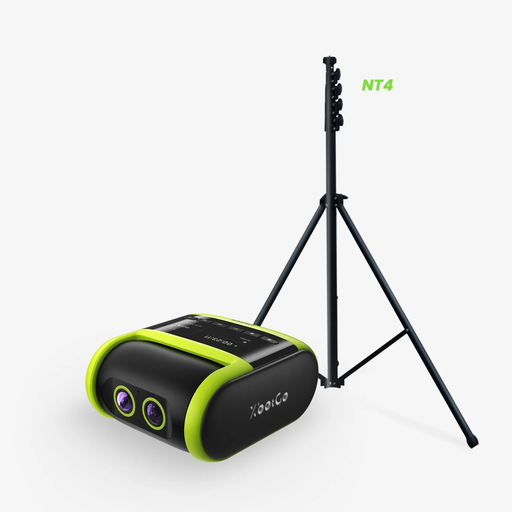
XbotGo Elite Pack: Falcon 4K AI Sports Camera with NT4 tripod
An option for anyone who wants to record the drawing process as a video; check in advance that the included setup works for the overhead view you want.
The product title lists 4K video, an NT4 tripod measuring 13 ft and up to 4.5 hours of recording. A microSD card is required for recording and is sold separately.
Joybuy
 No image available
DJI Osmo Pocket 4 Standard Combo
A compact video camera for recording drawing videos; check that you can position it where you want using your chosen mount.
The product title lists a 1″ CMOS sensor, 4K/240fps, 3-axis stabilisation, 107 GB of built-in storage and a 2″ rotating screen.
Joybuy
 No image available
Philips 4000 Series 4K UHD Webcam, EU Version, Black, SPL6408BT/00
A webcam option for anyone using a desktop computer; check that the mount and framing are suitable for the paper you want to film.
The product title lists 4K UHD video, autofocus, two built-in microphones and a privacy shutter.
Joybuy
 No image available
Philips 2K QHD PC Webcam, EU Version, Silver, SPL6308S/00
A webcam option for computer use; check in your recording programme that the field of view covers the whole sheet of drawing paper.
The product title lists 2K QHD, a noise-cancelling microphone and a clip mount for desktops and laptops.
Joybuy
 No image available
DJI Osmo Pocket 3
A video camera for anyone who wants to film the drawing process; check in advance that the positioning and framing work for an overhead view.
The product title lists a 1″ CMOS sensor, 4K/120fps video, 3-axis stabilisation, fast focusing and a 2″ rotating touchscreen.
Joybuy
Frequently asked questions
How can I stop the white background from looking tinted?
Make a test recording under the lighting in your workspace and check both the white area and the pastel colours. Canon Europe explains that different light sources can change how the colour of a white surface appears; adjustable white balance lets you fine-tune the colour reproduction.
Do I need a tripod or arm to film from above?
For a fixed overhead view, you’ll need a mount that holds your chosen camera steady above the workspace. Check that the height, load capacity and framing suit the camera, any lens and the paper size.
Can I publish a drawing video featuring identifiable pupils or other people without permission?
First, check which privacy rules apply to recording and publishing. According to the Dutch Data Protection Authority, when filming and publishing on behalf of an organisation for professional or commercial purposes, you need a legal basis under the GDPR, such as consent; there are also rules for images used in education. This isn’t a general restriction on cameras or on recordings showing only your own drawing.
Am I always entitled to just two years’ legal guarantee on a camera in the Netherlands?
No. According to ACM ConsuWijzer, the Netherlands’ statutory guarantee has no fixed time limit. What you can reasonably expect from a camera depends on factors including the product and its price; a commercial manufacturer’s warranty is separate from this.


