
Creator focused on pasta details
If you want to show folds, cut edges and dough texture clearly, compare the close-up capabilities of the lens you’ll actually be using. Canon Netherlands describes a macro lens as a way to take close-up food photos.


For wide shots in usable window light, your existing smartphone may be enough. A mirrorless camera gives you more scope to adapt your approach, with settings you can repeat and room to expand your kit. Choose a macro lens only if you want to fill the frame with small pasta details, and check the lens, screen position and total kit before deciding.
If you want to show folds, cut edges and dough texture clearly, compare the close-up capabilities of the lens you’ll actually be using. Canon Netherlands describes a macro lens as a way to take close-up food photos.
If you photograph several pasta collections, colour, brightness and composition across your images are important considerations. Sony Netherlands discusses colour and brightness in food photography, while Canon Netherlands points out that window light can change depending on factors such as direction, time of day and weather.
If you’re photographing on a small table and switching between overhead and angled shots, consider the screen position and the space available for your camera and support. Nikon Netherlands describes the Z50II’s vari-angle screen and the use of a fixed setup for precise focusing in food photography.
Start with the photos you want to take: wide shots, small dough details or repeatable images with similar colours. Then compare the complete combination of camera, lens and support.
| What to consider | What to look for | Who it matters more to |
|---|---|---|
| Close-up pasta details | Compare the magnification and focusing distance of the exact lens. Canon Netherlands and Nikon Netherlands list macro magnification for specific lenses; this feature doesn’t automatically apply to a standard zoom. | If I want folds, cut edges or dough texture to fill the frame, choosing the right lens is crucial. Around 33% of consumers prioritise capturing detail. |
| Colour and brightness | Take test shots in the light where you work and check whether you can adjust the white balance and exposure. Sony Netherlands discusses colour and brightness in food photography, while Canon Netherlands highlights changes in window light. | If my portfolio photos from different sessions need to look similar, I want to be able to assess and adjust colour and brightness. Around 27% of consumers prioritise consistency. |
| Angle and workspace | Check that the screen moves in the direction you need and that the camera and support can sit securely above your work surface. Nikon Netherlands describes the Z50II’s vari-angle screen. | For overhead or low-angle shots, I want to be able to check my framing in a cramped workspace. Around 20% of consumers prioritise shooting angle and setup. |
| Total kit cost | Check exactly what’s included in the camera kit and whether you’ll need an extra lens or support for the close-ups you want. A standard zoom and a dedicated macro lens are different options. | If I want to choose my equipment step by step, I want to know in advance which components I’ll need for my photos. Around 20% of consumers focus mainly on the total cost of the kit. |
A macro specification for a separate lens doesn’t automatically tell you anything about the lens included in a camera kit.
Check the specifications of the lens actually included in the kit and compare them with the details you want to capture.
For powerful close-ups, you may need a separate lens, so factor it into your choice of complete kit.
Light, white balance, lens and shooting angle also affect how useful a pasta photo will be for your portfolio. Canon Netherlands and Sony Netherlands discuss the importance of light and colour in food photography.
First decide which images you want to take. Then compare test shots and the complete camera-and-lens combination in your own shooting conditions.
A fixed lens means you don’t have to change lenses, but size alone won’t tell you whether a particular model can take the close-ups you need.
Check the model’s close-up capabilities against the pasta details you want to photograph, and consider whether you might want to use a different lens later.
The EOS R50 kit with RF-S 18-45mm is an option for wide shots; a close-up lens is a separate choice.
The Z50II is part of the Nikon Z system; a Z macro lens is a separate option for high magnification.
The X-S20 is part of the X system and is worth considering if you’re weighing up image settings and a kit you can expand.
The ZV-E10 II uses E-mount and is worth considering if you want to film pasta-making as well as take portfolio photos.
This selection includes compact photo and video cameras and a mirrorless camera with a zoom lens. For pasta close-ups, check whether the specific model and lens suit the shooting distance and framing you want.
 No image available
A compact camera for photography and video; check its close-up capabilities against the pasta details you want to capture.
The product name lists a 1-inch CMOS sensor, 4K/240fps, 2× lossless zoom, 107GB of built-in storage and a 2-inch rotating screen.
 No image available
A pocket camera for photos and video; check whether its close-up capabilities suit the details in your portfolio.
The product name lists a 1-inch CMOS sensor, 4K/120fps, 3-axis stabilisation and a 2-inch rotating touchscreen.
 No image available
A compact camera for photos; use test shots to see whether close-ups of your pasta shapes show enough detail.
The product name lists 4K, 44MP and 16× zoom.
 No image available
A mirrorless camera with a zoom lens for different compositions; check the close-up distance and whether the screen position suits your work surface.
The product name lists a 16-50mm zoom lens. According to the product description, an adapter/charger and SD card are not included.
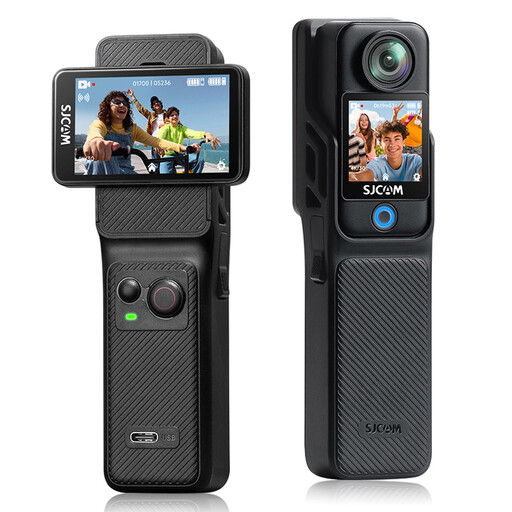 No image available
An action camera for photos and video; check whether its shooting distance and field of view are suitable for the close-ups in your pasta portfolio.
The product name lists 4K, 6-axis EIS and two 2.29-inch touchscreens. The product description mentions photos up to 16 MP and a 154° field of view.
No, not for every shot. Start by testing wide shots and details. If you want small folds or dough texture to fill the frame, compare the magnification of the exact lens. Canon Netherlands specifies up to 1:2 for the separate RF 35mm F1.8 MACRO IS STM, while Nikon Netherlands specifies 1:1 for the separate NIKKOR Z MC 50mm f/2.8.
First assess the light and white balance, then adjust them if needed. Sony Netherlands highlights colour and brightness as important considerations in food photography; Canon Netherlands points out that the direction of a window, time of day and weather can all affect the available light.
Check that you can see the screen from that camera position and place the camera securely. Nikon Netherlands describes using fixed support for precise focusing; check that your chosen setup fits safely and securely above the work surface.
For a consumer purchase, contact the seller if there’s a problem with a product. The Dutch government states that a 14-day cooling-off period applies in many cases to distance sales; check the terms and exceptions that apply to your purchase.
Original photos may be protected by copyright. The Dutch Data Protection Authority explains that identifiable people in images may count as personal data, meaning privacy rules could apply. This is different from a photo showing only pasta and a work surface.