If you’ll mainly be filming your hands and the folding sheet from a fixed position, first check whether a USB document camera will fit above your work surface and whether you want to record using a computer. If you also want to film yourself or record without a fixed computer setup, compare a webcam with a standalone camera. For each option, check the framing, focus at your recording distance and the mounting you’ll need. The features mentioned are based on manufacturer information, not a comparative hands-on test.
Which setup is right for you?
Filming folding instructions at your desk
If you mainly want to show paper and hand movements from above, a document camera with an adjustable arm could be a good fit. IPEVO describes the V4K as a document camera, although this model requires a computer with software.
A creator who also wants to appear on camera
If you switch between filming your face and your work surface, consider whether the camera is easy to reposition and can capture the framing you want. Logitech describes a downward-facing desk mode for the MX Brio, while Sony lists an adjustable screen for the ZV-1F.
A creator without a fixed computer setup
If you also want to record without a computer, check what mounting and storage you’ll need. Canon describes the PowerShot V10 as having a built-in stand and microSD storage; DJI lists microSD support for the Osmo Pocket 3. Neither feature on its own means the camera can be positioned directly above a folding sheet.
What should you look for when choosing?
Measure your work surface first and decide whether you want to record using a computer. Then compare focus, mounting and the option to record independently.
| What to consider |
What to check before buying |
Who it matters most to |
| Overhead view at a small desk |
Check that the paper, your hands and the mount will all fit in the frame at the same time. Also measure how much room the arm or stand will take up. |
If I want to show the whole folding sheet and my hands at once, the camera needs to fit securely above the work surface. Around 39% of consumers prioritise a consistent overhead view. |
| Focus and lighting |
Test at your intended recording distance, with your hands over the paper and using your usual lighting. A stated focus distance applies only to the model in question. |
If I want to show small fold lines clearly, I’ll check the focus from the height at which the camera will be mounted. Around 31% of consumers prioritise sharp detail in folds. |
| Recording with a computer |
Check the required computer port, software and cable routing. IPEVO states that the V4K requires computer software. |
If I want to use my existing computer, the connection and recording software are important factors in my choice. Around 15% of consumers prioritise computer use. |
| Standalone recording |
Check what storage and power are needed, and whether you can safely mount the camera above your work surface. |
If I want to record without a fixed computer setup, I’ll weigh up the freedom that offers against the mounting needed for an overhead view. Around 15% of consumers prioritise standalone recording. |
Common buying mistakes
-
Choosing based on resolution alone
For the IPEVO V4K, IPEVO lists a maximum of 15 fps at its highest stated resolution and up to 30 fps at Full HD. Resolution alone doesn’t tell you how moving hands will appear on screen.
Compare resolution and frame rate within the same recording mode, and test whether the folding movements remain clear.
-
Assuming a stand or gimbal is an overhead mount
A stand on the Canon PowerShot V10 or a gimbal on the DJI Osmo Pocket 3 won’t automatically hold the camera directly above your folding sheet.
Decide where the camera will go and measure the space available around your desk. Check whether you’ll need a separate mount to get the angle you want.
-
Confusing a manufacturer’s warranty with your legal rights
ACM ConsuWijzer makes clear that your statutory guarantee exists alongside a commercial manufacturer’s warranty and has no fixed statutory duration in years.
Keep your proof of purchase and product description, and distinguish between the manufacturer’s warranty and your rights against the retailer.
Brands to consider
IPEVO
The V4K is a USB document camera with an adjustable arm, designed to show material on a work surface.
- IPEVO says the V4K works as a UVC camera with software including OBS.
- The V4K requires a computer with software. IPEVO lists up to 30 fps at Full HD and up to 15 fps at its highest stated resolution; this does not automatically apply to other IPEVO models.
Logitech
The MX Brio is a USB webcam for use with a computer, and you can also try using it to capture a downward view of your desk.
- Logitech describes Show Mode as a way to share notes and sketches on a desk.
- You’ll need to check for yourself whether the angle and mounting can show the entire folding sheet.
Sony
The ZV-1F is a compact vlogging camera for recordings that can show you as well as the paper.
- Sony specifies a minimum focusing distance of around 5 cm from the front of the lens and an adjustable screen for the ZV-1F.
- The camera has a fixed wide-angle lens with no optical zoom. Check the framing at your planned mounting height; this applies to the ZV-1F.
Canon
Canon describes the PowerShot V10 as a compact vlogging camera with a built-in stand, microSD storage and webcam functionality.
- The built-in stand is designed to let you position the camera at different angles.
- A stand isn’t an arm for a directly overhead view. Check whether your setup needs an additional mount.
Panasonic
The LUMIX G100D, including the DC-G100DK kit with a 12–32mm lens, is a mirrorless camera option for anyone with other photography and video needs too.
- Panasonic specifies 4K/30p and FHD/60p for this kit.
- Check whether the lens can capture the entire folding sheet in focus from your desk height.
DJI
The Osmo Pocket 3 is a compact gimbal camera for anyone who wants to capture moving footage as well as fixed shots of folding.
- DJI specifies a minimum focusing distance of 0.2 m and microSD storage for the Pocket 3.
- The gimbal doesn’t provide a mount directly above the paper on its own. Check whether the focus distance and available mounting height will work together with your work surface.
Cameras for desk-based and standalone recording
This selection includes webcams for use with a computer and compact cameras for standalone recording. For each model, check whether the mount and recording distance will give you a usable overhead view.
 No image available
Mini Action Camera 4K with Clip
This camera is included in the selection for computer-based filming; check that the connections and mount suit the recording position you want.
The product name lists a 1.54-inch screen, a 140° field of view and a 1200 mAh battery.
Joybuy
 No image available
Philips 4000 Series 4K UHD Webcam SPL6408BT/00
A webcam for computer-based recording; check that the mount lets you show the paper and your hands at the same time.
The product name lists 4K UHD, autofocus, two built-in microphones, a privacy shutter and the EU version.
Joybuy
 No image available
DJI Osmo Pocket 3
A compact camera for standalone recording; you may need an additional mount to film directly above your work surface.
The product name lists 4K/120fps, 3-axis stabilisation and a 2-inch rotating touchscreen. DJI specifies a minimum focusing distance of 0.2 m for the Pocket 3.
Joybuy
 No image available
Insta360 Link 2C Standard Bundle, Graphite Black
A webcam for PC or Mac; check whether you can position it so that the entire folding sheet stays in view.
The product name lists 4K, a 1/2-inch sensor and HDR.
Joybuy
 No image available
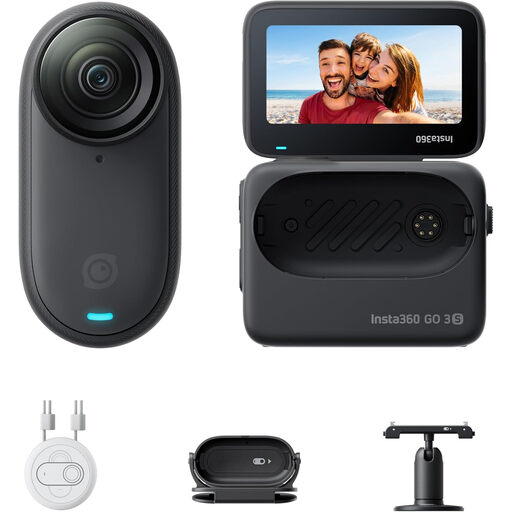
Insta360 GO 3S 128GB
A compact camera for hands-free recording; check that the mount is suitable for a stable overhead view of the paper.
The product name lists 4K recording and a battery life of 140 minutes. The product description warns people with a pacemaker not to use the magnetic pendant.
Joybuy
Frequently asked questions
How can you check before buying that the whole folding sheet will stay in view?
Measure the sheet and set up a test frame at the intended camera height, with the paper and your hands in place. Check that the mount allows this position; a stated resolution or minimum focusing distance on its own doesn’t prove that the whole sheet will fit in the frame.
Does a USB document camera need a computer?
The IPEVO V4K does: IPEVO says it requires computer software and can be used as a UVC video source, for example in OBS. Check the connections and software on your own computer.
What extra equipment should you check for your setup?
For each camera, check whether you already have a suitable mount, memory card, power supply and enough light. What you need depends on the camera and recording location; a stand or gimbal doesn’t automatically replace an overhead arm.
Can you try out a camera bought online at home?
According to ACM ConsuWijzer, the statutory cooling-off period for a product bought online generally ends 14 days after delivery. Check in advance which rules and exceptions apply to trying out and returning the product.
Can you publicly share a folding video featuring a housemate who can be recognised?
Not without checking the privacy rules first. The Dutch Data Protection Authority distinguishes between private use and sharing with a wider audience; the exception for personal or household use does not apply to public sharing. Keep a recognisable housemate out of shot if you don’t have a valid legal basis for publishing the video.


