If you’ll mainly be filming the work surface through a computer, start with an adjustable document camera. If you also want to film yourself or choose your own lenses and external audio, compare interchangeable-lens cameras. A compact gimbal camera is best suited to making moving shots as well as fixed shots of the work surface. Check that your paper size and mounting height allow the whole work area and cutting line to fit in the frame. None of these camera set-ups will, on its own, solve changing window light or ensure a secure mount.
Who are these cameras for?
Work-surface filmer
You mainly want viewers to follow the paper, your hands and the cutting line from above. Getting the framing right matters more than extra camera movement; IPEVO lists an adjustable arm and a 440 × 330 mm capture area for the V4K PRO 120.
On-camera teacher
You switch between showing the work surface and appearing on screen to explain things, and want to consider your choice of lens or external audio. Canon lists interchangeable lenses, a microphone input and a headphone output for the EOS R50 V.
Computer-based teacher
You show the work surface during a lesson or record through a computer. The connection and the app’s support for external cameras may be important; IPEVO specifies USB-A/UVC for the V4K PRO 120.
What should you look for when choosing?
Document camera above the work surface
A good fit if: you mainly show paper and hands, and record using a compatible computer or app.
Bear in mind: check the USB connection and app support. The stated capture area doesn’t prove that small cutting lines will be clear in your frame.
Interchangeable-lens camera
A good fit if: you want to record both tabletop shots and on-camera explanations, and choose your own lens or external audio.
Bear in mind: consider the lens, working distance and secure overhead mounting together. Interchangeable lenses don’t automatically guarantee a useful close-up.
Compact gimbal camera
A good fit if: you want to make moving detail shots as well as fixed shots of the work surface.
Bear in mind: a gimbal isn’t a substitute for a secure mount above the paper. Check that the focusing distance suits the detail shots you want to take.
| Buying concern |
What should you check? |
Who is this most important to? |
| Cutting line and work surface in frame |
From your intended mounting height, take a test shot of the whole sheet and a cutting detail. IPEVO lists a 440 × 330 mm capture area for the V4K PRO 120; check that it suits your paper and set-up. |
If I want viewers to follow both my hands and the smallest important cutting line, I prioritise framing. Around 33% of consumers prioritise clear visibility. |
| Window light and paper colour |
Take a test recording at the time you plan to film and assess shadows, exposure and white balance as the light outside changes. |
When paper colour and consistent image quality matter, I want to assess the results in changing daylight for myself. Around 27% of consumers prioritise light and colour. |
| Clear explanations |
Record your speech and cutting sounds together, then listen back. Check whether your chosen model has a suitable audio connection or another appropriate recording method. |
If I explain the cutting steps while filming, I want to check that my voice remains clear. Around 20% of consumers prioritise audio. |
| Recording through a computer or app |
Decide whether you’ll record through a computer or independently. For USB cameras, check the connection and whether your chosen app supports external cameras. |
If you want to record your lesson directly through a computer or app, it helps to have a workflow that works with your own equipment. Around 20% of consumers prioritise their recording workflow. |
What can you check in advance?
-
‘4K’ doesn’t automatically mean every cutting line will be clear
Resolution doesn’t tell you how large a cutting line will appear in your chosen frame. A wide shot can make small details harder to see.
Before choosing a model, assess a test shot using your paper, intended working distance and the smallest important cutting detail.
-
A gimbal isn’t the same as a fixed overhead mount
Stabilisation helps with camera movement, but it doesn’t automatically ensure that the paper stays in frame from a suitable angle.
First decide whether you’ll mainly make fixed shots of the work surface or also want to record additional moving shots.
A suitable, secure mount may still be needed for a fixed shot above the work surface.
-
A camera body isn’t always a complete recording set-up
The features of a camera body don’t tell you which items are included with every version. The lens, mount and any microphone need to suit the type of recording you want to make.
Check the exact kit contents, working distance and mounting options for the version you plan to buy.
You may need to buy a suitable lens, audio equipment or mounting accessories separately.
Brands to consider
IPEVO
Document cameras for teaching with physical materials; the V4K PRO 120 is an option for recording work surfaces via USB.
- IPEVO specifies an adjustable arm, a 440 × 330 mm capture area and USB-A/UVC for the V4K PRO 120.
- According to IPEVO, recognition on a tablet depends on whether the app you use supports external cameras. Also check that fine cutting lines are clear in your frame.
Canon
Interchangeable-lens cameras for anyone who wants to make other types of teaching videos as well as shots of the work surface; the EOS R50 V is the video-focused model reviewed here.
- Canon lists a microphone input and headphone output for the EOS R50 V.
- Consider the lens, working distance and overhead mounting together. The body features listed don’t prove that every lens will give you a suitable close-up.
Sony
The ZV-E10 II is an interchangeable-lens camera option for anyone looking for a different video angle and the flexibility of interchangeable lenses.
- Sony lists an APS-C sensor and 4K 60p for the ZV-E10 II.
- These specifications don’t determine whether your chosen lens will show fine cutting lines clearly enough from your mounting height.
DJI
The Osmo Pocket 3 is a compact gimbal camera for anyone who also wants to record moving shots of a lesson.
- DJI lists a focusing range from 0,2 m and three built-in microphones for the Osmo Pocket 3.
- A suitable, stable overhead set-up is still needed for a fixed paper-cutting lesson; the stated minimum focusing distance limits very close-up shots.
Joybuy products
This selection includes webcams for recording through a computer and compact cameras for additional or moving shots. For each version, check that the mounting and recording distance are suitable for filming above a work surface.
 No image available
Full HD 1080P USB webcam with microphone
A computer webcam to consider if you want to record using a PC or laptop; check that you can position it securely above the work surface.
The product description lists 1080p video, a 120° lens, automatic light correction, a built-in microphone and a flexible tripod base.
Joybuy
 No image available
DJI Osmo Pocket 4 Standard Combo with Ulanzi VL81 LED light
This compact gimbal camera may suit you if you want to make handheld videos as well as fixed shots of the work surface; a gimbal isn’t a substitute for a secure, fixed overhead mount.
The bundle description lists gimbal stabilisation and an included Ulanzi VL81 LED light with an adjustable colour temperature from 3200 K to 5500 K.
Joybuy
 No image available
Logitech C925e USB webcam, black, 30 fps
A USB webcam for recording through a computer; check that its mount suits your set-up if the camera needs to be positioned above the work surface.
The product description lists 1080p video, autofocus, a 78° field of view, a built-in microphone and an adjustable clip. The model number is 960-001076.
Joybuy
 No image available
DJI Osmo Pocket 3 Creator Combo
A compact option for varying your camera angles and recording spoken explanations; you’ll still need a suitable, stable overhead set-up for your main paper shots.
The product title lists a 1-inch CMOS sensor, 4K/120fps video, 3-axis stabilisation and an included microphone. DJI lists a focusing range from 0,2 m for the Osmo Pocket 3; bear this in mind when filming very close-up details.
Joybuy
 No image available
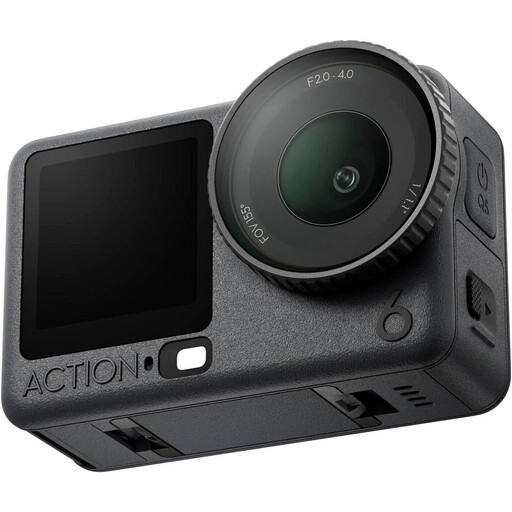
DJI Osmo Action 6 Adventure Combo
A video camera to compare if you also want to make other types of videos; check separately whether its mount is suitable for fixed shots above paper.
The product description lists a variable aperture from f/2.0 to f/4.0 and connections for two DJI microphone transmitters.
Joybuy
Frequently asked questions
How can I check that the whole sheet of paper and the cutting line are visible?
From your intended mounting height, take two test shots: one showing the whole work area and your hands, and one to assess the smallest important cutting action. IPEVO lists a 440 × 330 mm capture area for the V4K PRO 120; check that this framing works for your paper and details.
Can I use a document camera directly for my online lesson?
That depends on the camera, device and app. According to IPEVO, the V4K PRO 120 uses USB-A/UVC. On a compatible USB-C iPad, IPEVO Visualizer can recognise the camera, but other apps need to support external cameras themselves.
What should I check during a lesson when the light from the window changes?
Use a test recording to assess the light on the paper as your hands move and the light outside changes. Check the exposure and white balance; the actual image will depend on your lighting and camera set-up.
What costs and rights should I consider after buying?
Check which lens, memory card, power supply, microphone or mount is included with your chosen version. For online consumer purchases, you’ll generally have a statutory 14-day cooling-off period after delivery. Products must also meet reasonable expectations under normal use; ACM ConsuWijzer identifies the seller as your point of contact for your statutory guarantee.
Can I show identifiable pupils in a published lesson video?
Schools that film identifiable pupils and publish the footage must comply with GDPR requirements. According to the Dutch Data Protection Authority, the school must obtain permission to publish the footage from pupils aged 16 or over, or from the parents of younger pupils. This doesn’t automatically apply to a recording showing only your own hands and paper.


