Start by measuring the distance between the camera and the pottery: the lens needs to focus at that distance, and the frame should show both your hands and your brushstrokes. A USB webcam is a good fit for teaching via a computer; a compact or pocket camera is an option for recording independently, while a mirrorless camera gives you more lens options to consider. If you want to record a whole lesson, check the audio, power supply and storage too.
Which setup is right for you?
Teacher demonstrating brushstrokes
You want to film the pottery from above and check that your hands, brush and paint details remain visible from the available distance. Canon and DJI specifications can help you assess lens choice and focusing distance.
Teacher delivering lessons via a computer
You want to use the footage directly in a computer-based workflow and need a camera mount that fits on a small desk. Logitech lists USB connectivity and a tripod thread for the Brio 4K.
Teacher recording long lessons independently
You want to capture your explanations and the creative process without having to operate the camera constantly, so you’ll also need to consider audio, power and your recording workflow. Panasonic and the Consumers’ Association highlight points to consider around recording time and audio.
What should you look for when choosing?
USB webcam
Choose this when: you record or stream lessons via a computer and can mount the camera above your work area.
Consider: you’ll need a computer and a suitable mount; test the framing from your actual working distance.
Compact vlogging camera
Choose this when: you want to record independently and switch between explaining and showing your work. Sony lists a built-in zoom lens and Product Showcase Setting for the ZV-1 II.
Consider: check that the lens can frame your work area and focus closely enough from where you’ll be filming.
Mirrorless camera with a suitable lens
Choose this when: you want to match the lens to a fixed overhead setup. The Canon EOS R50 supports RF and RF-S lenses; the Sony ZV-E10 uses interchangeable lenses.
Consider: check which lens is included, the focusing distance and the mount; the camera body alone won’t determine how well it captures close-ups.
Pocket camera with a gimbal
Choose this when: you regularly change the camera angle as you explain. DJI specifies a mechanical gimbal for the Osmo Pocket 3.
Consider: DJI lists a focusing range starting at 0.2 m for the Osmo Pocket 3; this alone doesn’t tell you how large the brush tip will appear in the frame.
Camcorder
Choose this when: you want to record longer videos independently and find it useful to zoom without changing lenses. Panasonic lists 24× optical zoom for the HC-VX3.
Consider: check the close-up distance and how the camera will sit above your desk; zoom alone doesn’t prove that brush details will be clearly visible.
| What to consider |
What should you check? |
Who is this important for? |
| Work area and brush details |
Measure the distance from the lens to the pottery and test whether your hands and the details you want to show remain in frame together. |
If I want to show both the brushstroke and my hands, getting a sharp image at my working distance is my first concern. Around 33% of consumers prioritise seeing the work area and brush details. |
| Colour and lighting |
Make a test recording using your lesson lighting and check the whole piece, including any reflections. |
If I want to show paint colours clearly, I want to assess how they look under my usual lighting. Around 27% of consumers prioritise colour and lighting. |
| Audio and lesson length |
Test how your voice sounds while you paint, and check the microphone connection, power supply and storage for the planned recording. |
If my explanations need to remain clear throughout the lesson, I’ll consider audio and interruptions to the recording as well as picture quality. Around 20% of consumers prioritise clear explanations and recording the whole lesson. |
| Simple desk setup |
Decide whether you’ll record via a computer or independently, and check which mounting accessories are included. |
If I have little space around my painting, I want a setup that’s easy to position. Around 20% of consumers make a straightforward workflow their top priority. |
Common buying mistakes
-
Assuming 4K means you’ll get a usable close-up
Resolution alone won’t tell you whether the lens can focus on the pottery from your available filming position or show the brush tip large enough in the frame.
Measure the distance and make a test recording with the piece in its actual position before choosing based on resolution.
-
Assuming a mirrorless camera body is a complete recording setup
Your choice of lens and mount also affects how practical it is to film above a small desk.
Check the exact kit contents, lens mount, working distance and mounting options.
You may need to buy a suitable lens and mount separately.
-
Choosing a webcam or built-in microphone without testing your whole lesson setup
Computer connectivity and clear explanations require different checks from picture quality alone.
Make a test recording while painting and speaking from your usual position, and check what comes with the camera.
The Logitech Brio 4K doesn’t include a tripod; depending on your setup, you may also need a separate audio solution.
Camera brands to consider
Logitech
The Brio 4K is a USB webcam for a computer-based lesson workflow.
- Logitech specifies autofocus, adjustable fields of view and a tripod thread.
- Logitech says a tripod isn’t included; these specifications don’t show whether a brush tip will appear large enough at your working distance.
Sony
The ZV-1 II has a fixed lens; the ZV-E10 is for anyone who wants to choose a lens to suit their setup.
- Sony lists a built-in zoom lens and Product Showcase Setting for the ZV-1 II, and interchangeable lenses and a built-in microphone for the ZV-E10.
- These model specifications don’t test how well the camera captures brush details; check the lens and working distance for your desk.
Canon
The EOS R50 is a mirrorless camera for anyone who wants to match the lens to a fixed recording setup.
- Canon specifies support for RF and RF-S lenses.
- Canon doesn’t list in-body sensor-shift stabilisation; check the specific lens and working distance rather than assuming the body is suitable for close-ups.
DJI
The Osmo Pocket range is an option for recording when you regularly change the camera angle.
- DJI lists a focusing range starting at 0.2 m and a mechanical gimbal for the Osmo Pocket 3.
- This doesn’t guarantee that the brush tip will appear large enough in the frame; check the framing on your desk too.
Panasonic
The HC-VX3 is a camcorder option that doesn’t require lens changes; the LUMIX S5II is a mirrorless camera option for video.
- Panasonic lists 24× optical zoom for the HC-VX3.
- Zoom doesn’t automatically mean the camera is suitable for close-ups above a small desk; check the working distance and positioning.
Cameras at Joybuy
These Joybuy picks are portable cameras for recording video independently; check each model to make sure its focus, field of view and mounting options suit your working distance.
 No image available
DJI Osmo Pocket 3 with Ulanzi storage bag
A portable camera setup for recording independently; the product description mentions stabilisation.
The product name includes a Ulanzi storage bag.
Test the focus and framing with the pottery at your planned working distance.
View at Joybuy
 No image available
Osmo Pocket 4P Vlog Combo, black
The product title describes a vlogging combo for a self-contained recording setup.
Check the focus and framing at the distance between the camera and your work.
View at Joybuy
 No image available
4K mini action camera with clip
The clip gives you a way to mount the camera for hands-free filming; test whether it frames the pottery and your actions well from that position.
The product name lists 4K, a 1.54-inch screen, a 140° field of view, app control, an LED light and a 1200 mAh battery.
View at Joybuy
 No image available
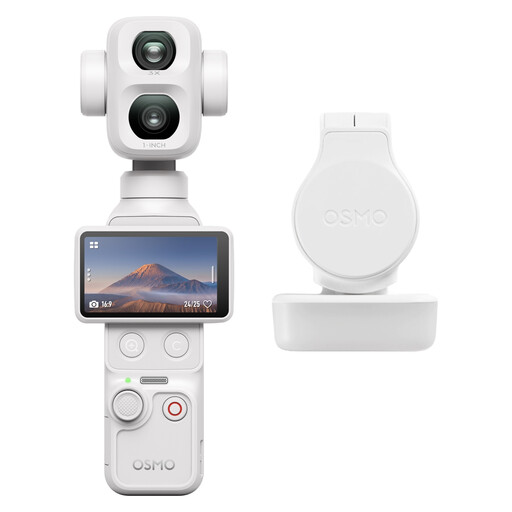
DJI Osmo Pocket 4P Standard Combo (White)
A pocket camera combo for recording video independently; check the focus and framing at your desk’s working distance.
View at Joybuy
 No image available
2K pocket vlogging camera with 360° rotating lens
The product title describes a portable POV camera for audio and video recording; check whether the rotating lens can reach the overhead position you need.
The product name lists 2K and a lens that rotates through 360°.
View at Joybuy
Frequently asked questions
How can I tell whether a camera focuses close enough?
Measure the distance between the planned lens position and the pottery, then compare it with the focusing range of the exact camera and lens. Also test the framing to see whether the brushstroke appears large enough. DJI lists a range starting at 0.2 m for the Osmo Pocket 3; this doesn’t guarantee sufficient magnification.
Will I need anything else to mount a webcam above my desk?
USB and a tripod thread are specified for the Logitech Brio 4K, but Logitech says the tripod isn’t included. Check the computer connection and choose a mount that stays clear of your painting area.
What should I check before recording a long lesson?
Make a test recording in advance, including spoken explanations, and check focus, audio, storage and power while working in your usual position. Panasonic links its recording-time claim for the LUMIX S5II to specific video modes; don’t apply that claim to other models.
What warranty and cancellation period apply to an online purchase in the Netherlands?
For consumer purchases in the Netherlands, there’s no fixed statutory warranty period: what you can reasonably expect from the product is what matters, according to the Dutch government. For eligible distance purchases from a business, you generally have 14 days to change your mind; terms and exceptions may apply.
Can I film participants so they can be identified and publish the lesson video?
Privacy rules may apply when people can be identified. The Dutch Data Protection Authority distinguishes between strictly personal use and wider sharing or business use; for filming and publishing for business purposes, you need a valid legal basis under the GDPR, such as consent. Before recording and publishing, check who may be identifiable or audible in the video.


