Choose a camera based on the framing you can achieve from your table: look at the lens’s magnification and focusing distance, not just the camera body. A compact camera with a fixed lens and macro modes doesn’t need a separate lens; OM SYSTEM lists these features for the Tough TG-7. A mirrorless camera gives you more choice of lenses, but you may need a separate macro lens and enough room for support and lighting.
Who is this buying guide for?
The detail-focused miniature painter
You want to capture faces, textures or brushwork in close-up, so you compare the magnification and focusing capabilities of the complete camera-and-lens combination. Practical advice from Tale of Painters and specifications from Canon Netherlands and Nikon Netherlands can help you make your choice.
The painter who wants to document colours
You photograph finished figures regularly and want the lighting and white balance to reproduce paint colours consistently. Adobe explains how white balance affects colour in digital photos.
The photographer with limited table space
You want to take both a full shot and a close-up without lots of components or a bulky set-up. Consider whether a fixed lens and your lighting set-up leave you enough room; the Consumers’ Association explains the difference between a compact camera and an interchangeable-lens camera.
What should you look for when choosing?
Compact camera with fixed lens
Best for: working without changing lenses, provided a test shot shows that both the whole figure and the details you want are large enough in the frame.
Trade-off: the lens can’t be changed, and shooting at close range may leave less room to light the figure.
Mirrorless camera with kit zoom
Best for: prioritising overview shots when the supplied lens offers enough magnification. The Canon EOS R50 kit with the RF-S 18-45mm is one example.
Trade-off: Canon Netherlands states that the kit lens achieves a maximum of 0.16× at 45 mm with autofocus, or 0.26× with manual focus. This isn’t the same as using a dedicated macro lens.
Mirrorless camera with macro lens
Best for: capturing tiny painted details and choosing a separate lens to suit your camera and the framing you want.
Trade-off: the lens is an additional part of your camera set-up, and you’ll also need room for support and lighting. Nikon lists 1:1 magnification for the NIKKOR Z MC 50mm f/2.8, and Canon lists 1:2 for the RF 35mm F1.8 MACRO IS STM.
| What to consider |
What should you check? |
Who is this important to? |
| Capturing small details clearly |
Compare the magnification of the exact lens and assess a test shot taken from your camera position. |
If I want to show brushwork or small details clearly, I look at both magnification and sharpness across the figure. Around 33% of consumers put small painted details at the top of their buying priorities. |
| Reproducing paint colours consistently |
Check whether you can adjust the white balance and consider whether you want to edit RAW images. Use the same lighting set-up when comparing colours. |
If I want to compare finished figures, I want to control changes in table lighting and colour casts. Around 27% of consumers prioritise consistent reproduction of paint colours. |
| A compact table-top set-up |
Try framing both a whole figure and a detail from the available distance, leaving room for support and lighting. |
If I have limited table space, I want to position the camera, figure and lights practically. Around 20% of consumers put a simple, compact set-up first. |
| The complete kit |
Check the exact bundle contents, lens mount and any additional components; compare the complete set-up, not just the camera body. |
If I want to put together a usable kit, I want to know in advance exactly which lens is included. Around 20% of consumers prioritise the cost of the complete kit. |
Common pitfalls
-
Assuming a kit zoom is a fully fledged macro lens
According to Canon Netherlands, the RF-S 18-45mm lens supplied with the Canon EOS R50 kit achieves a maximum of 0.16× at 45 mm with autofocus, or 0.26× with manual focus. Canon lists up to 1:2 magnification for the separate RF 35mm F1.8 MACRO IS STM.
Check the lens name and bundle contents. First, see whether the supplied lens can capture the framing you want of your figure.
A separate compatible macro lens may be an additional part of your set-up.
-
Confusing the minimum focusing distance with the clear space in front of the lens
The position of the camera and lens affects how much room you have to light a small figure. Sony lists different distance figures for the SEL30M35 on its product and specifications pages; they shouldn’t automatically be treated as the same measurement.
Assess your actual set-up with the figure and lighting in place. Only compare distance figures when it’s clear what each measurement refers to.
-
Comparing megapixels alone
OM SYSTEM specifies 12 megapixels for the Tough TG-7, but resolution alone won’t tell you whether the lens, focusing and lighting can capture your brushwork clearly.
Assess the complete camera-and-lens combination and, if possible, take a test shot from the distance you plan to use at your table.
Camera brands to consider
OM SYSTEM
The Tough TG-7 is a fixed-lens camera with built-in macro modes, for anyone who wants to work without a separate lens.
- OM SYSTEM lists macro modes and 12 megapixels for the Tough TG-7.
- The lens is fixed; the specifications can’t tell you whether you’ll achieve the framing you want on your table.
Canon
The EOS R50 with the RF-S 18-45mm is a mirrorless camera kit for overview shots; the RF 35mm F1.8 MACRO IS STM is a separate lens for close-ups.
- Canon lists focus bracketing for the EOS R50 and up to 1:2 magnification for the separate RF 35mm.
- The kit zoom and RF 35mm are different lenses: the magnification specified for one doesn’t apply to the other.
Nikon
A Z system camera can be paired with the separate NIKKOR Z MC 50mm f/2.8 when capturing tiny details is a priority.
- Nikon lists 1:1 magnification for the MC 50mm and compatibility with DX- and full-frame Z cameras.
- The macro lens isn’t automatically included with a Z50II purchase; check the exact bundle contents.
Sony
The ILCE-6400 with E-mount can be considered alongside the separate SEL30M35 macro lens.
- Sony lists E-mount for the ILCE-6400 and 1:1 magnification for the SEL30M35.
- Sony’s product and specifications pages give different distance figures for this lens; don’t rely on those alone to work out how much space you’ll have in front of the lens.
Cameras on Joybuy
Joybuy camera options related to this topic. Check each model to make sure its lens and focusing capabilities suit the close-up you want to take of your figure.
 Image unavailable
Mini Action Camera 4K with Clip
The product title describes a mini action camera with a clip; check whether its framing and focusing capabilities suit your figures.
The title lists 4K, a 140° wide-angle lens, a 1.54-inch display, app control, an LED light and a 1200 mAh battery.
Joybuy
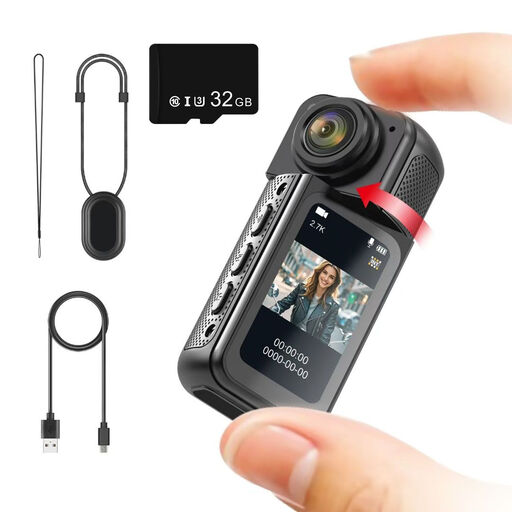 Image unavailable
NAXSIR Mini Action Camera 2.7K
This mini action camera has a magnetic mount; check that its focusing capabilities and framing suit the details you want to photograph.
The title lists a 180° rotating lens, a 1.47-inch IPS screen and an included 32 GB memory card.
Joybuy
 Image unavailable
2K Pocket Vlogging Camera
The title describes this model as a pocket vlogging camera; check whether its focusing capabilities are suitable for close-ups of painted figures.
The title lists 2K and a 360° rotating lens.
Joybuy
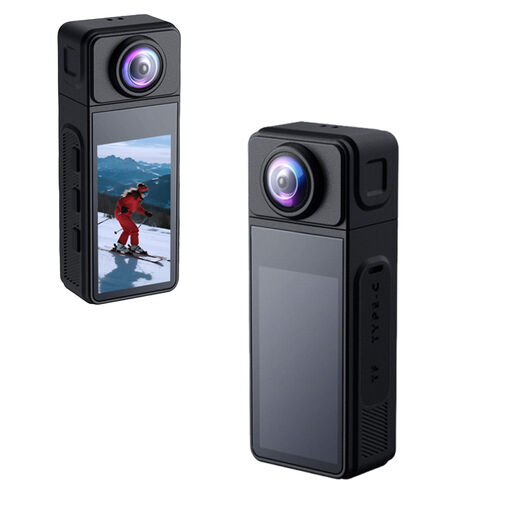 Image unavailable
KINSI Mini Action Cam 2K
The title lists a magnetic mount and a 1/4-inch thread; check whether the camera and mount will work for your table-top set-up.
The title lists a 270° rotating lens, a 1.86-inch IPS display, Wi-Fi, app control, a Type-C port and a TF card slot.
Joybuy
 Image unavailable
DJI Osmo Pocket 3 Creator Combo
The product title specifically describes this model as a small camera for photography; check whether its lens and focusing capabilities suit the close-up you want.
The title lists a 1-inch CMOS sensor, 4K/120fps video, 3-axis stabilisation and a microphone.
Joybuy
Frequently asked questions
Do I need 1:1 magnification to photograph a whole figure?
Not necessarily: first decide how large you want the whole figure to appear, then assess the framing on your table. Greater lens magnification can be useful for very small details; Canon Netherlands lists up to 1:2 for the separate RF 35mm, while Nikon Netherlands lists 1:1 for the separate Z MC 50mm.
How can I stop only the front of the figure from being in focus?
Set up the camera securely and use test shots to check focus from front to back. Canon describes focus bracketing as a way to combine shots taken at different focus positions; check how it works and review the results with your chosen camera-and-lens combination.
What do I need besides the camera body?
Check which lens is actually included and whether any separate lens is compatible with the camera’s mount. Leave room on your table for stable support and lighting; use the same lighting set-up and a suitable white balance when comparing colours.
What are my rights when buying a camera online in the Netherlands?
Online consumer purchases generally come with a statutory cooling-off period; ACM ConsuWijzer states that it ends 14 days after delivery. The statutory guarantee is also separate from any manufacturer’s warranty: if a product is faulty, the seller is responsible for providing a remedy under the applicable conditions. Check which exceptions apply to your purchase.


