
Folder who mainly films the work surface
You want the paper and both hands to stay visible throughout every fold. Start with a stable desk setup and a field of view that suits your workspace.


Start with the camera angle: for origami, a stable, practical overhead view matters more than extra stabilisation for handheld filming. A webcam could work if you’re recording on a computer; a standalone compact camera needs a different mounting setup, while a mirrorless camera gives you more choice of lenses but may require extra equipment. Before you buy, check that the whole sheet, your hands and your instructions are clearly in shot and audible in your student room.
You want the paper and both hands to stay visible throughout every fold. Start with a stable desk setup and a field of view that suits your workspace.
You want to record on a computer and show your work on the desk without immediately putting together a standalone camera setup. Logitech describes Show Mode on the Brio 500 as a way to show work on your desk.
You want to film yourself or other projects as well as origami lessons, so you’re considering a standalone camera or a choice of lenses. Canon lists support for RF and RF-S lenses on the EOS R50; Sony positions the ZV-E10 as an interchangeable-lens camera.
Best if: you already record on a computer and can securely position the webcam above or at an angle to your workspace.
Bear in mind: a desk-view feature doesn’t guarantee that your whole sheet will be in focus from every mounting position; Logitech lists Logi Tune as a requirement for RightSight auto-framing.
Best if: you want a camera with a fixed lens that you can also use to film yourself. Sony lists the ZV-1 II as having an integrated wide-angle zoom lens and a three-capsule microphone.
Bear in mind: a fixed lens gives you less flexibility to adjust the field of view to suit the distance from your desk.
Best if: you want to film moving or handheld footage as well as fixed lesson videos. DJI lists three-axis stabilisation and several focus modes for the Osmo Pocket 3.
Bear in mind: DJI gives the Osmo Pocket 3 a minimum subject distance of 20 cm, which matters when taking close-ups of paper.
Best if: you want to choose a lens and field of view to suit the distance from your desk, or use the camera for other projects too.
Bear in mind: a camera body without a suitable lens isn’t a complete filming setup; check which lens comes with the version you’re choosing.
When filming an origami lesson in a student room, your choice mainly comes down to seeing the folding process clearly, the setup, fine details and making sure your instructions are easy to hear.
| What to consider | What to look for | Who is this important for? |
|---|---|---|
| Paper and hands in shot | Test the mounting height and field of view with a full sheet of paper and both hands. | I want to follow every fold without the paper or my hands going out of shot. Around 33% of consumers prioritise seeing the paper and hands above all else. |
| Recording on a computer | Check where the webcam can sit or be mounted, and whether the software features you want will work. | I want to use my existing computer rather than build a standalone camera setup. Around 25% of consumers prioritise a simple computer-based setup. |
| Capturing fine folds clearly | Test focus on paper and moving hands in the lighting you use at home; if you’re choosing a mirrorless camera, check which lens is included. | I want to show small folds clearly in my room’s lighting. For around 25% of consumers, image detail is their main purchase priority. |
| Recording spoken instructions | Make a test recording from the planned camera position and listen to check that your instructions are easy to hear. | I want to speak while the camera is pointed at the workspace without my instructions getting lost. Around 17% of consumers put clear spoken instructions at the top of their list. |
The Osmo Pocket 3’s gimbal is designed to stabilise camera movement, but it doesn’t determine where your paper sits or how much of your workspace is visible.
First, decide where to mount the camera and how much you need in the frame. Give stabilisation more weight if you’ll also be filming while moving.
You may still need a suitable mount or tripod to achieve a useful fixed position.
With an interchangeable-lens camera, the lens also affects what fits in the frame. A body without a suitable lens won’t automatically give you a good view of your workspace.
Compare body-only and lens-kit versions separately, and check what’s included, the working distance and the mount you’ll need.
If your chosen version doesn’t include a suitable lens, you’ll need to arrange one separately.
Logitech describes Show Mode on the Brio 500 as a way to show work on your desk. The feature doesn’t ensure your paper will be fully in frame and in focus from every position.
Make a test recording from your planned camera position with the whole sheet, both hands and a small fold in shot.
The Dutch government states that there is no fixed statutory guarantee period in the Netherlands, and that a manufacturer’s warranty is separate from your legal rights.
Keep your proof of purchase and contact the seller if the product is faulty.
The Brio 500 is a webcam option for lessons you record on a computer, with the camera pointed at your desk.
The Osmo Pocket 3 is a compact gimbal camera for anyone who wants to shoot moving footage as well as fixed lesson videos.
The EOS R50 is a mirrorless camera option for anyone who wants to choose a lens to suit their preferred field of view and use the camera for a wider range of projects.
The ZV-1 II has an integrated zoom lens, while the ZV-E10 is an alternative with an interchangeable lens.
The Joybuy products below include webcams and compact video and action cameras. Check that each model’s mounting height, framing and focus suit your desk.
 No image available
The title describes a vlogging camera; check that your chosen mount brings the whole sheet of origami paper into shot.
Version as named in the product listing: Vlog Combo, black.
 No image available
The clip and rotating lens could give you another way to position the camera; check that they provide a stable view of your workspace.
The product name lists a 1.54-inch display, a 140° wide-angle lens, app control, LED light and a 1200 mAh battery.
 No image available
The product name says it connects to a PC or laptop, making it suitable if you want to record on a computer; check whether it can achieve the angle you need on your desk.
The product name lists Full HD 1080p, a built-in microphone and USB plug-and-play.
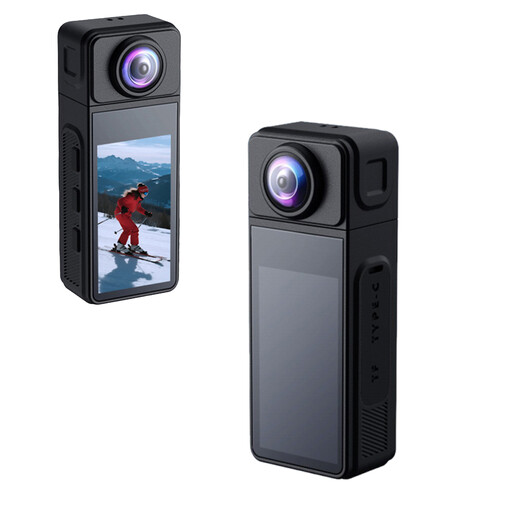 No image available
The product name mentions a tripod mount; check that the mount and lens angle show the entire workspace.
The product name lists a 270° rotating wide-angle lens, magnetic housing and electronic image stabilisation.
 No image available
The product name describes a pocket gimbal camera; check that you can mount it securely in the position you want above your workspace.
The product name lists a 1-inch CMOS sensor, 4K/240fps, three-axis stabilisation, 2× lossless zoom, 107GB built-in storage and a 2-inch rotating screen.
Frame a test shot from the planned mounting position, with the whole sheet and both hands in view. Then check the focus in a close-up; DJI gives the Osmo Pocket 3 a minimum subject distance of 20 cm.
Don’t assume that you can. According to the Dutch Data Protection Authority, identifiable people are considered personal data, and the exception for personal or household use doesn’t apply when sharing publicly. You need a legal basis under the GDPR, which in many cases means consent; keep housemates out of shot if filming them isn’t necessary.
No. The Dutch government states that there is no fixed statutory guarantee period in the Netherlands: what you can expect from a product depends, among other things, on the product and the sales information. If a product is faulty, the seller must provide a solution; the manufacturer’s warranty is separate.
For online purchases from a business, you generally have a legal cooling-off period of up to 14 days after delivery, with some exceptions. ACM ConsuWijzer advises checking the returns policy; handle the camera carefully while you assess it.
Check that the feature works with your software setup. Logitech states that RightSight auto-framing on the Brio 500 requires Logi Tune; also test whether your desk work stays in shot while you’re recording.