Who is this guide for?

For makers who want to show the whole sample

You want an overall shot where the colour distribution and pattern are easy to see. A steady, repeatable set-up matters more than high magnification. MPB describes a tripod as a way to keep your composition steady.

For makers capturing grout and texture

You want to photograph small details individually, so you’re comparing the close-up capabilities of the camera and lens. The magnification quoted applies to the specific lens, not automatically to every camera from the same brand.

For makers comparing colours across samples

You’re photographing several samples and don’t want colour differences to be confused with changing window light or a different white balance. Canon Netherlands explains how you can adjust white balance afterwards when shooting in RAW.

What should you look for when choosing?

A simple camera or one you already own

Choose this if: you mainly want to show the whole mosaic sample and want to start by getting the set-up, lighting and white balance right.

Trade-off: close-up capabilities depend on your camera and lens; this option doesn’t guarantee high magnification for small details.

Mirrorless camera with a standard lens

Choose this if: you want to take overall shots and be able to adjust the lens, crop and settings yourself.

Trade-off: check the close-up capabilities of the specific lens and exactly what’s included in the kit.

Mirrorless camera with a macro lens

Choose this if: small tiles, grout or surface texture are your main subject and a standard lens doesn’t capture enough detail.

Trade-off: extra magnification depends on using a suitable lens. Canon specifies up to 1:2 for the RF 35mm F1.8 IS Macro STM, while Nikon specifies 1:1 for the NIKKOR Z MC 50mm f/2.8.

What to consider What should you check? Who is this important for?
Colour comparison Check whether you can set the white balance and, if you edit your photos, shoot in RAW. Canon Netherlands explains that you can adjust the white balance afterwards when shooting in RAW. If I’m comparing several samples, I don’t want to confuse colour differences with changing daylight or a different white balance. Around 36% of consumers put colour comparison first.
Small details Decide which detail you want to show, then compare the magnification of the exact lens, the lens mount and a test crop. If I want to document individual tiles or grout, I want to know whether they’ll appear clearly in the image. Around 29% of consumers give detail reproduction the highest priority.
Shadows and reflections Try soft window light, check shiny areas for reflections and see whether you can keep the camera steady. Digifoto Starter advises avoiding harsh, direct sunlight. If reflections or harsh shadows obscure my mosaic, I want to be able to adjust the light and shooting angle. Around 21% of consumers put lighting control first.
Complete set Check whether you’re buying a body or a kit, which lens is included and whether you’ll need an additional macro lens. If I want to get started without an unnecessary extra lens, I want to know in advance which parts are included with the camera. Around 14% of consumers give the overall kit contents the highest priority.

Common buying mistakes

  • Choosing based on megapixels alone

    The megapixel count alone doesn’t tell you how large a small detail will appear in the image. Magnification also depends on the lens and the crop you choose.

    First decide whether you want to show the whole sample or a small section of grout. Then check the lens, shooting distance and whether you can keep the camera steady.

  • Assuming a camera body is a complete kit

    A body doesn’t automatically come with a lens. A macro lens may also be sold separately, so the camera alone might not be enough for the shot you want.

    Read the details of the specific offer and check that the lens is compatible with the mount.

  • Letting direct sunlight fall on shiny tiles

    Harsh, direct sunlight can create sharp shadows and noticeable reflections, making colour and surface details harder to assess. Digifoto Starter describes this risk when photographing shiny surfaces.

    Try softer window light, adjust the position of the camera or sample, and check for reflections in a test shot.

Camera brands to consider

Canon

An EOS R50 kit with a standard lens could suit a set-up you can expand for both overall and detailed shots.

  • Canon lists an APS-C sensor with 24.2 megapixels and an included RF-S 18-45mm lens for the EOS R50 kit.
  • Canon says the RF 35mm F1.8 IS Macro STM is compatible with the R50 and offers up to 1:2 magnification as a separate lens. It isn’t included in the kit mentioned.

Nikon

The Z50II is a DX mirrorless camera. You can consider separate Z lenses for detailed work.

  • Nikon lists 20.9 million effective pixels for the Z50II. According to Nikon, the NIKKOR Z MC 50mm f/2.8 offers 1:1 magnification and can also be used on DX cameras.
  • Check whether a specific Z50II offer includes a lens; the macro option mentioned is a separate lens.

Fujifilm

The X-M5 is an X-mount mirrorless camera to consider if you’re also looking for a lightweight all-round camera alongside your mosaic photography.

  • Fujifilm lists an APS-C sensor with 26.1 million effective pixels and a body weight of 355 grams.
  • A body without a lens isn’t ready for taking photos; close-up capabilities depend on the X-mount lens you choose. The specifications listed don’t by themselves tell you how accurately colours will be reproduced in window light.

Panasonic

The LUMIX G97 is a Micro Four Thirds mirrorless camera with interchangeable lenses. Compare the body or kit on offer with the shooting distance you need.

  • Panasonic lists a 20.3-megapixel sensor and image stabilisation for the DC-G97.
  • The Dutch manufacturer’s page we consulted describes a body without a lens. Image stabilisation doesn’t automatically replace a fixed composition for repeatable sample photos.

Cameras at Joybuy

These Joybuy products are suited to a simple overall shot or to flexible framing with a camera and zoom lens. Take a test shot to check that your desired close-up is in sharp focus.
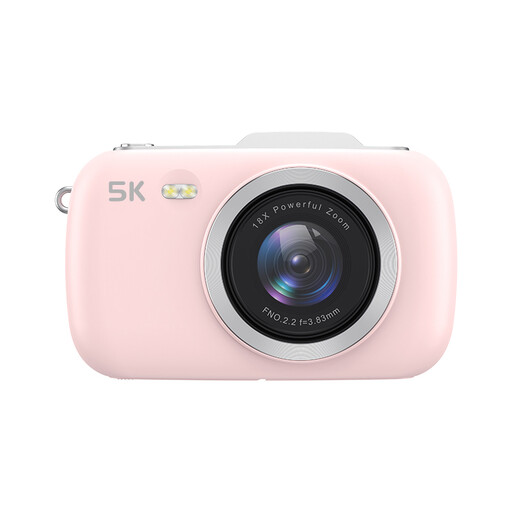
KOMERY G7 5K camera, pink, without SD card

KOMERY G7 5K camera, 80 MP, 18X zoom, pink, without SD card

The listed point-and-shoot camera could suit a simple overall shot. Take a test photo to check whether your chosen details are sharp enough. The product title lists 5K, 80 MP and 18X zoom; an SD card isn’t included.

View at Joybuy

Sony ZV-E10 with 16-50mm zoom lens, black

Sony ZV-E10 + 16-50mm Zoom, black

The included 16-50mm zoom lens gives you flexibility when framing your shot. Take a test photo to check that it gives you the crop you want of your mosaic sample. A memory card isn’t included.

View at Joybuy

Sony Alpha A6100 with 16-50mm f/3.5-5.6 OSS II lens

Sony Alpha A6100 + 16-50mm f/3.5-5.6 OSS II

This offer lists a camera with a 16-50mm kit lens. Take a test photo to check whether the combination can focus on the smallest detail you want to capture. A memory card isn’t included.

View at Joybuy

Frequently asked questions

Do you need a macro lens to photograph the whole mosaic sample?

No, not necessarily. Start with an overall shot and check whether the pattern and grout are clear at the size you want. Only compare macro lenses if small details aren’t coming through clearly enough; maximum magnification applies to the specific lens.

How do you set up a mosaic sample in window light?

Use soft window light rather than direct sunlight where possible, check shiny areas for reflections and keep the camera steady. According to the photography guide we consulted, a piece of white card can brighten the shadow side. Take a test shot first.

How can you keep colours consistent across several photos?

Keep the lighting and background as consistent as possible, and set the white balance deliberately. If your camera supports RAW, you can also adjust the white balance when processing the RAW files, as Canon Netherlands explains. RAW doesn’t, by itself, correct reflections or uneven lighting.

What extra items should you check before ordering?

Check whether you’re buying a body or a kit with a lens, and whether you’ll need to buy a macro lens separately. Also check the contents of the specific offer; a body or brand page doesn’t confirm what’s included in a different bundle.

What cooling-off period and statutory guarantee apply when buying in the Netherlands?

For most consumer purchases made at a distance, you have a statutory cooling-off period of up to 14 days after delivery, with exceptions explained by ACM ConsuWijzer. If a product is faulty, you’re also entitled to a statutory guarantee from the seller, depending on what you could reasonably expect with normal use. This is not the same as a fixed manufacturer’s warranty period.
