What should you look for?
Compact camera monitor
Choose this if: you want to check the footage close to a camera mounted above your crochet area.
Trade-off: a small screen takes up less space, but may be harder to read from your crochet position.
Larger screen beside your workspace
Choose this if: you want to watch from a little further away while you crochet.
Trade-off: the screen needs space on or beside your workspace; also check that the image orientation suits the camera’s position.
Footage on a computer
Choose this if: you want to view or record camera footage in recording software.
Trade-off: as well as a camera and software, you may need a compatible HDMI-to-USB capture device.
When filming crochet from above, the right setup mainly depends on focus, viewing distance, the connection to your camera and the power supply you need.
| What to consider |
What to look for |
Who is this important for? |
| Focusing on small stitches |
Check whether the model has focus-assist features and whether the camera outputs a suitable HDMI signal while recording. |
If I want to see whether small stitches are in focus while I’m filming, I’ll check the focus-assist features and my camera’s signal first. Around 33% of consumers give focus the highest priority. |
| Watching from your crochet position |
Work out the viewing distance and where the monitor will be mounted; check whether you need image flipping for the camera’s position. |
If my camera is above my workspace, I want to see the footage without taking my hands off my crochet. Around 27% of consumers prioritise being able to watch from their working position. |
| Connection and computer recording |
Compare the camera output with the monitor input; for computer recording, also check the capture device and software. |
If I want to view or record footage on a computer, I’ll check how the camera’s signal gets there. Around 20% of consumers give compatibility or their computer workflow the highest priority. |
| Power and required accessories |
Check whether the package includes the required battery, adapter, HDMI cable and mount. |
If I want to use the monitor in my planned setup, I want to know in advance how it’s powered and what accessories I’ll need. Around 20% of consumers prioritise a complete, ready-to-use setup. |
Joybuy monitors for your workspace
These Joybuy options are larger monitors that you can place beside your crochet area; they are not computer capture devices. Check that each model’s connections and input signals are suitable for your camera. According to the Dutch government, electronic devices placed on the market in the EU must carry a CE mark; check the mark and product information for the specific item.
 No image available
Dell Pro P3426WEV 34.1-inch curved WQHD IPS monitor
Suitable for a setup where you want to view camera footage on a large, separate screen, provided the camera can supply a compatible signal.
34.1-inch curved WQHD IPS screen with 3440 × 1440 resolution; the product description lists an HDMI input, USB-C hub, webcam, 100 Hz and 90 W Power Delivery.
Check that the HDMI connection and your camera’s output signal are compatible.
View at Joybuy
 No image available
Dell Pro P P2726DEV 27-inch QHD IPS monitor
Suitable if you want a separate screen beside your workspace for viewing camera footage, as long as the camera and monitor are compatible.
27-inch QHD IPS screen with 2560 × 1440 resolution; the product name also lists 100 Hz and a webcam.
Check the connections and supported input signals for the specific model before pairing it with a camera.
View at Joybuy
 No image available
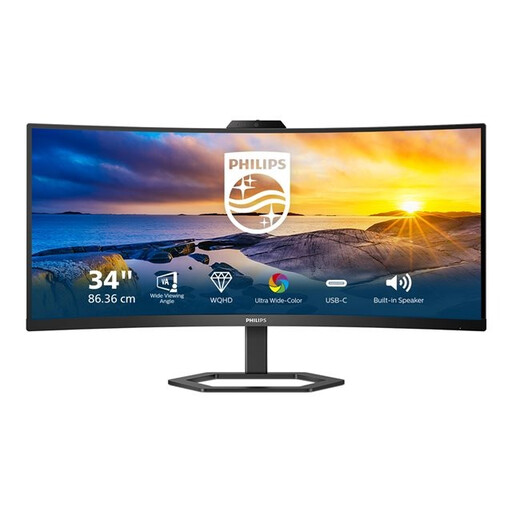
Philips 34E1C5600HE/00 34-inch LCD monitor with Windows Hello webcam
Suitable for a setup with a large screen beside your crochet area, provided the camera outputs a video signal that the monitor can display.
34-inch LCD monitor with 3440 × 1440 resolution and a 21:9 aspect ratio; the product name lists HDMI, USB and DisplayPort.
Check the right input, camera output and supported signal settings for your recording setup.
View at Joybuy
Frequently asked questions
Will an external camera monitor also record my crochet video on my computer?
No. An HDMI screen on its own won’t record video on your computer. For HDMI streaming to a computer, Canon describes using an HDMI-to-USB capture device; OBS can use compatible capture devices as a video source. Check that the connection works with your camera and computer.
Why can I see camera icons instead of just my crochet?
Check whether your camera has a setting to turn off information on the HDMI output. Canon describes this step for the relevant HDMI streaming setup; the setting and menu name may vary between cameras.
Can I use the NEEWER F100 straight away without an extra power supply?
For the F100 version reviewed, the manufacturer states that the NP-F battery and 12V adapter are not included. Check what’s in the specific sales package and the specified power supply.
What can I do in the Netherlands if a monitor I’ve bought turns out to be faulty?
According to the Dutch government, the seller must provide a solution if a product is faulty. There is no fixed statutory guarantee period in the Netherlands; a manufacturer’s guarantee doesn’t replace your statutory rights.
Is there a cooling-off period for online purchases?
According to the Dutch government, many eligible distance purchases from a business come with a 14-day cooling-off period. Check the terms of the specific transaction, as not every online agreement is covered by this right.
What should I check for camera monitor product safety?
According to the Dutch government, electronic devices placed on the market in the EU must carry a CE mark. Check the mark and product information for the specific item.


