Who is a camera monitor suitable for in a teaching setup?

Teacher demonstrating fine details

If you’re filming your hands, small movements or camera settings, an external monitor can help you check focus and framing from your teaching position. Manufacturers list tools such as peaking and analysis features for specific models.

Teacher using a shared workbench

You’ll want to position the screen, mount, power supply and cables so there’s still room for the demonstration and other people using the workspace. Dimensions, mounting options and power options vary by model.

Creator who wants to record externally

If you want to record directly to compatible storage as well as monitor your footage, you’ll need to distinguish between a monitor-recorder and a monitor without a recording function. Blackmagic Design describes recording features for specific Video Assist models.

What should you look for when choosing one?

Compact HDMI monitor

Suitable if: your camera records footage itself and you mainly want to check framing, focus and exposure. Portkeys lists features including peaking, histogram and false colour for the PT5 II.

Keep in mind: the manufacturer specifies a maximum of 4K UHD 30p for the HDMI input. Check that this suits the camera signal you use.

Brighter screen or camera control

Suitable if: your screen position or work lighting makes the camera’s built-in display difficult to read. FEELWORLD lists 1600 cd/m² and HDMI input and output for the F6 PLUSX; Atomos lists 1500 cd/m² and control of supported cameras for the Shinobi II.

Keep in mind: these are manufacturer specifications, not comparative measurements taken in your workspace. According to Atomos, the Shinobi II has one HDMI input, so don’t assume it supports HDMI loop-through.

Monitor-recorder

Suitable if: recording on the monitor or an SDI connection is part of your teaching workflow. Blackmagic Design lists recording to an SD card or USB-C storage for the Video Assist 5" 12G HDR.

Keep in mind: check the exact model, camera formats, storage and power supply. The 12G HDR’s capabilities don’t automatically apply to the Video Assist 5" 3G.

Consideration What should you check? Who is this most important for?
Focus and framing Check which tools, such as peaking, are available on the exact model and make a test recording from your teaching position. If you demonstrate small movements, you’ll want to check focus and framing from where you’re standing without cluttering the work surface. Around 31% of consumers prioritise focus and framing for demonstrations.
Camera compatibility Compare the camera output, connection, resolution and frame rate with the monitor input. Check camera control separately for your camera model and the connection required. If you’re filming with your existing camera, you’ll want the monitor to accept its signal in the recording mode you’ve chosen. Around 25% of consumers prioritise a connection to their existing camera.
Exposure and visibility Check the stated screen brightness and tools such as waveform, histogram or false colour; assess the picture under your workspace lighting. When the lighting varies, you’ll want to assess the footage properly, not just look at a brightness figure. Around 19% of consumers give exposure control and screen visibility their highest priority.
Positioning and power Measure the available space and viewing distance; check the mounting options, cable routing, power options and which accessories are included with the version you’ve chosen. At a shared workbench, you’ll want to position the monitor and cables so there’s still room to work, and make sure the power supply will last for the lesson. Around 19% of consumers prioritise positioning and power in a shared space.
External recording Decide whether your camera records footage itself or whether you need to record to a compatible SD card or USB-C storage; check which camera formats are supported. If you want to record the lesson outside the camera, monitoring alone won’t be enough. Around 6% of consumers consider external recording their main reason for buying.

Common buying mistakes

  • Assuming every camera monitor can record

    A screen for monitoring isn’t automatically a recorder. Atomos describes the Shinobi II’s SD card as being for updates and LUTs; Blackmagic Design lists recording to an SD card or USB-C storage for the Video Assist 5" 12G HDR.

    Decide in advance whether your camera will record internally or whether you really need recording on the monitor.

  • Confusing 4K input with a 4K screen

    Panel resolution and the camera signal a monitor accepts are different specifications. Atomos lists a 1920 × 1080 panel and support for certain 4K signals for the Shinobi II.

    Check the panel resolution and input signal separately, in the recording mode you use.

  • Assuming camera control or HDMI loop-through from a working video connection

    An HDMI preview doesn’t prove that you can control the camera through the monitor. Atomos limits camera control to supported cameras and lists one HDMI input for the Shinobi II; FEELWORLD separately lists an HDMI output for the F6 PLUSX.

    Check your camera model, the control cable required and the connections on the exact monitor version you’re considering.

Relevant brands to consider

Portkeys

The PT5 II is a compact HDMI option for checking your picture and exposure in a teaching space.

  • Portkeys lists a 5-inch screen, peaking, waveform, histogram and false colour, with power via NP-F or LP-E6.
  • The stated maximum brightness is 500 cd/m², and according to Portkeys the HDMI input supports up to 4K UHD 30p. MOVNORM OS is listed for the PT5 II (V4).

FEELWORLD

The F6 PLUSX is designed for anyone looking for a 5.5-inch HDMI screen with loop-through output and monitoring tools.

  • FEELWORLD lists 1600 cd/m², waveform and HDMI input and output up to 4K 30 Hz.
  • The stated brightness hasn’t been independently measured against that of other models. Don’t confuse the F6 PLUSX with an F6 PLUS with different specifications.

Atomos

The Shinobi II combines a compact HDMI screen with monitoring tools and camera control for supported cameras.

  • Atomos lists a 5.2-inch screen, 1500 cd/m², waveform, peaking and power via NP-F or USB-C PD.
  • Camera control requires a supported model and a compatible connection. The SD card is for updates and LUTs, not video recording.

SmallHD

The Indie 5 is worth considering if your teaching setup needs both HDMI and 3G-SDI.

  • SmallHD lists a 5-inch 1920 × 1080 screen with 1000 cd/m² brightness and HDMI and 3G-SDI connections.
  • Camera control is optional. The RED control mentioned requires separately sold software licences.

Blackmagic Design

The Video Assist range is worth considering if you need a monitor-recorder or an SDI connection.

  • Blackmagic Design distinguishes the Video Assist 5" 3G, which records up to 1080p60, from the 5" 12G HDR, which supports connections up to 2160p60 and recording to an SD card or USB-C storage.
  • Check the exact model: the 12G HDR’s capabilities don’t automatically apply to the 3G.

Joybuy products for smartphone filming

These options let you view footage from a compatible smartphone camera while filming; they aren’t general-purpose HDMI monitors for cameras with an HDMI output.
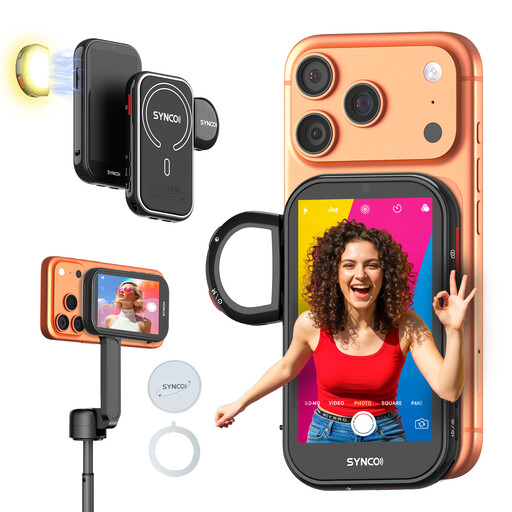
SYNCO Wireless AI Selfie Monitor Screen

SYNCO Wireless AI Selfie Monitor Screen

Designed to mirror the rear camera view of a compatible smartphone; check that it works with your phone and teaching setup.

The product description lists wired and wireless phone mirroring, wireless control, a fill light and a built-in speaker.

View at Joybuy
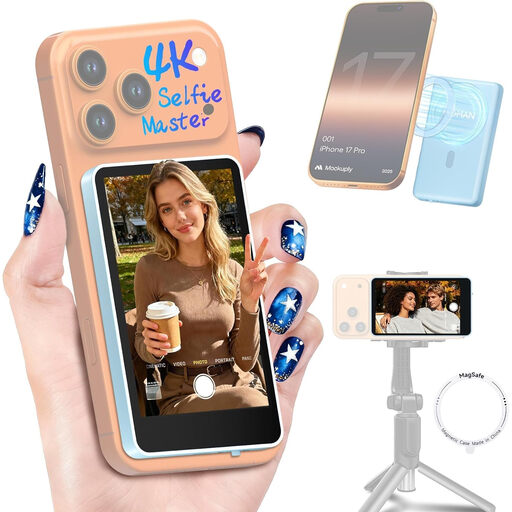
Moman M4 Phone Vlog Selfie Monitor, iPhone 7-18 and Android, blue

Moman M4 Phone Vlog Selfie Monitor, iPhone 7-18 and Android, blue

An option for viewing footage from a compatible phone camera while filming; check that the stated compatibility suits your phone.

The product description lists wireless display, a Bluetooth shutter button, magnetic mounting and a 1300 mAh battery with up to 3 hours of use.

View at Joybuy
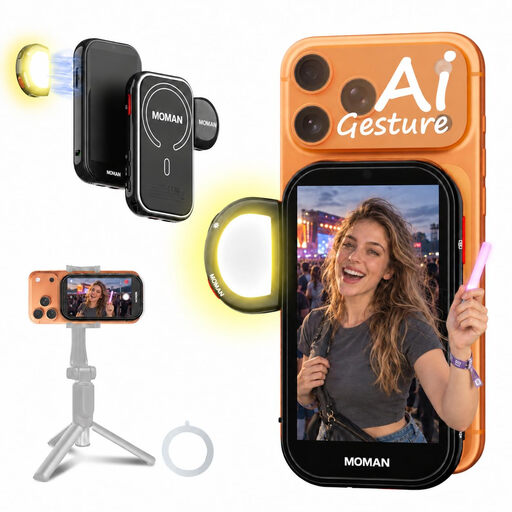
Moman M4 AI Selfie Monitor Screen, black

Moman M4 AI Selfie Monitor Screen, black

Designed to mirror the view from a compatible phone camera; only choose this if your setup works with the stated phone connections.

The product description lists wired 4K mirroring and wireless display of the iPhone rear camera view, gesture control, a magnetic fill light and a weight of 130 g. For wired Android display, the description specifies HCCast and excludes Google Pixel.

View at Joybuy

Frequently asked questions

Does a camera monitor need to have the same resolution as your 4K recording?

No. Panel resolution and the camera signal the monitor accepts are separate specifications. Atomos lists a 1920 × 1080 screen and monitoring of certain 4K signals at up to 30 frames per second for the Shinobi II. So compare your camera’s output signal in the recording mode you use with the monitor input.

How can you avoid power problems during a lesson?

First decide where the monitor will be positioned and how long you’ll use it. Atomos lists NP-F and USB-C PD as power options for the Shinobi II; Portkeys lists NP-F and LP-E6 among the options for the PT5 II. Also check which accessories are included with the version you’re buying.

What rights do you have when buying a monitor online?

According to the Netherlands Authority for Consumers and Markets’ consumer advice service (ACM ConsuWijzer), consumers who buy online generally have a statutory cooling-off period of up to 14 days after delivery, subject to exceptions. The statutory guarantee is separate from any manufacturer’s warranty: when used normally, the product must meet what you could reasonably expect from it.

Can you film other people in a shared workspace and publish the lesson?

Not without more. The Dutch Data Protection Authority considers identifiable people in footage to be personal data; professional or public use requires a lawful basis under the GDPR. The applicable basis depends on who is filming, who is identifiable in the footage and what happens to the recording. Let the people involved know about the recording and publication.

What should you check when buying an electronic device in the Netherlands?

The Dutch Government states that electronic devices in the EU must carry a CE mark. Check the marking and product information for the specific version you’re considering.
