
Camera user who wants to see the details
You’re filming at a worktable and want to check the framing and focus while keeping your hands free. First, check whether your camera has a compatible HDMI output.


Start with your recording device: choose an HDMI field monitor if your camera can output a compatible live feed, or a phone monitor that works with your handset if you’re filming with the rear camera. For fine cutting lines, focus-assist tools and clear visibility from your working position are important. Also check that the screen, cables and power supply will fit in your shared workspace.
You’re filming at a worktable and want to check the framing and focus while keeping your hands free. First, check whether your camera has a compatible HDMI output.
You’re filming with the rear camera but can’t see your phone screen clearly from your workspace. Whether a phone monitor will work depends on its compatibility with your handset.
You want to fit the screen, cables and power supply in without getting in the way of your carving. If you share footage, you’ll also want to check whether anyone you live with appears recognisably in shot.
First choose a signal connection that works with your camera or phone. Then consider detail visibility, table space and power.
| What to consider | What should you check? | Who is this important for? |
|---|---|---|
| Connection | Check your camera’s video output and supported signals, or confirm compatibility with your exact phone model. | If I’m filming with a camera or phone, I first want to know whether the image can reach the monitor. Around 36% of consumers make connection their top priority. |
| Clarity and detail | Check that the screen is easy to read from your working position and that tools such as focus peaking or image magnification suit the way you work. | When I’m working on fine cutting lines, I want to check while filming that the relevant area is in focus. Around 29% of consumers put detail checking first. |
| Workspace and privacy | Try positioning the screen, mount and cables without obstructing your cutting movements. Check footage for identifiable people before sharing it. | In a shared bedroom, I want to film my work without blocking my workspace or unintentionally capturing someone I live with in an identifiable way. Around 21% of consumers prioritise space and privacy. |
| Power and accessories | Check the power requirements and what’s included with the version on offer. Bear in mind how long your filming sessions will be. | For a complete setup, I want to know in advance what power supply and mount I’ll need. Around 14% of consumers look at this first. |
A monitor that accepts a 4K signal doesn’t automatically have a 4K-resolution panel. According to Portkeys’ specifications, the PT5 II can receive a 4K UHD signal up to 30p and has a resolution of 1920 × 1080.
Read the panel resolution and maximum supported input signals as two separate specifications.
SmallRig states that the 4851 isn’t compatible with the Google Pixel series or Samsung S22 series.
Check your exact phone model and the monitor’s model number, rather than relying on the general operating system compatibility information.
An incompatible combination could mean a return or a replacement purchase.
The Atomos Shinobi GO and Shinobi II don’t offer the same camera control features. The FEELWORLD P6XL can also differ from other FEELWORLD models in terms of screen and power.
Compare the full model name and check the power supply and contents of the exact version you’re considering.
The Dutch Data Protection Authority distinguishes between strictly personal use or sharing with a very limited group and wider publication.
Point the camera at your work and hands. Review the footage before sharing it, and check whether anyone you live with is recognisable.
The PT5 II is a compact HDMI option for checking focus and exposure at your worktable.
The Shinobi II and Shinobi GO are HDMI monitors for viewing your footage. The Shinobi II is also worth considering if you want to control a compatible camera.
The P6XL offers an HDMI connection and a larger screen for viewing your footage, with a built-in battery.
The 4851 is designed for viewing footage when filming with the rear camera on a compatible phone, not with an HDMI camera.
The Indie 5 offers HDMI and SDI connections for professional camera workflows. These connections aren’t necessarily needed for a small bedroom setup.
This selection includes a phone monitor and a USB-C monitor. Check that your chosen screen and connection work with your recording device. If you share a worktable, also consider how much space you have available.
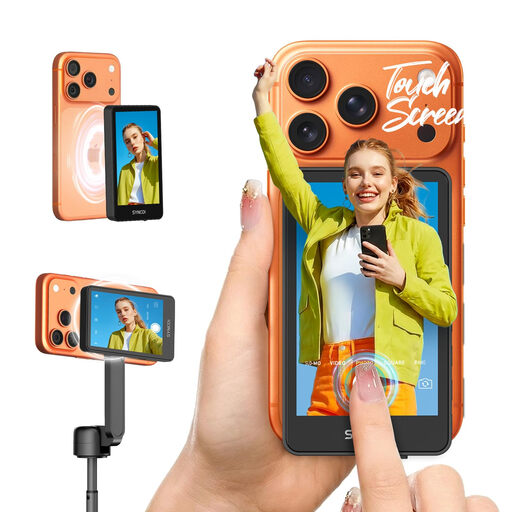 No image available
A phone monitor to consider if you film with the rear camera and want to see the screen from your working position.
The product name mentions touchscreen control and compatibility with iPhone 7-17 and Android. Check that your exact handset is supported.
 No image available
This larger screen may suit you if you have a spacious worktable and want a bigger view while filming.
The product name specifies a 23.8-inch FHD screen and USB-C. Check that the connections work with your recording device. The screen’s size will take up space on your worktable.
Not necessarily: the output and connection need to be compatible with the screen. The SmallRig 4851 is a separate phone-monitor option. Check your exact phone model, as SmallRig excludes the Google Pixel series and Samsung S22 series for this model.
First decide where to position the camera and where you can see the screen from your carving position. Then make a short test recording and check that the mount, cable and power supply are clear of your usual hand movements, and that the stamp is in focus.
Follow the instructions for your chosen model when cleaning, storing and charging it. After filming, check that the connections are clean. If the model has a built-in battery, charge it according to the manufacturer’s instructions.
For a consumer purchase in the Netherlands, the product must meet reasonable expectations. According to the Dutch government, you should contact the seller if there’s a fault. Your statutory guarantee is separate from the manufacturer’s warranty. Applicable online consumer purchases generally also come with a 14-day cooling-off period, which is different from a remedy for a faulty product.
Don’t assume that private use and wider publication are the same. The Dutch Data Protection Authority distinguishes between personal use or sharing with a very limited group and wider publication. Keep the camera on your work and check any recognisable people in the footage before sharing it.