Who is this choice relevant to?

Creator of close-up soldering videos

Wants to check that small solder joints are in focus while filming. Focus peaking and image magnification are features worth comparing; FEELWORLD, Portkeys and Nikon describe relevant monitor and macro lens features.

Creator with an existing camera set-up

Wants to add a monitor without choosing an incompatible video signal, camera mode or power connection. Compare the specifications of the exact monitor with those of your camera; Canon Europe and Atomos describe considerations that depend on the model and settings.

Creator monitoring from the workbench

Wants to follow their work and framing from a comfortable viewing position, and choose a screen size that suits the available mounting space. NEEWER and Cameranu describe field monitors and features that can help you make this choice.

What should you look for when buying?

Consideration What to check when buying Who is this most important to?
Focus on fine details Check whether the exact model offers focus peaking and useful image magnification; assess these features with your camera and working distance. When I film small solder joints, I want to see whether those details are in focus. Around 36% of consumers give focus checking top priority.
Camera and signal compatibility Compare the HDMI output in your chosen recording mode with the input signals supported by the exact monitor; check the connectors too. I want to know in advance whether my camera outputs a signal that the monitor accepts in the selected mode. Around 29% of consumers prioritise connection compatibility.
Monitoring and framing Consider your viewing distance, available screen space and where you can mount the monitor. At the workbench, I want to follow my hands and framing without the screen getting in the way. Around 21% of consumers give monitoring and framing top priority.
Power and complete set-up Check which power supply, cables and mounting parts are included with the specific version, and what else your set-up needs. For a longer recording session, I want to know what else I need to use the monitor at my workstation. Around 14% of consumers focus mainly on the complete set-up.

Common mistakes

  • Assuming ‘4K HDMI’ means a 4K screen

    Screen resolution and the video formats a monitor can receive via HDMI are different specifications. Portkeys lists the PT5 II’s screen resolution as 1920 × 1080 and its maximum HDMI input as up to 4K UHD at 30p.

    Compare both the screen resolution and the supported HDMI input formats with your camera’s output mode.

  • Assuming a monitor also records or passes through the signal

    An HDMI input does not prove that a model also has an HDMI output or recording function. Atomos lists an HDMI input for the Shinobi II; features vary by model.

    Check separately whether the exact model can record or pass through an HDMI signal if your set-up requires it.

  • Comparing a monitor on its own with a complete bundle

    Power supplies, cables and mounting parts can vary between versions and bundles. NEEWER lists the F100 and an F100 battery bundle as separate versions.

    Compare what’s included in the specific offer with the parts you need, such as a suitable power supply, HDMI cable and mount.

Brands to compare

Portkeys

The PT5 II is a compact HDMI monitor for anyone looking for focus and exposure aids.

  • Portkeys says the PT5 II has a 5-inch screen, peaking, false colour, HDMI input and HDMI output.
  • Maximum HDMI formats are model-specific; according to the manufacturer, MOVNORM OS is listed only for the PT5 II (V4).

FEELWORLD

The FW568 PRO is a 6-inch HDMI option for anyone looking to combine screen space with monitoring features.

  • FEELWORLD lists a Full HD panel, up to 4K@60Hz HDMI transmission and a specified brightness of 1200 nits for this model.
  • These specifications apply to the FW568 PRO and do not necessarily describe other monitors from the brand.

NEEWER

The F100 is a 7-inch field monitor for anyone considering a larger screen for monitoring.

  • According to NEEWER, the F100 has a resolution of 1280 × 800 and a specified brightness of 450 nits.
  • Check which version and accessories are included in the offer; the F100 and a battery bundle are listed separately.

Atomos

The Shinobi II is worth considering if you want a compact screen and potentially the ability to control your camera.

  • Atomos lists a 5-inch screen, 1500 cd/m² and USB-C camera control for the camera systems specified.
  • Support for a camera brand does not confirm that every model or feature will work. Atomos lists HDMI input, not HDMI output, for the Shinobi II.

SmallHD

The Indie 5 is worth considering if you need SDI or more advanced production features as well as HDMI.

  • SmallHD specifies HDMI and SDI connections for the Indie 5.
  • According to SmallHD, licences for certain camera control features are sold separately; check what your camera supports.

Joybuy product selection

This selection is a desktop monitor for anyone who wants a larger screen at a fixed workstation. Before buying, check that the camera output, connections and power supply suit your set-up.
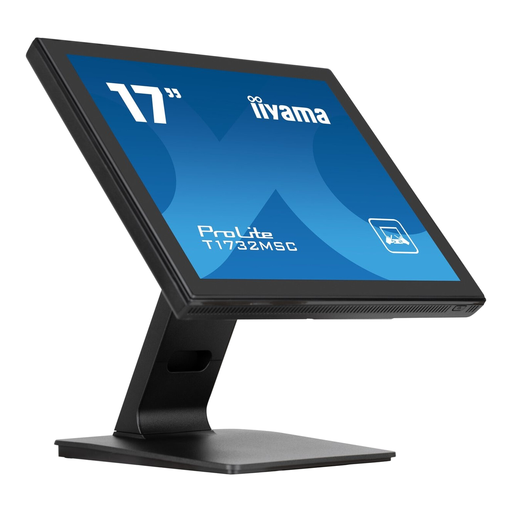
iiyama ProLite 17-inch 1280 × 1024 LED touchscreen monitor, black

iiyama ProLite 17-inch 1280 × 1024 LED touchscreen monitor

The 17-inch size may suit you if you want a larger image at a fixed workstation; check that the connections work with your camera and set-up.

17 inches; 1280 × 1024; LED touchscreen; black.

View at Joybuy

Frequently asked questions

Can an external monitor make out-of-focus soldering look sharp in the recording?

No. A monitor displays what the camera sends it, but it cannot make an out-of-focus recording sharp. The right lens and accurate focus still matter; use peaking or image magnification to check the picture while filming.

What should I check before connecting the monitor?

Compare your camera’s HDMI output in the selected recording mode with the input formats supported by the monitor. Also check the connector type and what happens to the external display and internal recording in that camera mode.

How can I keep the monitor working during a longer studio session?

Check which battery or continuous power supply the exact model supports and which parts are included with the version on offer. Secure the monitor firmly, keep cables away from your soldering area and follow the manual for the model you buy.

Do I always get only a two-year warranty in the Netherlands?

No. ACM ConsuWijzer explains that your statutory guarantee depends on what you could reasonably expect from the product under normal use. If a product is faulty, the seller must provide an appropriate remedy free of charge, according to ACM ConsuWijzer.

Which product safety rules apply to an electrical camera monitor in the Netherlands?

Check whether the relevant EU product requirements and required CE marking apply to the specific version, and whether they have been met. The Dutch government and Ondernemersplein explain that CE marking is compulsory for certain product groups; a brand name or model specification alone does not confirm that the version you are buying complies.
