
Filming at a small worktable
You want to see your hands and the whole sheet of paper while teaching, without putting a large screen on the work surface. So compare not just screen size, but also the weight and how much room the mount takes up.


Start by finding a position where you can see the entire work surface, then check that your camera’s video signal is compatible with the monitor. A compact HDMI screen with focus-assist tools could work well on a cramped table. Higher brightness or exposure tools are most useful when the lighting changes, but remember to allow space for the screen, battery and mount too. This comparison is based on the stated product specifications, not on a practical test at a collage-making table.
You want to see your hands and the whole sheet of paper while teaching, without putting a large screen on the work surface. So compare not just screen size, but also the weight and how much room the mount takes up.
You switch between a wide view and close-ups of cutting or sticking, and want to check the focus and exposure of the camera feed. The image-assist tools available vary by model.
You film in daylight by a window or move your lights around, and want to be able to read the screen and check the exposure. Look at both the stated brightness and the image-analysis tools available.
First, measure where the screen, mount and power supply can go. Then check your camera’s signal and the features you’ll actually want to use while teaching.
| What to consider | What to look for | Who is this important for? |
|---|---|---|
| Space on the table | Measure the available space and allow for the screen, mount, cables and battery. | If I want to keep the collage area clear, I’ll check whether the monitor can fit beside or above the table. For around 36% of consumers, a usable picture without an obstructed work surface is the top buying priority. |
| Focus and framing | Check whether the monitor offers focus-assist tools and supports your camera’s HDMI format. | When working on small cutting and sticking details, I want to see whether the edges are in sharp focus. That’s the top priority for around 29% of consumers. |
| Lighting and image monitoring | Compare the stated brightness and tools such as waveform, histogram or zebras; try out the screen position with your own lighting. | When the light on the table changes, I want to be able to read the screen and assess the picture. Around 21% of consumers give this kind of monitoring top priority. |
| Signal and power | Check the camera output, monitor input and supported frame rate, as well as the battery, cables and power source you’ll need. | For a longer lesson, I want to know whether the signal and power will work with my setup. Connections and power are the top buying priority for around 14% of consumers. |
A monitor won’t necessarily support every camera signal. For example, Atomos states that the Shinobi II supports HDMI up to 4K30 or 1080p60.
Check your camera’s manual to see which video output is available while filming, then compare it with the exact monitor model.
A different cable or output setting may require extra preparation.
The screens reviewed range from 5,2 to 6 inches. The stated brightness won’t tell you how much room the screen, mount, battery and cables will take up on your table.
Measure the available space first and decide where the monitor can go while you’re filming.
A separate mount or a different place for the monitor and power supply may take up extra space.
According to FEELWORLD, the F6 PLUSX has an HDMI output; Atomos lists only an HDMI input for the Shinobi II. USB-C camera control on the Shinobi II depends on the camera.
Decide whether you need a second screen or control from the monitor, then check the connections and compatibility.
You may need a different monitor or additional compatible equipment to use these features.
The PT6 is a compact HDMI monitor to consider if you want to mount the screen away from a small work surface. The LH5P II is a separate model with more extensive camera control, according to Portkeys.
The F6 PLUSX is a 5,5-inch HDMI monitor with a loop-through output. The FW568 PRO is a separate 6-inch model.
The Shinobi II is a 5,2-inch HDMI monitor with tools for checking focus and exposure on screen.
The Indie 5 is most relevant if you need 3G-SDI as well as HDMI in your existing professional setup.
The F500 PRO is a 5,5-inch HDMI model with several stated mounting and power options.
This product selection is for filming a collage lesson with a compatible smartphone: the screen displays a live preview from the rear camera. This is a different setup from using an HDMI monitor with a standalone camera.
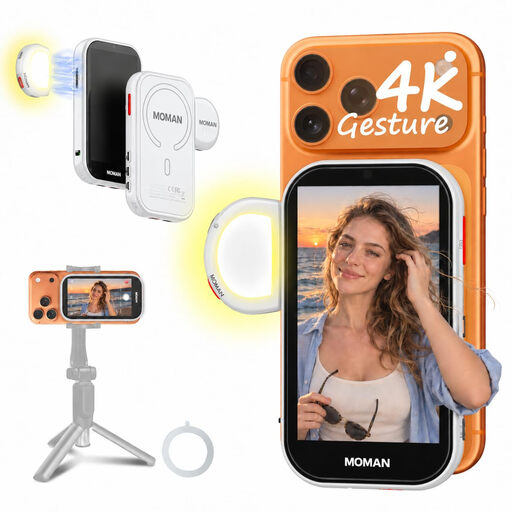 Image unavailable
Use it to view the rear camera’s composition on a separate screen while filming with a compatible phone.
4,02-inch screen and stated weight of 130 g; magnetic attachment to compatible phone cases.
The product description lists iPhone 7–17 and supported Android phones. A wired Android connection requires HCCast.
No. Check your camera’s video output, connection, resolution and frame rate, then compare them with the monitor. Atomos states that the Shinobi II supports up to 4K30 or 1080p60 via HDMI; USB-C camera control is a separate feature and depends on the camera.
Choose a stable position outside the collage-making area where you can see the whole frame. Atomos lists a 1/4-inch-20 thread mounting point for the Shinobi II; the mount and viewing angle need to suit your setup.
It depends on the monitor, power supply and recording time. Atomos lists an NP-F battery or continuous power via USB-C PD for the Shinobi II, and states that the model has no built-in battery. Check in advance that you have the power supply and cables you need.
When you buy as a consumer in the Netherlands, you have statutory rights if a product doesn’t meet expectations. ACM ConsuWijzer explains that the expected lifespan under normal use is taken into account, and that the legal guarantee is not simply a fixed two-year period. The cooling-off period for an online consumer purchase is separate: it generally ends 14 days after delivery, subject to legal exceptions.
The Dutch government states that electronic devices sold in the EU must carry a CE mark. Check the marking and product information for the version you intend to buy; a general model description doesn’t confirm that a specific offer has been checked.