Who is this guide for?

Filming by a bright window

You want to keep the paper and frame in view when daylight falls on the screen. Compare the stated brightness and try positioning the monitor so reflections don’t obstruct your view. The Videomakers and monitor manufacturers highlight brightness and screen visibility as important considerations.

Teacher demonstrating precise folds

When filming from above, you’ll want to check that your hands and small fold lines are in focus, and that light-coloured paper is easy to assess. The Videomakers, Portkeys and FEELWORLD offer useful points of comparison for screen detail and monitoring tools.

Maker with a compact setup

You want to position the monitor above or beside the worktable without an impractical cable and battery setup. Power options vary by model; Portkeys and FEELWORLD list different solutions.

What should you look for when buying?

What to consider What should you check? Who is this important for?
Reading the screen in window light Compare the stated brightness of the exact model and see whether you can position the monitor away from direct reflections. If daylight falls on the screen, I want to be able to see the paper and frame clearly. Around 29% of consumers prioritise readability in window light.
Checking fold lines and exposure Check the panel resolution and whether the model has tools such as zoom, focus peaking, waveform or false colour. When demonstrating precise folds, I want to be able to assess hands, lines and light-coloured paper while filming. Around 29% of consumers prioritise fold detail and exposure.
Video signal and connection Compare your camera’s video output, including resolution and frame rate, with the monitor’s input specifications and the cable you’ll need. Before comparing extra features, I want to know whether my camera sends the right signal to the monitor. Around 24% of consumers prioritise signal compatibility.
Power and positioning Check the battery type or power input, the mounting options and which accessories are included with the version you’ve chosen. For a lesson at a table, I want to position the monitor without power cables or batteries getting in the way. Around 18% of consumers prioritise power and positioning.

Common mistakes

  • Confusing a 4K input with a 4K screen

    The resolution an input accepts and the number of pixels on the monitor screen are two different things. Portkeys lists the PT6 as supporting UHD 4K at up to 30 frames per second, with a screen resolution of 1920 × 1080 pixels.

    Compare both the supported camera signals and the panel resolution of the exact model.

  • Assuming every version includes a battery

    According to FEELWORLD, the standard accessories for the FEELWORLD F5 PROX do not include a battery or power adapter; versions may vary.

    Check what’s in the specific package and what power source you’ll need before ordering.

    This version may need a separate battery or power adapter. The parts required depend on the version and setup you choose.

  • Assuming you can control your camera based on the brand name

    Camera touch control on the Atomos Shinobi II depends on the camera model and firmware.

    Check the compatibility information for your exact camera and firmware before relying on this feature.

Brands to compare

Atomos

The Shinobi II and Shinobi GO are compact HDMI monitors. The Shinobi II also offers camera control for supported cameras.

  • Atomos states a brightness of 1500 cd/m² for both models.
  • Camera control on the Shinobi II depends on the model and firmware. Check the compatibility information for your camera.

FEELWORLD

The F5 PROX offers monitoring tools, while the P6XL is another option if you’re looking for a built-in battery.

  • FEELWORLD states that the F5 PROX has a brightness of 1600 nits. The manufacturer lists 1200 nits and around 2 hours of use at 100% brightness for the P6XL.
  • According to FEELWORLD, the standard accessories for the F5 PROX don’t include a battery or power adapter. Check which version you’re buying.

Portkeys

The PT6 and HD7H differ in screen size, brightness and panel resolution, among other things.

  • Portkeys lists the PT6 at 600 nits and 1920 × 1080 pixels; the HD7H is listed at 1000 nits and 1280 × 720 pixels.
  • Brightness, readability and panel detail are separate considerations. Assess them in relation to your setup and the paper you’re filming.

Viltrox

The DC-X2 is a 6-inch HDMI monitor with monitoring tools.

  • Viltrox specifies a 1920 × 1080-pixel screen and 2000 nits for the DC-X2.
  • According to Viltrox, the DC-X2 has HDMI. SDI is available on the separate DC-X3 version.

Godox

The GM6S Pro Camera Monitor Kit 2 is a version where the included cables and mount may be useful for a tabletop setup.

  • Cameranu lists HDMI cable variants and a monitor mount among the items included in the kit.
  • Before buying, check which cables and mounting parts are included with the specific kit.

Joybuy product selection

This Joybuy pick is a wireless selfie monitor screen. Before choosing it for a paper-folding lesson, check that the connection and mounting options are suitable for filming from above.
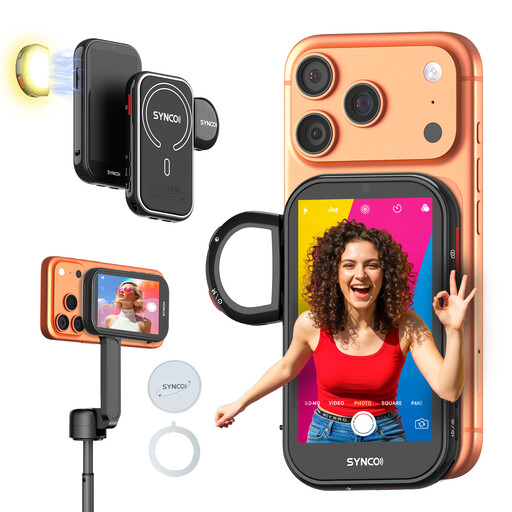
SYNCO Wireless AI Selfie Monitor Screen

SYNCO Wireless AI Selfie Monitor Screen

It could suit a shoot where you want a separate screen to monitor the footage as you film. First, check that the connection and mounting options work with your camera and overhead setup.

The product name describes a wireless AI selfie monitor screen.

View at Joybuy

Frequently asked questions

Do I need a monitor with a 4K screen for a 4K camera?

No, not necessarily: the input and the screen have separate specifications. Portkeys lists the PT6 as supporting UHD 4K at up to 30 frames per second, while its screen has 1920 × 1080 pixels. Check that the monitor accepts your camera’s output setting.

How should I position and power a monitor during a long folding lesson?

Position the monitor so you can check the overhead view without blocking the work surface. Then compare the power options for the exact version: Portkeys lists a Sony NP-F-type battery or external power for the HD7H; FEELWORLD lists a built-in battery for the P6XL, with around 2 hours of use at 100% brightness. Before filming, also check the cables, mounting options and remaining battery life.

What are my rights if a monitor I bought online doesn’t work properly?

For a consumer purchase in the Netherlands, the product must conform to the contract. The Dutch government states that there is no fixed statutory guarantee period and that you should contact the seller if there’s a fault. Online purchases from a business also often come with a 14-day cooling-off period, subject to applicable conditions and exceptions.

Can I publish a paper-folding lesson featuring identifiable people?

This may depend on how the footage is used and shared. According to the Dutch Data Protection Authority, the GDPR may apply when identifiable people are filmed outside a very limited private setting, or when the footage is shared. For business use or publication, you’ll need an appropriate legal basis under the GDPR; consent is one possible example. Different rules may apply if the footage remains private.
