
Artists filming from above
You want to check that your hands, lines and paper stay in focus and well framed as you draw. The Atomos Shinobi II and Portkeys PT5 II are examples with tools for checking your image.


Choose a camera monitor that genuinely supports your camera’s HDMI signal and lets you check details from your drawing position. Then consider screen placement, image-assistance tools and power in relation to your lighting and recording time. A bigger or brighter monitor won’t make checking cables and compatibility any less important.
You want to check that your hands, lines and paper stay in focus and well framed as you draw. The Atomos Shinobi II and Portkeys PT5 II are examples with tools for checking your image.
First, check that your camera output, cable and monitor can all handle the same video signal. Check the input specifications for the exact model; an HDMI port alone doesn’t guarantee support for every signal.
You want to be able to see the screen clearly without cables or power supplies getting in the way of your drawing space. FEELWORLD says the P6XL has a built-in battery; according to Atomos, the Shinobi GO can run on an L-series/NP-F battery or optional USB-C-PD power.
Start with your camera’s signal, then decide which image-checking tools, screen placement and power options suit your drawing set-up.
| What to consider | What should you check? | Who is this most relevant to? |
|---|---|---|
| Camera signal compatibility | Compare your camera’s HDMI output, resolution and frame rate with the monitor’s input. Portkeys lists a maximum UHD 4K30 input for the PT5 II. | If I already own the camera, I want to be sure the monitor receives the signal I’ve selected; around 33% of consumers prioritise signal compatibility. |
| Checking drawing details | See whether features such as peaking, waveform or false colour suit what you want to check while drawing. Portkeys lists these tools for the PT5 II. | When filming from above, I want to check lines, hands and lighting as I record; around 27% of consumers give checking drawing details their highest priority. |
| Visibility in your working light | Compare the stated brightness and screen size, but also consider reflections and where you can mount the monitor. A manufacturer’s stated figure doesn’t guarantee visibility in your workspace. | If lights are reflecting off the screen, I still want to be able to see the image from my drawing position; around 20% of consumers prioritise visibility in working light. |
| Power and placement | Choose a power option to suit the length of your sessions, and check which battery, charger and mounting equipment you’ll need. FEELWORLD states that the P6XL runs for around 2 hours at 100% brightness; Atomos lists a replaceable battery or optional USB-C-PD power for the Shinobi GO. | If I’m recording for a long time at a small table, I want enough battery life without loose equipment taking up my drawing space; around 20% of consumers prioritise power and placement. |
A monitor can accept a 4K signal without having a 4K panel. According to Portkeys, the PT5 II has a panel resolution of 1920 × 1080 pixels and accepts input up to UHD 4K30.
Check the panel resolution separately from the maximum input resolution and frame rate.
Stated figures describe a model, not how clearly you’ll be able to see the screen under your lights or from your viewing angle.
Consider where you can position the monitor in relation to your lighting and drawing surface.
The Atomos Shinobi II and Shinobi II + Accessory Kit Version II are separate product listings; don’t assume they include the same items.
Before buying, check which cables, mounting parts and power accessories are included with the exact version.
According to Business.gov.nl, the statutory 14-day cancellation period applies to consumers, not to business purchases made by a business owner.
Before checking out, decide whether you’re buying as a consumer or for business, and check the terms that apply to your order.
The Shinobi GO and Shinobi II are compact HDMI monitors. According to Atomos, the Shinobi II adds camera control features for supported models.
The P6XL is designed for a set-up with a built-in battery; the FW568 PRO is a separate HDMI monitor.
The PT5 II is a compact 5-inch HDMI monitor with tools for checking focus and exposure.
The GM6S Pro is an on-camera monitor.
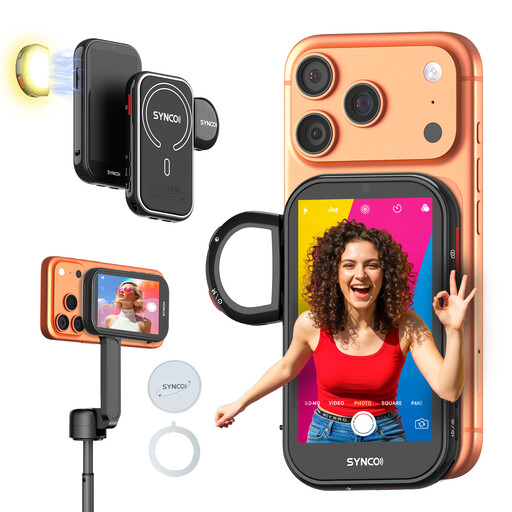
This product is designed for monitoring footage captured with a compatible iPhone; it isn’t an HDMI camera monitor for a separate camera.
 No image available
If you’re filming a drawing demonstration with a compatible iPhone, you can use this to view footage from the rear camera.
According to the product description, the screen supports wired mirroring and wireless monitoring up to 50 m. Listed features include 4K at 30 fps, a magnetic mount and a fill light.
The description lists a 1500 mAh battery and over 3 hours of use. Check that your specific iPhone is compatible; according to the stated limitation, the product isn’t suitable for Google Pixel.
Not necessarily. Portkeys lists UHD 4K input up to 30p for the PT5 II, but the panel has a resolution of 1920 × 1080 pixels. Check the input and panel resolutions separately.
Compare the length of your session with the power options for the exact model. FEELWORLD states that the P6XL runs for around 2 hours at 100% brightness and specifies a 9 V charger; Atomos lists an NP-F battery or optional USB-C-PD power for the Shinobi GO.
No. According to Business.gov.nl, the statutory 14-day cancellation period applies to consumers, not to business purchases made by a business owner. Before placing a business order, check the applicable terms; consumer purchases are subject to statutory terms and exceptions.
For a consumer purchase, you’re entitled to a product that works as it should; according to the Government of the Netherlands, there’s no fixed statutory warranty period in the Netherlands. Contact the seller if there’s a problem. For a business purchase, don’t assume that the same consumer rights apply.
Footage in which people can be identified may count as personal data. According to the Dutch Data Protection Authority, filming and publishing for professional or commercial purposes requires a lawful basis under the GDPR; consent is one possible basis. If you only film paper and hands that can’t be identified, this information doesn’t indicate that the footage contains personal data.