
Creators filming fine pen strokes
If you want to check that the nib and fine lines are in focus during close-ups, compare the magnification and focus-assist tools on the exact model. Portkeys lists peaking among its monitoring aids.


Choose a monitor that accepts your camera’s video signal and is easy to see from your writing position. For fine pen strokes, magnification and focus-assist tools are useful; when working with light-coloured paper, exposure-assist tools can help you assess the image. The stated brightness and features vary by model and, on their own, say nothing about the quality of the final recording.
If you want to check that the nib and fine lines are in focus during close-ups, compare the magnification and focus-assist tools on the exact model. Portkeys lists peaking among its monitoring aids.
If you’re filming ink on white or light-coloured paper, you’ll want to check while filming that the paper and ink remain distinguishable. Portkeys lists histogram and false-colour features for monitoring; also check the image with a test recording under your own lighting.
If your camera is positioned above your work surface, you’ll need to be able to reach the screen, cable and power supply without getting in the way of your hands. Atomos and Feelworld describe different power options; also check how you’ll mount the screen in your setup.
A good fit if: your camera provides a compatible HDMI signal and you mainly want to check the nib, paper and framing. Portkeys lists peaking, histogram and false colour for the PT5 II.
Consider: the stated screen brightness of the PT5 II is 500 cd/m²; think about how the screen and incoming light will interact in your setup.
A good fit if: you need to read the screen beside a window or further away from the camera. Atomos specifies 1500 cd/m² for the Shinobi II and Shinobi GO.
Consider: brightness doesn’t guarantee good visibility in every lighting condition; the Shinobi II has no built-in battery, and camera control only works with supported cameras.
A good fit if: you want to minimise the need for a separate monitor power supply or connect a second screen. Feelworld lists a built-in battery for the P6XL; according to Portkeys, the PT5 II has an HDMI output.
Consider: Feelworld states that the P6XL runs for two hours at 100% brightness; plan for a suitable power supply if you’re teaching for longer.
| What to consider | What should you check? | Who is this important for? |
|---|---|---|
| Sharpness of the nib and lines | Magnification, peaking, panel resolution and screen position. | If you want to assess fine lines in close-ups without relying solely on the camera screen, visible detail is the main priority for consumers focused on sharpness; this applies to around 36%. |
| Exposure of the paper and ink | Check which histogram, waveform, zebra or false-colour tools the model offers, and make a test recording with your own lighting. | If you want to see whether the light areas of the paper and ink remain distinguishable in the image, consumers focused on exposure mainly look for monitoring tools and the ability to make a test recording; this applies to around 29%. |
| Camera connection | Check the HDMI output, cable connector and signal in your chosen filming mode; check camera control separately from image display. | If you first want to know whether the camera and screen work together in your chosen filming mode, the signal connection is the main priority for consumers focused on compatibility; this applies to around 21%. |
| Positioning and power | Check the line of sight from your writing position, mounting, cable route and power supply for the length of your lesson. | If the screen and cables must not get in the way of your hands on the work surface, positioning and power matter most to consumers focused on an easy setup; this applies to around 14%. |
A supported HDMI signal, the monitor panel’s resolution and recording capability are separate features. Atomos specifies a 1920 × 1080 panel for the Shinobi II.
For the exact model, check the supported input signals, panel resolution and any recording capability separately.
For the Shinobi II, Atomos distinguishes HDMI video input from camera control via USB-C; camera control is available with supported camera models.
Check your full camera model and the connection required for the control feature.
A screen that fits doesn’t automatically mean you’ll be able to see it easily from your writing position. The monitor, mount and cable must not block the space you need for your hands.
Plan the positions of the camera, screen and work surface, then check which cables, mounting options and power supply are compatible with the exact version.
The Shinobi II and Shinobi GO are options if you’re looking for a bright HDMI monitoring display; the Shinobi II adds camera control for supported cameras.
The P6XL is worth considering if a built-in battery suits your overhead setup; the F5 Pro V2 is a separate model to compare by its specifications.
The PT5 II is a good fit if you’re looking for a compact HDMI monitor with focus and exposure aids for a sheltered workspace.
The GM6S Pro Kit 2 is worth considering if you’re looking for a bundle for a camera setup with a monitor and cables.
The Indie 5 is an option to compare if you need 3G-SDI as well as HDMI.
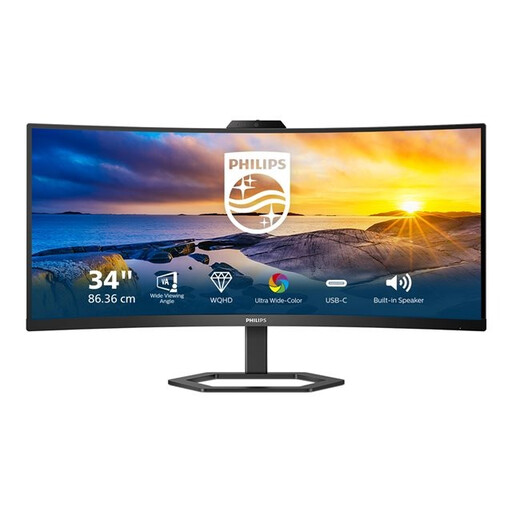
A Joybuy HDMI screen that may be suitable as an external viewing display; first check your camera’s signal and the space around your work surface.
 No image available
This is a desktop monitor, not a dedicated camera monitor. Consider it only as an external viewing display if your camera outputs a compatible HDMI signal and the monitor fits your workspace.
Listed features: 34 inch, 3440 × 1440, 21:9 aspect ratio, 300 cd/m², 4 ms, HDMI, USB and DP. The product name also mentions a Windows Hello webcam.
The ultra-wide format may take up a lot of space around your work surface. Before buying, check your camera output, cable and preferred screen position.
Don’t assume you can: a monitor and recording equipment serve different purposes. Check whether the exact model can record and where your camera stores the video.
Not necessarily. Atomos distinguishes HDMI video input from camera control via USB-C on the Shinobi II and lists supported camera models for this feature. Check image connection and control compatibility separately for your camera.
First, work out where you can see the screen from your writing position, then check the mount, cable and power supply. Feelworld states that the P6XL runs for two hours at 100% brightness; Atomos lists no built-in battery for the Shinobi II and gives an NP-F battery or USB-C PD as power options.
According to the Dutch government, when you buy from a business at a distance, you have 14 days to change your mind; exceptions apply. Your statutory guarantee is separate: the Netherlands does not have one fixed statutory guarantee period for all products.
According to the Dutch Data Protection Authority, identifiable people in footage are personal data. For wider publication or commercial use, the exception for strictly personal or household use does not apply; check in advance which GDPR lawful basis applies.