
Filming close-ups of origami folds
You film the paper from above and want to spot small focus errors as you fold. Screen detail and focus aids matter more than remote camera control.


Start with your camera’s video output: the camera monitor needs to support the signal and image format you use while filming. Then choose a monitor that suits your setup. For small folds, focus aids and magnification matter; power, mounting and screen readability in window light may be more important in other situations. A stated brightness is a model specification, not a guarantee that the screen will be easy to read on your desk.
You film the paper from above and want to spot small focus errors as you fold. Screen detail and focus aids matter more than remote camera control.
You need to see the image while your hands are busy, and want to check in advance that the camera signal, viewing angle, mounting and power will all work together.
You want to keep assessing the light and dark areas of the paper as the ambient light changes. So compare screen readability and exposure aids, not just a brightness figure.
First, check that your camera outputs a video signal the monitor can handle. Then compare focus aids, positioning and power with the available desk space and lighting.
| What to consider | What should you check? | Who should pay particular attention? |
|---|---|---|
| Small folds and sharpness | Check the screen resolution, focus aids and magnification. Also consider how far away you’ll be when viewing the screen as you fold. | I want to assess small folds from above while my hands are moving; around 33% of consumers prioritise sharpness and fold detail. |
| Connecting to the camera | Check the exact camera model, connection, output resolution and frame rate in the recording mode you use. | I want to know before filming that my camera will send a supported signal to the screen; around 27% of consumers give compatibility top priority. |
| Positioning and power | Check the mounting point, viewing angle, battery or power supply required, and which cables and mounting accessories are included with the version you’ve chosen. | With a camera above my desk, I want to position the screen well and finish the lesson with a suitable power supply; around 20% of consumers prioritise setup and power. |
| Changing window light | Check for reflections from where you’ll be viewing the screen, and look at the brightness settings and available aids, such as waveform or false colour. | When the window light changes, I want to assess the paper and exposure on screen; around 20% of consumers give visibility in changing light top priority. |
According to their manufacturers, the Portkeys PT5 II and FEELWORLD F6 PLUSX have a panel resolution of 1920 × 1080. Support for a 4K input doesn’t mean the screen itself has a 4K panel or accepts every 4K frame rate.
Compare the panel resolution, HDMI input specification and your camera’s actual output separately.
An incompatible format may mean you need a different camera output setting, cable or monitor.
An external screen displays the camera image, but that doesn’t automatically mean it records the lesson too. If your camera records the footage itself, a monitor may be all you need to check the image. For external recording, the exact model must support that feature.
First decide where the recording will be stored, then check the features of the specific monitor.
If you later need external recording after all, you may need separate equipment.
According to Atomos, the Shinobi II doesn’t have a built-in battery. Camera control also requires a suitable control connection in addition to HDMI, and works only with compatible camera models.
Map out your whole setup before buying: camera, HDMI cable, screen position, mounting, power and any control cable you may need.
Depending on the model and setup you choose, you may need a battery, suitable power supply, mount or extra cable.
The PT5 II is a compact HDMI monitor worth comparing if you want to check focus and exposure from a fixed position.
The F6 PLUSX is an HDMI option to compare if screen brightness and exposure checks in window light are important to you.
The Shinobi II is worth considering if, as well as checking the image, you want to control a compatible camera from an awkward-to-reach position.
The DC-550 Pro II is another option to compare if your camera needs an HDMI signal of up to 4K 60 Hz.
The GM6S Pro is a model to compare separately if you’re considering a 4K camera monitor.
These Joybuy monitors provide an external screen for an origami setup. Before buying, check whether your camera can output a compatible video signal through the connection on the monitor you’ve chosen; a monitor doesn’t automatically record footage.
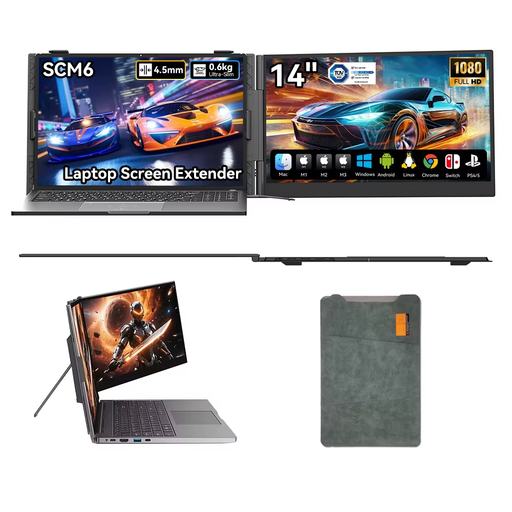 No image available
Could suit a desk setup where you want to position a separate 14-inch screen; using it as a camera monitor depends on your camera’s video output.
14 inches and 1080p; USB-C Plug & Play, built-in speaker and a 180° adjustable stand.
 No image available
An option if you have room for a large external screen; it could take up a lot of space on a student bedroom desk.
34.1 inches, curved WQHD (3440 × 1440), IPS panel, HDMI input, anti-glare finish and VESA mounting. The product name also lists a USB-C hub, webcam, 100 Hz and 90 W Power Delivery.
 No image available
Could suit you if you’re looking for an external screen to check your footage and have enough desk space; first check that the connection matches your camera’s video output.
27 inches, QHD IPS screen with a stated resolution of 2560 × 1440, 100 Hz and integrated webcam.
No. Having HDMI ports alone doesn’t guarantee a compatible image. Compare the output settings of your exact camera model with the monitor’s input specifications, and check that you have the right cable. Sony Support explains that recording and proxy settings on specific camera models can also determine which screen displays the image.
Only if the exact camera model and the required settings support this feature. Atomos describes a control connection in addition to HDMI for camera control. Before buying, check compatibility with your camera and the relevant firmware.
It depends on the model you choose and your setup. Atomos says the Shinobi II doesn’t have a built-in battery and can be powered by a suitable NP-F battery or USB-C PD. Check whether a battery, adapter and mounting are included with each version.
As a consumer in the Netherlands, you’re entitled to a product that meets the terms of your agreement; if there’s a fault, the seller must provide an appropriate solution. The Dutch government states that there is no fixed statutory warranty period. Online purchases from a business also generally come with a 14-day cooling-off period; check which terms and exceptions apply to your purchase.
Don’t assume that you can. The Dutch Data Protection Authority explains that identifiable people in footage count as personal data, so privacy laws apply. If possible, film only your hands and the paper. If others are identifiable or can be heard, consider your privacy obligations before sharing the lesson.