If your camera is already recording the lesson, a compact HDMI monitor is usually the obvious choice for checking focus and framing at your painting table. A larger screen may be more comfortable if you sit further away. Choose a monitor-recorder only if you need an external recording workflow. First check your camera’s HDMI signal, and bear in mind that a monitor that accepts 4K does not necessarily have a 4K panel.
Who is this guide for?
Close-up filming at the painting table
You film fine brushstrokes and want to check as you work that the model stays in focus and fully in frame. A practical report by Tangible Day on miniature painting videos describes how the camera angle and a hand in shot can obstruct the view of the model.
Creator with an existing camera
You want to connect an external screen without changing your camera or recording settings on a whim. Supported HDMI signals vary between monitor models, so compare them with your camera’s configured output.
Lesson creator with a recording workflow
You record lessons for a portfolio and are considering external recording only if your camera’s internal recording doesn’t suit your preferred file workflow. A monitor and a monitor-recorder serve different purposes.
What should you look for?
Compact monitor without recording
Best for: when your camera records the lesson itself and you want to check the brush tip, focus and framing close to your work surface. The Portkeys PT5 II is one example, with a 5-inch screen, peaking and a Full HD panel.
Trade-off: you’ll need to position the small screen where you can see it clearly while painting. Portkeys specifies a maximum brightness of 500 nits and an HDMI input up to UHD 4K/30p for the PT5 II.
Larger or brighter monitor
Best for: when you sit further from the screen or want several people to follow what you’re doing. The Portkeys HD7H has a 7-inch screen; FEELWORLD lists a 6-inch screen and HDMI signal processing up to 4K/60 Hz for the FW568 PRO.
Trade-off: a larger screen doesn’t automatically mean more panel detail. According to Portkeys, the HD7H has a 1280 × 720-pixel panel. Also check that you have room for the monitor, mount and cables.
Monitor-recorder
Best for: when you need an external recording workflow and the camera output, desired format and storage media are compatible with the recorder. Blackmagic says the Video Assist 5-inch 12G HDR records to an SD card or USB-C storage.
Trade-off: as well as monitoring your footage, you’ll need to manage storage, power and the file workflow. If your camera’s internal recording already meets your needs, the recording function won’t necessarily add anything.
| What to consider |
What to look for when buying |
Who is this important for? |
| Focus and framing |
Check the screen size, panel resolution and whether peaking is available; position the screen where you’ll look while painting. |
If I want to check fine brushstrokes and my hand might partly cover the model, I want to be able to check focus and framing. Around 36% of consumers say checking detail is their main buying concern. |
| Camera compatibility |
Compare your camera’s live HDMI output and connector with the resolution and frame rate supported by the exact monitor model. |
If you’re using an existing camera, you’ll want to know whether its configured signal appears on screen before changing anything. Around 29% of consumers make this connection their top priority. |
| Workspace and power |
Plan the screen position, cable routing and session length; check the power connection and what’s included with the model you’ve chosen. |
If I want to stay focused on my work during a long painting lesson, the screen and cables need to be practical. Around 21% of consumers prioritise their workspace setup and power. |
| External recording |
Check that the recorder supports your camera signal and preferred recording format, and find out what storage media you’ll need. |
If you want to record the lesson externally, you’ll need to know in advance whether your camera’s internal recording is insufficient and what workflow you’ll need. Around 14% of consumers name external recording as their main buying concern. |
Buying pitfalls
-
Mistaking ‘4K HDMI’ for a 4K screen
A monitor may accept a 4K signal even if its own panel has a lower resolution. According to Portkeys, the Portkeys PT5 II accepts UHD 4K/30p, but has a 1920 × 1080-pixel panel.
Check the supported input signals and the panel resolution as two separate specifications.
-
Buying a recorder when your camera already records the way you need
A monitor-recorder adds a separate recording and storage workflow; that’s different from simply monitoring a live feed.
First decide what recording problem you want to solve, then check the camera output, recorder and required media.
-
Choosing brightness without considering your painting space
A high stated brightness doesn’t, on its own, tell you whether you’ll be able to read the screen comfortably from your working position.
Consider the screen position and ambient light as well as the brightness specification. If you always paint indoors at the same table, outdoor readability may not be your top priority.
-
Assuming every model sold in the Netherlands has been checked
The Government of the Netherlands points out that electrical appliances placed on the EU market must meet the applicable product safety requirements and carry the required CE marking. A general manufacturer specification does not confirm that every model on offer complies.
Before buying, check the seller, the exact model, the required CE marking and which power supply or accessories are included.
Relevant brands to consider
Portkeys
The PT5 II and HD7H offer different screen sizes and panel resolutions, which you’ll need to weigh up separately.
- According to the official specifications, the PT5 II has a 5-inch, 1920 × 1080-pixel screen, peaking and a maximum UHD 4K/30p input.
- According to Portkeys, the HD7H has a 7-inch screen and a maximum brightness of 1000 nits.
- The HD7H has a panel resolution of 1280 × 720 pixels; brightness and screen size alone don’t tell you how easy the screen will be to read in your workspace.
FEELWORLD
The FW568 PRO is a monitor-only option for anyone who wants to view an HDMI signal up to 4K/60 Hz.
- FEELWORLD lists a 6-inch screen, 1200 nits and waveform tools for the FW568 PRO.
- These are manufacturer specifications. Compare signal support with your camera and check what’s included with the model on offer.
Atomos
The Shinobi II is a compact monitor for anyone who wants to use image-assist tools and, potentially, camera control with a supported camera.
- Atomos specifies a 5-inch, 1920 × 1080-pixel screen, 1500 nits and power via NP-F or USB-C PD.
- The Shinobi II has no built-in battery and supports HDMI input up to a maximum of UHD 4K/30p. USB-C camera control depends on the camera.
Blackmagic Design
The Video Assist range is worth considering when both live monitoring and external recording are part of producing your lesson.
- According to Blackmagic, the Video Assist 5-inch 12G HDR can record to an SD card or USB-C storage and process signals up to 2160p60.
- These features are only suitable if the camera output matches your preferred recording workflow; external storage and recording add extra steps.
Choosing a product on Joybuy
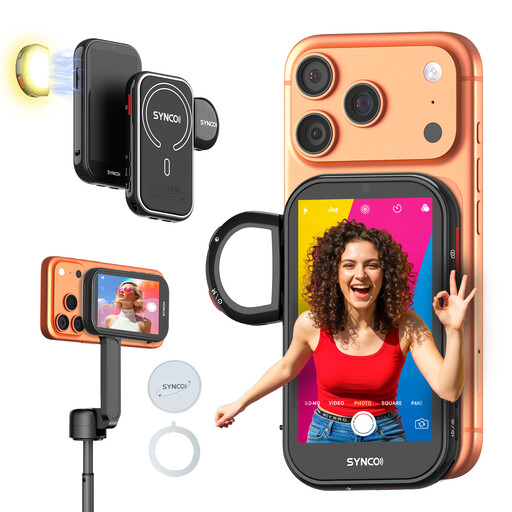
The product selection below is aimed at anyone who wants to monitor footage from an iPhone’s rear camera while filming. Check that the phone monitor suits your device and recording setup.
 No image available
SYNCO Wireless AI Selfie Monitor Screen
According to the product information, it’s designed to monitor an iPhone’s rear camera; check compatibility with your exact device.
The product information states that wireless monitoring works up to 50 m. Google Pixel is listed as incompatible.
Before buying, check that the model on offer meets the applicable product safety requirements and carries the required CE marking.
View on Joybuy
Frequently asked questions
Does the screen need the same 4K resolution as my camera?
No. The HDMI signal resolution and the monitor panel resolution are separate specifications: according to Portkeys, the Portkeys PT5 II accepts UHD 4K/30p, but its screen is 1920 × 1080 pixels. Check both specifications and your camera’s actual output.
How can you connect the monitor without getting in the way of your painting?
First decide where to position the camera and where you’ll look while painting. Then compare your camera’s HDMI connector and output signal with the monitor, and check whether the required cable and mount are included with the model you’ve chosen. In a practical report on miniature painting videos, Tangible Day describes how the camera angle and a hand in shot can obstruct the recording.
How can you keep the screen on during a long lesson?
Use a power supply that the manual says is suitable for the exact model, and check what’s included. According to Atomos, the Shinobi II has no built-in battery and can be powered by an NP-F battery or USB-C PD; this doesn’t tell you how long any particular battery will last.
What warranty are you entitled to when buying as a consumer in the Netherlands?
According to the Government of the Netherlands, there is no fixed statutory warranty period in the Netherlands: you’re entitled to a product that does what you can reasonably expect it to do. If a product is faulty, the seller must provide an appropriate solution; a separate manufacturer’s warranty does not replace this right.
What should you know about product safety and publishing your lesson?
For electrical appliances placed on the EU market, the Government of the Netherlands points to the required CE marking; check the specific model on offer. If recognisable people appear in your footage, the images count as personal data. The Dutch Data Protection Authority explains that the GDPR then applies; check which legal basis covers your publication.


