
A miniature painter filming their work
If you film at your own workbench, you’ll want to check that your brush tip, model and hands are framed well and in focus. Tangible Day covers framing, close-ups and lighting when filming miniature painting.


Choose a monitor that supports your camera’s video signal and can be positioned so your hands and brush don’t block your view of the model. For fine details, magnification and focus-assist tools are useful. A monitor-recorder is worth considering if external recording or extra audio connections fit your workflow.
If you film at your own workbench, you’ll want to check that your brush tip, model and hands are framed well and in focus. Tangible Day covers framing, close-ups and lighting when filming miniature painting.
For tutorial videos you make regularly, it’s useful to match the connections, positioning and power supply to your fixed camera set-up. Portkeys and FEELWORLD list different connections and power options for each model.
If you need external recording or separate audio connections as well as a camera monitor, you could consider a monitor-recorder. Blackmagic Design describes these features for specific Video Assist models.
Best for: filming yourself with a camera that provides a compatible HDMI signal, when you mainly want to check framing and fine details.
Trade-off: a smaller screen takes up less space, but check that the screen size and HDMI connection are compatible with your camera.
Best for: a set-up where you want to view the picture further away from the camera, or where you need external recording and extra audio connections.
Trade-off: a recorder requires a more involved recording set-up. Blackmagic Design lists support up to 1080p60 for the Video Assist 7-inch 3G, while 2160p60 is supported by the 12G HDR models.
Best for: a workflow where a second person needs to watch from away from the painting table and a cable connection would be inconvenient.
Trade-off: the extra wireless feature may be unnecessary if you have one fixed camera and are filming alone. Hollyland describes the Mars M1 Enhanced as a monitor, transmitter and receiver.
| What to consider | What to check | Who this matters to |
|---|---|---|
| Fine details and focus | Check that magnification and focus-assist tools work with your camera’s video signal. | When I film miniatures, I want to check the brush tip and model without my hands blocking the view. Around 36% of consumers put detail and focus first. |
| Connection and positioning | Compare the camera output, video format, monitor input, cable and mounting options. | At a permanent workbench, I want a connection and screen position that suit my camera set-up. Around 29% of consumers give connection and positioning top priority. |
| Assessing exposure and colour | Check which exposure tools the exact model offers and make a test recording with your own lighting. | When I want to assess paint and details under my work lighting, I look for tools that help me check the incoming picture. Around 21% of consumers prioritise exposure and colour monitoring. |
| Power while filming | Check the power input, compatible battery or adaptor, and what is included with the specific version. | For a longer session or a portable set-up, I want to know in advance how the monitor is powered. Around 14% of consumers put power first. |
A monitor may accept a particular input signal without having the same screen resolution or recording capability. Blackmagic Design also distinguishes between the 3G and 12G HDR Video Assist models.
For the exact version, check the supported input signals, screen resolution and any recording formats separately.
Recording and storage options vary between Atomos Ninja versions. FEELWORLD also distinguishes between the LUT7S and LUT7S PRO.
Before buying, check the full model name and the specifications for the version you’re choosing.
On 26 May 2025, Ondernemersplein explained that consumers have a statutory 14-day cooling-off period, but that it does not apply when a business buys in a business capacity.
Before placing a business order, check the return terms agreed for that purchase.
The PT5 II is a compact HDMI option for anyone looking for an extra screen to check their camera’s picture.
The F6 PLUS offers monitoring tools for close-ups, while the separate LUT7S is a larger option.
The Shinobi II is designed for monitoring, while the Ninja range is worth considering if you’re also looking into external recording.
The Video Assist 7-inch 3G combines a larger monitoring screen with recording and audio features.
The Mars M1 Enhanced is worth comparing if wireless monitoring is part of your set-up.
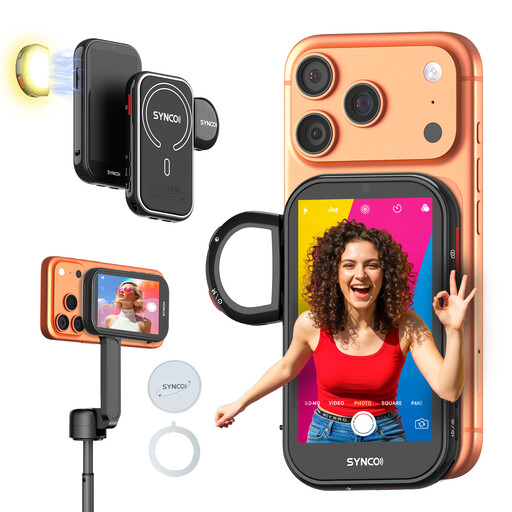
This Joybuy selection is for anyone who wants to monitor the picture on a separate screen while filming with an iPhone’s rear camera. It’s a phone monitor, not an HDMI field monitor for a standalone video camera.
 No image available
An option for viewing the picture from an iPhone’s rear camera on a separate screen while filming.
According to the product description, this monitor is compatible with iPhone but not Google Pixel. Check that your device meets this requirement.
No. Having an HDMI connection alone doesn’t guarantee compatibility. Compare your camera’s video output format and connection with the supported input of the specific monitor model. For example, Blackmagic Design distinguishes between Video Assist 3G formats up to 1080p60 and 12G HDR formats up to 2160p60.
Not if you only want to view the camera picture on a larger screen. Consider a recorder if you’ll use external recording or, on a model that has them, extra audio connections in your workflow.
Make a test recording using your own camera output, lighting, screen position and power supply. Check that your hands don’t cover the model and that small details remain visible. Tangible Day highlights framing and lighting as things to consider when filming miniature painting.
No. According to information from Ondernemersplein dated 26 May 2025, the statutory 14-day cooling-off period applies to consumers and does not automatically apply to a business purchase. Before ordering, check the return terms agreed for your business purchase.
The GDPR applies when filming and publishing recognisable people for professional or commercial purposes, and you need a lawful basis under the GDPR, according to the Dutch Data Protection Authority. Consent is one possible lawful basis; consider the circumstances before publishing the video.