
Detail-focused filming at the workbench
You film small parts and actions, and want to check while you build that the details are in focus and stay in shot.


Start with a monitor that can display your camera’s video signal while you’re filming and is easy to see from your workspace. When you’re working with small parts, image magnification and focus aids are useful; in changing light, exposure aids and screen readability also matter. Check the power supply, cables and mounting too: a larger or brighter screen won’t automatically make your setup more practical.
You film small parts and actions, and want to check while you build that the details are in focus and stay in shot.
You want to check that your camera, cable and monitor work together to display an image in the video mode you use.
For example, you work near a window or under changing artificial light, and want to assess the image and exposure while filming.
First, check that the camera signal is compatible with the monitor. Then decide which image aids and positioning you need.
| What to consider | What should you check? | Who is this most relevant for? |
|---|---|---|
| Keeping small details in focus and in shot | Check the image magnification and peaking, and assess the screen from where you’ll be working. | I want to see whether small parts are in focus and make sure my hands don’t obscure them. This is the main concern for around 36% of consumers. |
| A working camera signal | Compare your camera’s video output while recording with the monitor’s supported input signals, and check the cable. | If I’m using my existing camera, I want to know before the tutorial whether the image comes through in my chosen video mode. Around 29% of consumers put this connection first. |
| Exposure and visibility in changing light | Check the screen position and reflections in your workspace; also consider whether you want to use waveform or false colour. | When the light from a window or lamp changes, I want to be able to see the camera image clearly and assess the exposure. Around 21% of consumers prioritise this kind of light control. |
| Power and positioning | Plan the power supply for the length of your recording, and check which battery, cables and mount you’ll need. | I want to move my hands freely and avoid dealing with power or cables halfway through the tutorial. For around 14% of consumers, power and a clear workspace are top priorities. |
A monitor can receive a 4K signal even if its own panel has a lower resolution. So how well you can assess small details doesn’t depend on the input signal alone.
Compare the supported camera input and panel resolution as separate specifications.
A monitor may lose power or get in the way of your workspace if the power supply, cables and mount aren’t suited to your setup.
Check what’s included with the exact version you’re considering, and test the complete setup before the tutorial.
A stated brightness figure alone doesn’t tell you how easy the screen will be to see under your lights or in daylight from a window.
Assess the screen position and lighting in your workspace. Extra brightness matters most if visibility is a problem there.
The PT5 II is a compact HDMI option for a fixed indoor setup, with focus and exposure aids.
The Shinobi II is a compact HDMI monitor for anyone looking for a brighter screen with monitoring aids.
The F6 PLUSX is a 5.5-inch option for anyone looking for a larger screen and HDMI connectivity.
The T5+ is a 5.5-inch field monitor with aids such as peaking and false colour.
This selection includes both standalone monitors and monitors for smartphones. Before buying, check that the connections and video signal are compatible with the camera and recording setup you’ll use for the tutorial.
 No image available
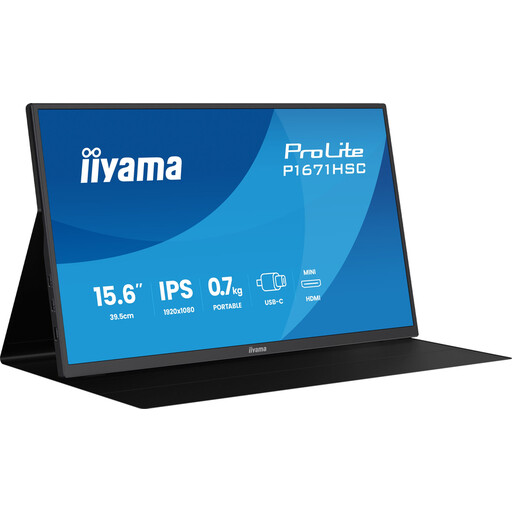
This portable monitor could work for viewing the tutorial as you film, provided your camera can output a compatible video signal. The product title lists a 15.6-inch screen, Full HD, 60 Hz and IPS.
 No image available
This is a 27-inch monitor. Use it to view your camera image only if your camera’s video output is compatible with its connection. The product title lists QHD, IPS, 100 Hz and an integrated webcam.
 No image available
This portable monitor could work for your tutorial setup only if the camera and monitor share a compatible video signal. The product description lists Mini-HDMI and USB-C video connections; check which signals are supported through the connection you plan to use.
 No image available
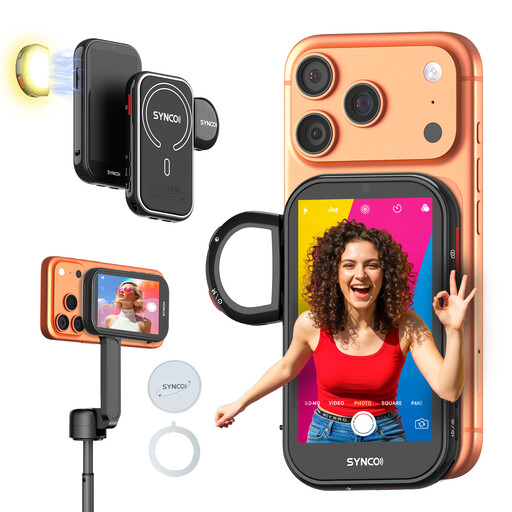
This monitor is designed for viewing footage while filming with a compatible phone camera, rather than for connecting directly to an HDMI camera. The product description mentions AI gesture control and states that it isn’t for Google Pixel.
 No image available
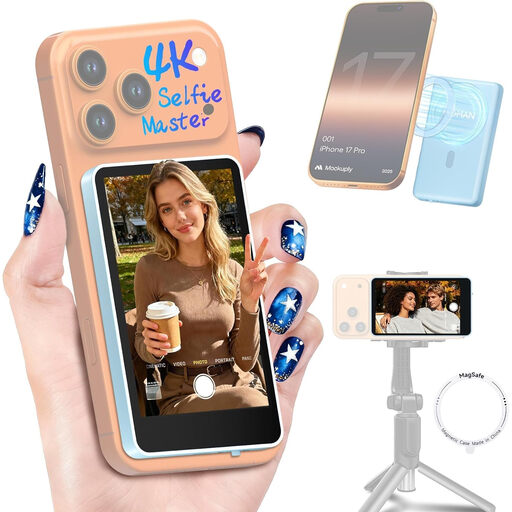
This model is designed for viewing footage from a phone’s rear camera while filming; it isn’t a general-purpose HDMI camera monitor. The product description lists a 1300 mAh battery and up to 3 hours of use, and states that the model isn’t compatible with Google Pixel.
No. According to their manufacturers, the Atomos Shinobi II and Portkeys PT5 II can receive certain 4K signals, but both have a 1920 × 1080-pixel panel. Check the supported input signals and panel resolution separately.
Plan a suitable power supply and test the cables and mount before the tutorial. Atomos says the Shinobi II has no built-in battery; Portkeys lists a battery plate and external power options for the PT5 II.
No. A monitor and a monitor-recorder are different types of product. Check explicitly whether the model has recording functionality if you want to do more than view the camera image.
Compare the video output of your exact camera model while filming with the monitor’s supported input signals. Also check the cable, power supply and mount, and test the complete setup before the tutorial.
For online consumer purchases, there is generally a statutory 14-day cooling-off period after delivery, according to ACM ConsuWijzer. Exceptions and rules on trying out or returning an item may apply; consumer rights do not necessarily apply to business purchases.