
Knitters filming their own hands
You want to check from your knitting spot that your hands, project and small stitches stay in focus and fully in frame.


A separate camera monitor isn’t essential: if you can already check the framing and focus on your camera’s screen, start there and review a test recording. If you want a closer view of your stitches and hands while knitting, choose a monitor that’s compatible with your camera’s video signal, and consider its position, focus-assist tools and power supply. A monitor-recorder is mainly worthwhile if you need a separate recording as well as a live view.
You want to check from your knitting spot that your hands, project and small stitches stay in focus and fully in frame.
You want to assess light and dark yarns while filming, without mistaking screen brightness for a correctly exposed recording.
You regularly reposition your camera and workspace, so screen placement, cables and power are important considerations.
Choose this if: you can already check the framing and focus from your knitting spot; make a test recording first and review it on a larger screen.
Keep in mind: if your camera is mounted high, its built-in screen may be difficult to see.
Choose this if: your camera outputs a compatible HDMI signal and you want to check your stitches, hands and framing from your workspace.
Keep in mind: an HDMI picture doesn’t automatically give you camera control or recording. Check the cable, power supply and mounting options too.
Choose this if: you’re filming with a compatible smartphone and want an extra screen to show the rear camera’s live view.
Keep in mind: check that it works with your phone and app; this option won’t necessarily suit a separate camera with HDMI.
Choose this if: you need a separate video file as well as a monitor display, and your camera outputs a compatible signal.
Keep in mind: check the recording format, storage media and exact model; features of a 12G HDR model don’t automatically apply to a 3G model.
For a knitting demonstration, the main differences to consider are how well you can see the details, whether the camera connection works, the lighting and the practicalities of your set-up.
| Buying consideration | What to look for | Who should consider this? |
|---|---|---|
| Focus and framing | Compare the viewing distance, panel resolution and focus-assist tools of the exact model. Portkeys specifies a 1920 × 1080 panel and peaking for the PT5 II. | If I need to check small stitches and moving hands from my knitting spot, I want to see the focus and framing straight away. Around 33% of consumers prioritise detail and framing. |
| Camera connection | Check the camera signal in your chosen recording mode, along with the connector and the monitor’s supported resolution and frame rate. | If I already own a camera, I want to know before recording whether it will send a compatible signal to the screen while filming. Around 27% of consumers give a working camera connection top priority. |
| Lighting and visibility | Check which exposure-assist tools are available, then test a recording with your own yarn and workspace lighting. Atomos lists waveform for the Shinobi II; Portkeys lists waveform and false colour for the PT5 II. | When working with light-coloured yarn or changing daylight, I want to assess the picture without mistaking screen brightness for correct exposure in the recording. Around 20% of consumers prioritise lighting and exposure control. |
| Position and power | Check the mounting options, the cables and power supply you’ll need, and whether you can see the screen from your usual working position. | If I regularly rearrange my knitting spot, I want a screen that stays visible without getting in the way of my work surface. Around 20% of consumers give set-up and power top priority. |
A monitor may accept a 4K signal even if its own panel has a lower resolution; according to the manufacturer, the Portkeys PT5 II has a 1920 × 1080 panel.
Compare the panel resolution and maximum supported input signal separately with your camera’s recording mode.
The stated brightness describes the screen, not the exposure or colour of the recorded file.
Use the exposure-assist tools available and assess a test recording using the yarn and workspace lighting you’ll actually use.
According to Atomos, the Shinobi II has no built-in battery; FEELWORLD says the P6XL does have a built-in battery. A recorder may also need storage media.
Check the exact model and what’s included in the box, and prepare the power supply and mounting equipment you’ll need in advance.
You may need to buy a compatible cable, mount and power supply separately; a recorder may also require storage media.
According to Portkeys, the PT5 II has a version-specific difference in its operating system. Blackmagic Design offers Video Assist models in 3G and 12G HDR versions.
Check the full model name and, where relevant, the version or firmware before relying on a particular feature.
The PT5 II is a compact HDMI monitor for anyone who values focus-assist tools and an HDMI output.
The Shinobi II and Shinobi GO are separate 5.2-inch HDMI monitoring monitors.
The P6XL is a 6-inch HDMI option for a movable set-up, with a built-in battery.
Video Assist is worth considering if you need a separate recording as well as a monitor display.
The 4850 wireless monitor is designed for makers filming with a smartphone camera.
The product selection below is for filming with a smartphone camera; check that it’s compatible with your phone before ordering.
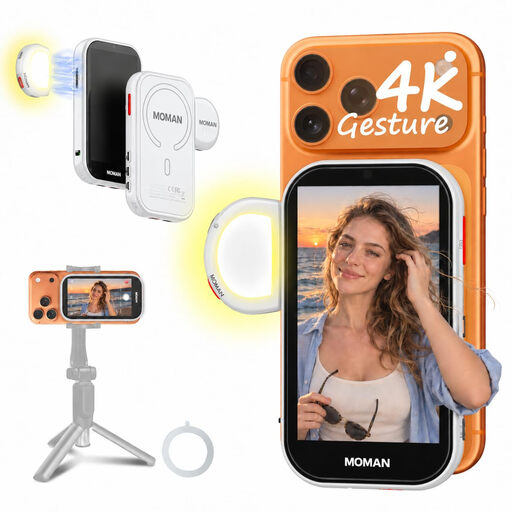 No image available
For smartphone filming when you want to use the rear camera’s live view to check the framing from your knitting spot.
The screen measures 4.02 inches and, according to the product description, offers 180° rotation and three aspect ratios. The description also mentions magnetic mounting and an included magnetic ring for non-magnetic phones.
Stated compatibility includes iPhone 7–17 and supported Android phones. A wired Android connection requires HCCast; Google Pixel is not supported.
First, position the screen where you can see it from your usual knitting position. Then check the video signal in the recording mode you plan to use, along with the HDMI connectors, cable and supported monitor formats. Make a test recording to check both the framing and the recorded file.
No, a camera monitor doesn’t automatically record. Blackmagic Design lists recording as a feature of Video Assist; if you choose this option, check the exact model, camera signal and storage media.
Check the power requirements for the exact model and what’s included with that version. Atomos lists NP-F or USB-C PD power for the Shinobi II, which has no built-in battery; FEELWORLD lists a built-in rechargeable battery for the P6XL. Keep cables clear of your work surface and follow the manual for charging and maintenance.
According to ACM ConsuWijzer, when you buy as a consumer online, you generally have up to 14 days after delivery to change your mind, subject to legal exceptions. You’re also entitled to a product that does what you could reasonably expect during normal use; in the Netherlands, there is no fixed general two-year period for this.